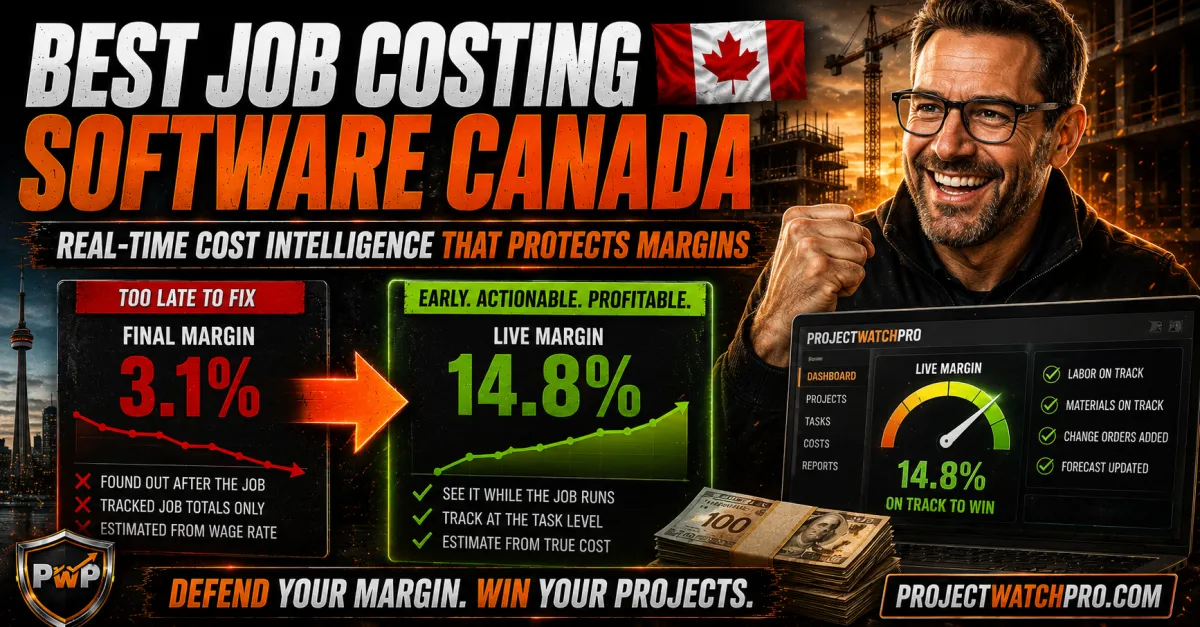
Best Job Costing Software Canada 2026 | ProjectWatchPRO
Best Job Costing Software Canada 2026: Real-Time Cost Intelligence for Project-Driven Businesses
A roofing company in Calgary was stuck at 4% margins and couldn't figure out why. The owner had done everything right — solid crew, decent close rate, jobs finishing on schedule. He blamed the software. So he switched.
New platform. New setup. New dashboards.
Twelve months later, margins were still at 4%.
The software wasn't the problem. The problem was that every system he used told him what happened to his margin after the job was done. Accurate reports. Delivered too late. By the time the number showed up, the crew was three jobs further down the road and every decision that could have saved the margin had already expired.
He didn't need different software. He needed software that could see the job while it was still running.
If that story sounds familiar — regardless of whether you're a roofing contractor like the Calgary owner above, or any business in Canada that quotes jobs, runs crews, tracks time against projects, and closes out work for billing, such as:
- Electrical, plumbing, HVAC, and mechanical contractors
- Roofing, framing, and general contractors
- Sandblasting, painting, and coating operations
- Welding, fabrication, and machine shops
- Autobody and collision repair shops
- Landscaping and civil crews
- Any project-driven business where labor, materials, and time flow through jobs
— this guide is for you. We'll use "contractor" as shorthand for any business on that list — any operation that bids work, deploys crews, and needs to know whether each job made money before it's too late to do anything about it.
Most job costing software in Canada gives you the same thing: a report that tells you how the job went.
The problem isn't the report. The problem is when it arrives.
By the time most Canadian contractors and project-driven businesses see a completed job-cost report, the job is closed, the crew has moved on, and the margin — if it leaked — is already gone. The data is accurate. The timing is useless.
The best job costing software in Canada for 2026 isn't the one with the longest feature list. It's the one that tells you what a job is costing right now — while the job is still running, while decisions can still be made, and while the margin can still be defended.
That's the standard this guide uses to evaluate your options.
Job costing software: A system that tracks all project costs — labor, materials, subcontractors, and overhead — against a job's budget. The best systems track this in real time, at the task level, and update continuously rather than waiting for month-end reconciliation.
Best Job Costing Software Canada 2026 | ProjectWatchPRO
Best Job Costing Software Canada 2026: Real-Time Cost Intelligence for Project-Driven Businesses
Why Most Job Costing Software in Canada Falls Short
What Canadian Contractors Actually Need From Job Costing Software
The Software Stack — What Belongs Where
What Makes ProjectWatchPRO Canada's Top-Awarded Job Costing System
The Project Is the Center of Everything
Real-Time Cost Intelligence — The Core Differentiator
The Human Layer — What No Other Software Company Offers
The True Labor Cost Problem — Why Most Job Costing Starts With the Wrong Number
How the Best Job Costing Software Canada Has to Offer Should Actually Work
1. Cost Updates While the Job Is Running
2. Task-Level Tracking, Not Just Job Totals
3. True Loaded Labor Cost Applied to Every Hour
4. The Project as the Organizing Unit
5. A Decision Rhythm, Not Just a Dashboard
Rearview Operator vs Profit Defender — Which Operating Model Are You Running?
Why Most Job Costing Software in Canada Falls Short
Canadian trades businesses have more options than ever for job costing and project financial management. Most of the software on the market shares the same fundamental limitation: it processes cost data after the fact.
Here's what that looks like in practice. A roofing contractor in Ontario runs a $180,000 commercial job. The crew clocks in and out. Materials are tracked on site. The PM checks progress weekly. But the job-cost data doesn't sync to a reportable picture until accounting closes the period, allocates overhead, and reconciles against the payroll run.
By the time that picture is clear, the job is done. The margin question has already been answered by the market — not by the operator.
This is the 45-Day Blind Spot. It's not unique to one software platform or one province. It's built into the operating model that most job costing systems were designed around.
What Canadian Contractors Actually Need From Job Costing Software
The jobs costing needs of a $3M electrical sub in Alberta are not the same as those of a $15M mechanical contractor in Ontario — but both share one requirement that most software fails to meet:
Visibility while the job is alive.
Not after. Not at close. While the crew is on site, while materials are being deployed, while labor hours are accumulating against the estimate. That's when the information is actionable. That's when a decision to re-sequence, call a change order, or redeploy resources can protect the margin.
The software that delivers this is categorically different from software that generates accurate post-mortems.
The Software Stack — What Belongs Where
Before comparing options, one clarification that saves a lot of confusion:
Job costing software and accounting software are not the same thing — and they shouldn't try to be.
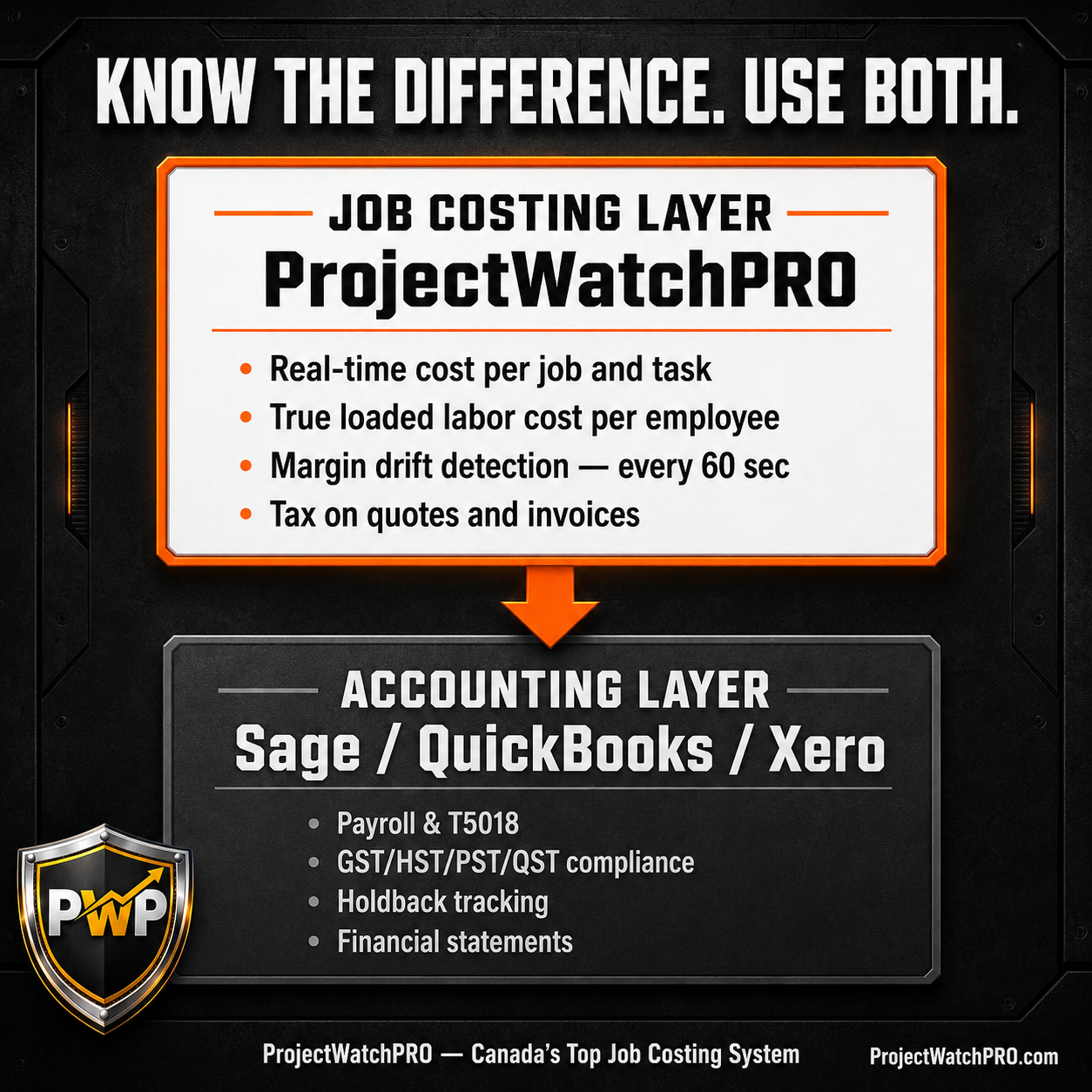
Accounting software (Sage, QuickBooks, Xero) handles financial compliance: payroll, GST/HST/PST/QST remittances, T5018 subcontractor reporting, holdback tracking, and statutory obligations. These are non-negotiable, regulated functions.
Job costing software sits upstream of accounting. Its job is to tell you what each project is actually costing you — in real time — so you can defend the margin while the work is still happening. When the job closes, that data flows to accounting. But the profit-defense work happens before accounting ever sees it.
ProjectWatchPRO calculates tax on quotes and invoices so your client sees the tax impact and total price — but payroll processing, T-slips, and compliance remittances are handled by your accounting software. Each system does what it was built to do. The question is whether your job costing layer is giving you what you need before the accounting layer gets involved.
What Makes ProjectWatchPRO Canada's Top-Awarded Job Costing System
ProjectWatchPRO was awarded Canada's top construction job costing and project management software — and the reason it earned that recognition is the same reason it's on this list first.
Every other system on this page tells you what happened to your margin. ProjectWatchPRO tells you what is happening — right now, while the job is still running, while something can still be done about it.
The Project Is the Center of Everything
Most job costing systems are built around accounting workflows. Costs flow in, get categorized, and produce reports. The accounting structure drives the architecture.
ProjectWatchPRO is built differently. The project is the center of all activities. Everything — employee time, labor cost, charge-out rates, task budgets, materials — flows to and from the project in real time. The system is designed for the operator who needs to know what a specific job and a specific task is costing right now, not what it cost last month.
This architecture difference is why the reporting is fundamentally different. It isn't a module added to an accounting platform. It's a cost intelligence system built specifically for project-driven operations.
Real-Time Cost Intelligence — The Core Differentiator
ProjectWatchPRO is cost intelligence and profit insight while the job is still being worked on.
Here's what that means in practice:
- Employee time is allocated to specific jobs and specific tasks as hours are logged — not reconciled after the fact
- Each employee's true cost to the company is calculated fully burdened: base wage + labor burden + overhead burden + task-specific consumables + shift differential + overtime premium
- The correct charge-out rate for each employee is calculated and applied to each task
- Costs, charge-outs, and time are broken out by job and by task — with tasks configurable to match your company's cost codes and charge-out rates
- The margin picture updates every 60 seconds
A sandblasting shop in Saskatchewan runs a coating job. An electrical sub in BC tracks rough-in vs. trim-out separately. A fabrication shop in Ontario breaks out welding hours by job phase. All of them see the same thing: what the job is costing right now, against what they estimated — while they can still act on it.
That is what separates cost intelligence from cost reporting.
The Human Layer — What No Other Software Company Offers
Most software companies sell you a seat and give you a help desk.
ProjectWatchPRO is different. When you subscribe, you get John A. McCabe — the 20-year consulting veteran who wrote the book on the Profit Defense System (*Profit Defended*, ISBN: 978-1-0698828-0-6) — working with your company personally.
Here's what that includes:
- Personal implementation: John works with you directly to set up your company in the software — not a setup wizard, not an onboarding video library
- Hands-on training: Your team gets trained on the system and the methodology together
- Launch day availability: John is present when you go live — you're not left to figure it out on your own
- Ongoing operational coaching: Not just software support. Business coaching on how to use the data to defend your margins
- Fractional COO services: Available for companies that want a deeper engagement — operational guidance from someone who has spent two decades inside project-driven businesses
Most software sells you a tool. ProjectWatchPRO sells you a transformation — with the author of the system guiding the implementation. This is the trust and ROI differentiator that no feature list can replicate.
The goal isn't for you to use the software. The goal is for you to see measurable profit improvement because of it.
The True Labor Cost Problem — Why Most Job Costing Starts With the Wrong Number
Before any software can defend your margin, it needs the right numbers to work with. This is where most Canadian contractors are already behind — not because of the software they chose, but because of the number they're feeding it.
Here's the gap: if your field labor earns $36/hour, the true cost to your business is closer to $119/hour.
The six layers that explain the difference:
1. Base wage — the number everyone uses
2. Labor burden — CPP, EI, workers' compensation, extended benefits
3. Overhead burden — your operating cost per billable labor hour
4. Task-specific consumables — materials consumed on that specific task
5. Shift differential — if applicable
6. Overtime premium — on compressed-schedule jobs
Most estimates are built from Layer 1 only. The business pays all six. When you estimate from $36/hour and reality costs $119/hour, the budget overrun isn't a field performance problem. It's a math problem — locked in before the crew set foot on site.
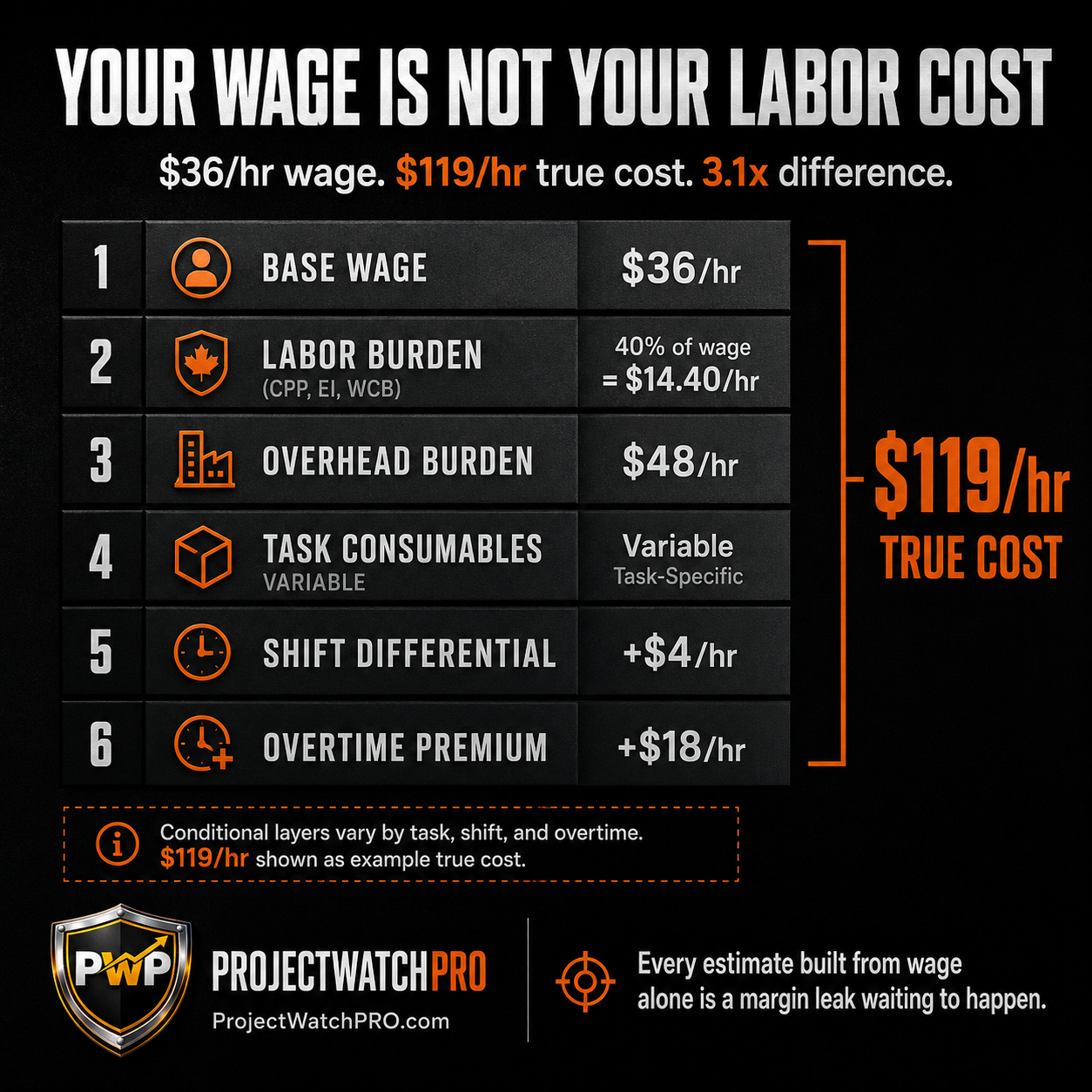
ProjectWatchPRO calculates each employee's true cost to the company using all six layers — then applies that number to every task in every job, in real time.
Use the True Labor Cost Calculator at truelaborcost.site to find your number before you build another estimate.
How the Best Job Costing Software Canada Has to Offer Should Actually Work
Whether you use ProjectWatchPRO or evaluate any other system, these are the operational standards that separate job costing tools that protect margins from ones that explain losses.
1. Cost Updates While the Job Is Running
The system should reflect current costs as hours are logged from the field — not after a weekly sync or a period close. Every day of lag is a day you can't act on drift.
2. Task-Level Tracking, Not Just Job Totals
A job total creates false confidence. One phase can run 30 hours over while the total still "looks okay." The leak is invisible until the job closes. Task-level tracking makes drift visible in week two — when there's still time to do something.
3. True Loaded Labor Cost Applied to Every Hour
Wage-based estimates are structural losses waiting to happen. The system needs to apply fully burdened cost — all six layers — to every labor hour on every task. Not as a report setting. As the operating assumption.
4. The Project as the Organizing Unit
Everything should be centered on the project — time allocation, task budgets, charge-out rates, cost codes. If the software is built around an accounting chart of accounts instead of a project structure, you're going to spend more time reconciling than managing.
5. A Decision Rhythm, Not Just a Dashboard
Real-time data without a review cadence is wasted. The best systems support a weekly live job review — not a month-end post-mortem, a weekly check where the questions are: which tasks are over budget right now, what is the current margin projection, and what decision can I make this week that protects the margin?
Rearview Operator vs Profit Defender — Which Operating Model Are You Running?
The difference between contractors who consistently defend their margins and those who explain their losses isn't talent, crew quality, or bid accuracy. It's timing.
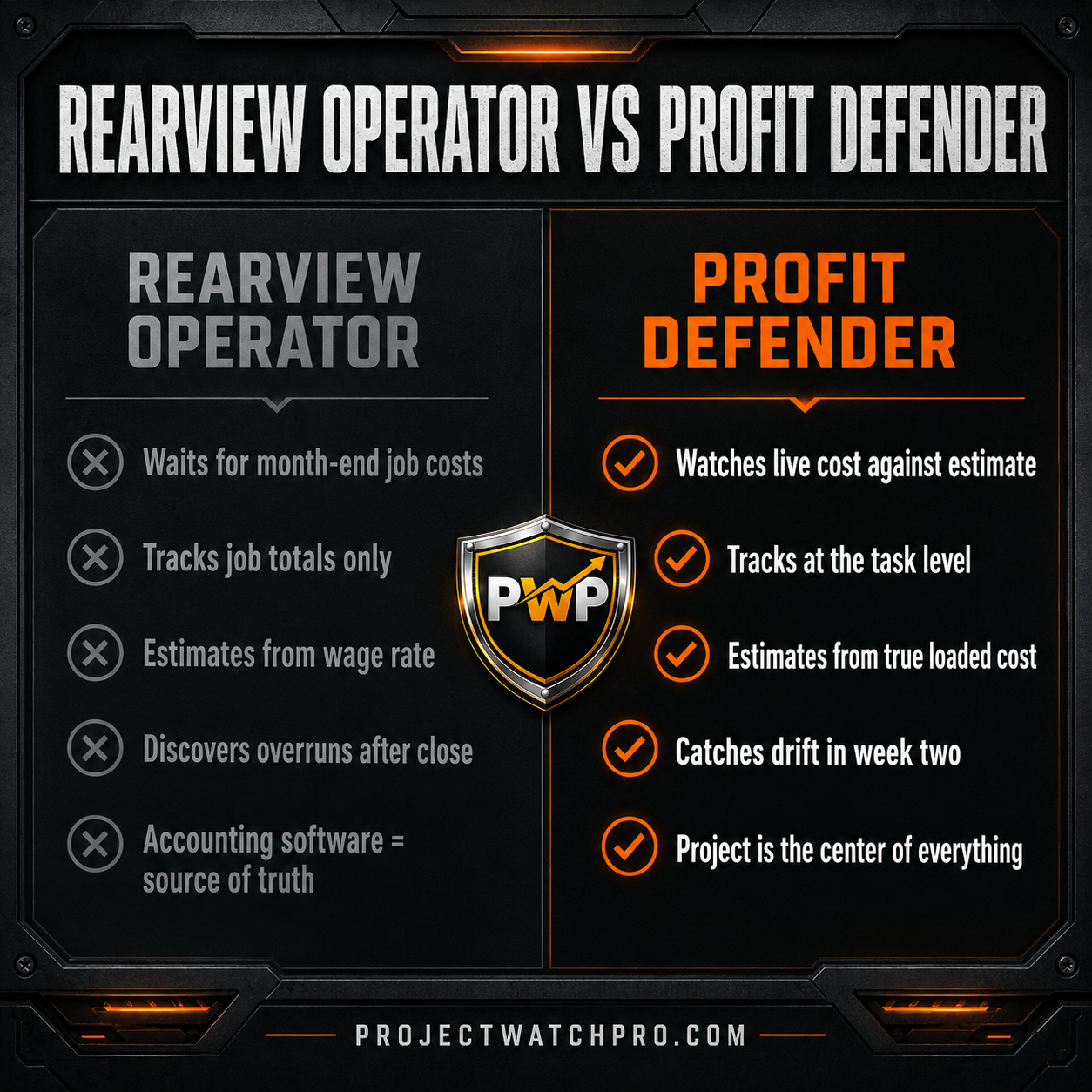
Rearview Operator
Waits for month-end to see job costs
Tracks job totals only
Estimates from wage rate
Discovers overruns after the job closes
Explains what happened to the margin
Accounting software is the source of truth
Profit Defender
Watches live cost against estimate
Tracks at the task level
Estimates from true loaded cost
Catches drift in week two
Defends the margin while the job is alive
Project is the center of all activities |
The software you use doesn't determine which operator you are. The operating model does. But the right software makes the Profit Defender model possible — and the wrong software locks you into the Rearview model no matter how hard you work.
Key Takeaways
- The best job costing software in Canada in 2026 is the one that tells you what a job is costing right now — not what it cost after it closed.
- ProjectWatchPRO is Canada's top-awarded construction job costing system — built around the project, not the accounting workflow, with 60-second margin updates.
- Job costing software and accounting software do different jobs. Accounting handles compliance (payroll, GST/HST, T5018, holdback). Job costing handles cost intelligence while the work is happening.
- True labor cost is 2x–3x the wage rate. Estimating from wage alone locks in a structural loss before the job starts. All six cost layers must be applied.
- Task-level tracking is non-negotiable. Job totals hide the leak until it's too late to fix it.
- The human layer matters. The difference between buying software and transforming your margins is whether someone with 20 years of consulting experience inside project-driven businesses is guiding the implementation — not a setup wizard.
- The 45-Day Blind Spot is the real enemy. The gap between when cost starts drifting and when you find out is where margins die. Closing that gap is the entire point.
Frequently Asked Questions
What is the best job costing software in Canada for 2026?
ProjectWatchPRO is Canada's top-awarded construction job costing and project management software. What distinguishes it from other options is real-time cost intelligence while the job is still being worked on — margin drift is visible every 60 seconds, at the task level, using fully burdened labor cost. Most other systems generate accurate reports after the job closes. That's too late to act.
What is the difference between job costing software and accounting software in Canada?
Accounting software (Sage, QuickBooks, Xero) handles financial compliance: payroll, GST/HST/PST/QST remittances, T5018 subcontractor reporting, and holdback. Job costing software handles cost intelligence: what each job and task is actually costing right now, in real time, against the estimate. They work together — job costing upstream, accounting downstream — but they serve different functions. A business that uses only accounting software for job costing is always managing in the rearview mirror.
How do I track labor costs on a construction project in Canada in real time?
Real-time labor cost tracking requires a system that allocates employee time to specific jobs and tasks as hours are logged — and applies fully burdened labor cost (not just wage rate) to each hour. That means accounting for labor burden, overhead burden, consumables, and any shift or overtime premiums. ProjectWatchPRO does this continuously, updating the cost picture every 60 seconds so the margin position on any job is always current.
What job costing tools do Canadian trades businesses use?
Canadian contractors, fabrication shops, sandblasting operations, machine shops, and other project-driven businesses use a range of tools — from basic spreadsheets to accounting-integrated platforms. The common failure across most tools is reporting lag: costs are tracked but the actionable picture arrives too late to influence the outcome. The shift toward real-time cost intelligence — systems that surface margin drift while the job is running — is what separates the top-performing 13–16% margin businesses from the industry average of 3–5%.
Does job costing software in Canada handle GST/HST and T5018 reporting?
Job costing software handles cost tracking and project profit visibility. Tax compliance — GST/HST/PST/QST remittances, T5018 subcontractor reporting, payroll, and holdback — lives in accounting software. ProjectWatchPRO calculates tax on quotes and invoices so clients see the tax impact and total price, but full compliance processing is handled by your accounting platform. Both systems have a specific job; neither replaces the other.
How does job costing software help a fabrication shop or welding operation in Canada?
Any business that quotes jobs, deploys labor to projects, and closes work for billing can use job costing software — not just trades contractors. A fabrication shop, sandblasting operation, or machine shop has the same core problem: labor hours accumulate against job estimates, and the question is whether you find out the job was losing money at week two (when you can act) or at week eight (when the job is done). ProjectWatchPRO is configured around your job structure — your tasks, your cost codes, your charge-out rates — regardless of the trade.
Most Canadian project-driven businesses are running on the same reporting model they used 20 years ago: work happens, data accumulates, accounting processes it, a report arrives. The margin question gets answered after the fact.
The businesses hitting 13–16% margins aren't working harder than the ones stuck at 3–5%. They have better feedback — and they have it faster.
BLIND SPOT DIAGNOSTIC
Before you evaluate another software option, find your Blind Spot Number.
Your Blind Spot Number is the dollar amount that the 45-Day Blind Spot is costing your business every year — the margin that leaks between when cost starts drifting and when you find out.
The Blind Spot Diagnostic takes three minutes and gives you three numbers:
1. Your Blind Spot Number — what the reporting delay is costing you annually, based on your revenue, margin, and current reporting cycle
2. Your Year-One Recovery Target — a conservative estimate of what you should be recovering in the first twelve months of running real-time cost intelligence
3. The Cost of Doing Nothing — what staying on your current operating model costs you over five years if the Blind Spot stays open
This isn't a pitch. It's a number. Your number. And once you see it, the software decision makes itself.
→ Run your Blind Spot Diagnostic at projectwatchpro.com