
Inaccurate Time Tracking: What It's Really Costing You
Inaccurate Time Tracking Isn't Just a Payroll Problem. It's a Profitability Problem.
It's Wednesday afternoon. A job is two weeks in — eight-person crew, industrial coating contract, $340,000 scope.
The PM calls the office and asks how they're tracking on labor.
The office pulls the job cost report. "$87,400 labor to date. You're within budget."
The PM makes a decision: no schedule adjustment, no crew change, no flag to the client.
The job closes four weeks later. Final payroll reconciliation runs. True labor: $112,800.
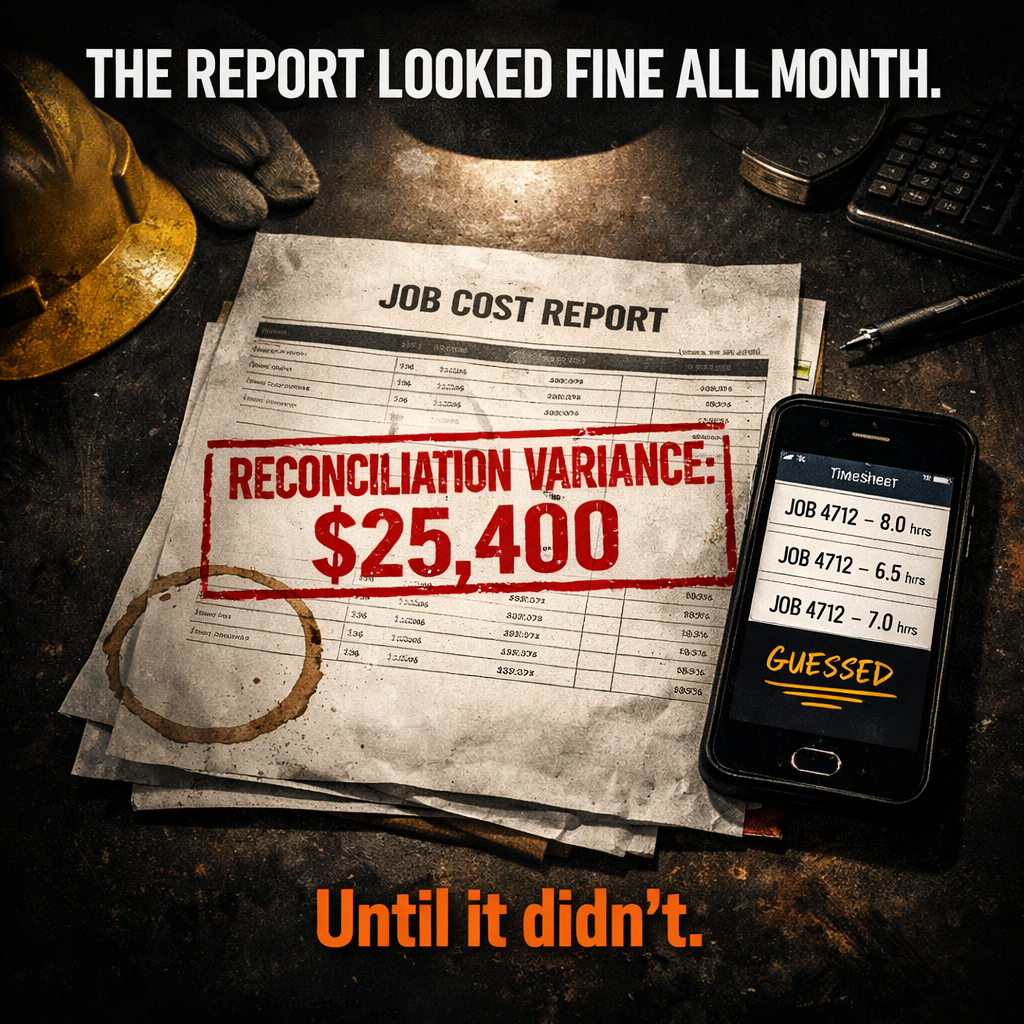
The difference? Hours logged to the wrong cost codes. Supervisors filling in timesheets from memory. A few employees who clocked out of the job but kept working. Nothing dramatic. Just the ordinary, daily noise of inaccurate time tracking — accumulated over six weeks into a $25,400 swing that nobody saw coming because the data in the system was wrong the whole time.
The cost of inaccurate time tracking in construction goes well beyond payroll errors. The direct payroll hit is real — up to 8% of total payroll in paper-based operations. But the damage that actually kills jobs is what bad time data does to your job costing. Wrong hours corrupt cost records. Corrupt cost records produce decisions that accelerate losses. And by the time the right number appears, the window to act is already closed.
Inaccurate Time Tracking: What It's Really Costing You
Inaccurate Time Tracking Isn't Just a Payroll Problem. It's a Profitability Problem.
What Inaccurate Time Tracking Actually Costs — More Than Just Payroll
The Direct Hit — Payroll Errors, Time Theft, and Admin Waste
The Hidden Hit — Job Cost Data You Can No Longer Trust
The Three Ways Contractors Track Time Wrong — And What Each One Costs
Paper Timesheets — 3 to 7 Days Late, 8% Error Rate Built In
End-of-Day Memory Entry — You're Paying for Reconstruction, Not Recording
Right Hours, Wrong Task — When the Time Is There But the Job Code Isn't
Why the Job Costing Damage Is Worse Than the Payroll Damage
How One Wrong Time Entry Corrupts the Whole Job Record
You Can't Make a Good Decision From Bad Data — No Matter How Fast You Look at It
What Accurate Task-Level Time Tracking Changes
When the Clock Starts at Clock-In — What Becomes Visible
Task-Level vs. Job-Level Tracking — Why the Distinction Matters for Job Costing
The Number in Your Job Cost Report Is Only as Good as the Data Behind It
What Inaccurate Time Tracking Actually Costs — More Than Just Payroll
Most contractors think about time tracking errors as a payroll problem. Fix the timesheet, fix the paycheck. That's the visible layer.
It's the smaller problem.
The Direct Hit — Payroll Errors, Time Theft, and Admin Waste
The American Payroll Association reports that 75% of companies experience some form of time theft. Construction is not an exception — it's the industry most exposed to it.
Paper-based operations lose up to 8% of total payroll to calculation errors alone. Time theft — buddy punching, early clock-outs, rounded-up hours — adds another layer on top. Industry data puts the average loss from time theft and payroll errors at $4,285 per worker per year.
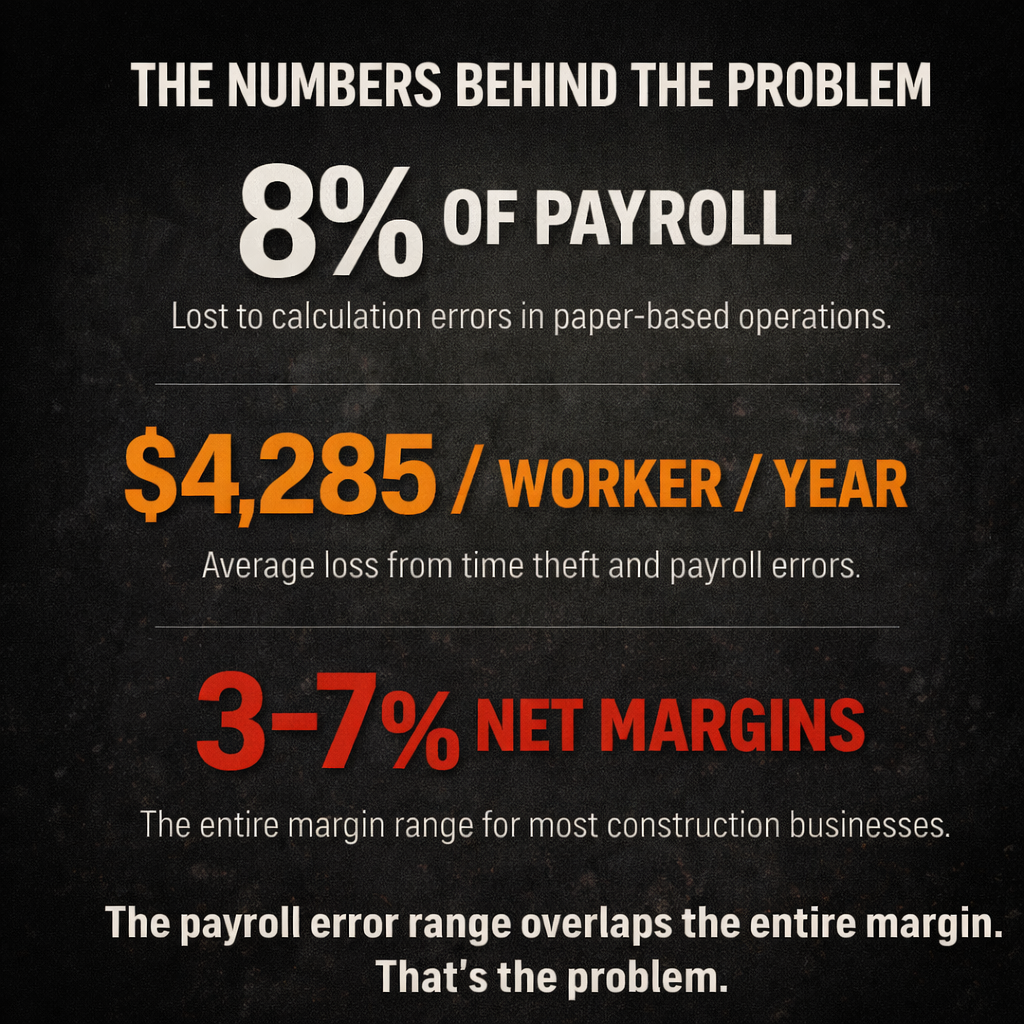
Run that across a 15-person crew: you're looking at $64,000 in payroll error annually. On a business running 5% net margins, that's the equivalent of $1.28 million in revenue you'd have to generate just to recover it.
That's the direct cost. It hurts. But it's visible. You see it in payroll reconciliation. You notice it at tax time.
The hidden cost is different. It doesn't announce itself. It just quietly makes every other number in your business wrong.
The Hidden Hit — Job Cost Data You Can No Longer Trust
When time tracking is inaccurate, the damage isn't isolated to payroll. It flows directly into your job costing records — and it corrupts them in ways you can't easily detect.
Hours entered to the wrong cost code mean the wrong task is over-budget while the right one looks fine. Hours that arrive three days late mean your Wednesday job cost report is reflecting Monday's reality. Hours reconstructed from memory at the end of the day — or the end of the week — are approximations wearing the mask of data.
A job cost report built on inaccurate time data doesn't show you where your job stands. It shows you a fiction. And every decision you make from that report — whether to adjust the crew, flag a scope creep, request a change order, or authorize overtime — is a decision built on numbers that aren't real.
The contractors who lose money consistently on jobs aren't making bad decisions. They're making reasonable decisions from bad data. The cost of inaccurate time tracking isn't just the wrong paycheck. It's every downstream decision that wrong data drives.
The Three Ways Contractors Track Time Wrong — And What Each One Costs
There isn't one version of this problem. There are three — and they show up in order of sophistication.
Paper Timesheets — 3 to 7 Days Late, 8% Error Rate Built In
65% of construction businesses still use paper time cards as their primary tracking method.
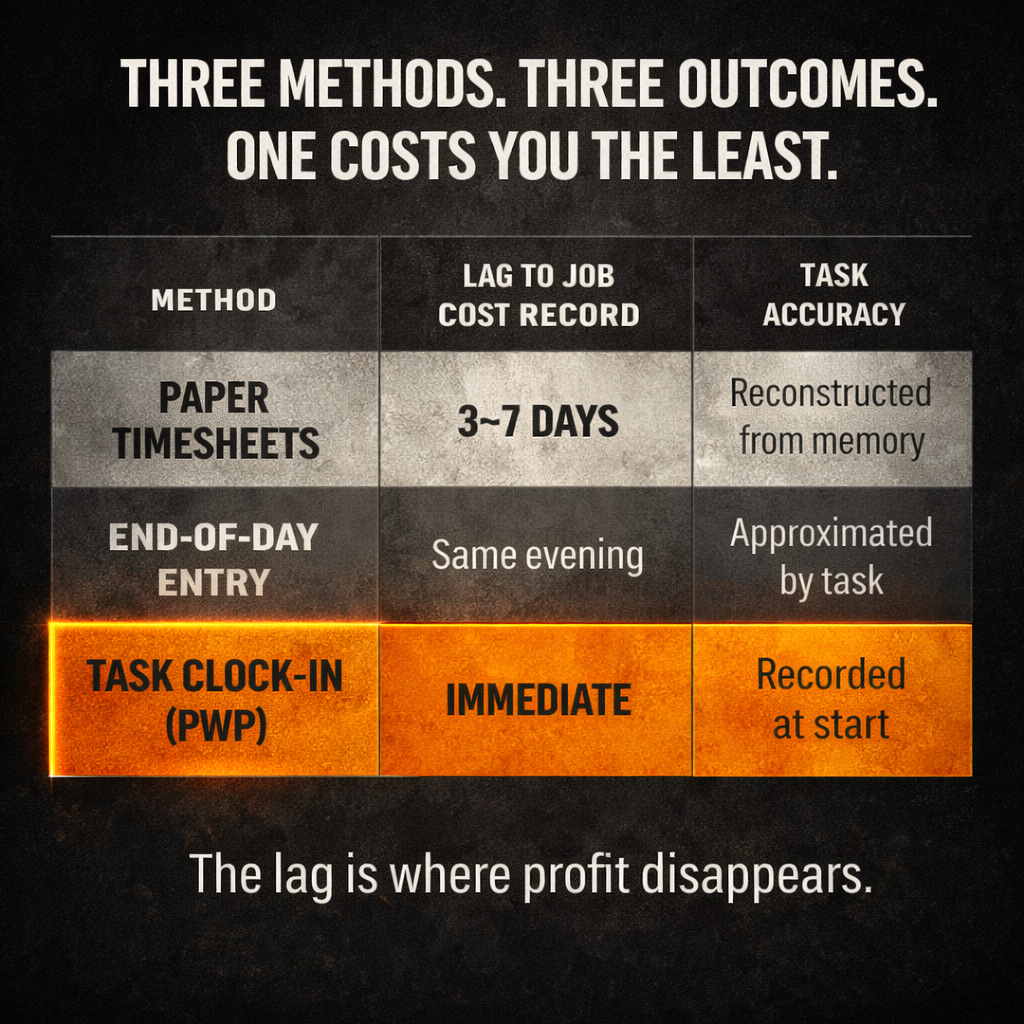
Here's what that means in practice. Work happens Monday. The timesheet gets written — from memory — at the end of the shift, or at the end of the week, or when the foreman finally gets to it. It gets collected Friday. It's entered into the system Monday. By the time Tuesday's job cost report runs, the labor from last Monday is only now appearing.
That's a 7-to-10 day lag between work performed and cost recorded.
On a three-week job, you can be two-thirds of the way through before the first accurate labor figure hits the record. And the calculation error rate on paper-based timesheets runs up to 8% of total payroll — not because anyone is being dishonest, but because paper offers no guardrails. Hours get transposed. Jobs get misread. Codes get estimated. The math doesn't get checked until payroll, and by then the job has moved on.
End-of-Day Memory Entry — You're Paying for Reconstruction, Not Recording
The step up from paper is end-of-day digital entry: employees log their own hours at the end of the shift, or a supervisor enters the crew's time before they leave.
This eliminates the 7-day lag. But it replaces it with a different problem.
An 8-hour shift involves a lot of task switching. A welder might start on one assembly, shift to a repair, help on a different unit, and close out on their primary task. By end of day, they're logging from memory. How long on each task? Roughly. Which cost code? The one they work on most.
The result isn't fraud. It's reconstruction. And reconstruction is an approximation.
Hours are real. Task allocation is guesswork. The job gets the right total labor but the wrong breakdown — and for job costing purposes, the breakdown is everything. You don't manage a job. You manage tasks within a job. If the task-level data is approximate, your task-level cost visibility is approximate — which means your ability to catch problems at the task level before they become job-level disasters is exactly zero.
Right Hours, Wrong Task — When the Time Is There But the Job Code Isn't
The third version is the most expensive — and the hardest to detect.
Hours are entered on time. The total is accurate. But the cost code is wrong.
An employee clocks their sandblasting hours to a welding code. A foreman logs prep time under the wrong phase. A supervisor assigns crew hours to yesterday's job because today's hasn't been opened in the system yet.
The payroll clears correctly. No error flag fires. The report looks clean.
But the sandblasting task is now under-cost. The welding task is over-cost. You're watching the wrong numbers go red, making adjustments on the wrong task, and missing the real problem entirely — because the data is technically complete and numerically wrong in the worst possible way: silently.
Why the Job Costing Damage Is Worse Than the Payroll Damage
Payroll errors cost you money. That's bad.
Job cost errors cost you the ability to see where your money is going. That's worse. Because without visibility, you can't intervene.
How One Wrong Time Entry Corrupts the Whole Job Record
Your job cost record is only as accurate as the inputs that build it.
When hours are wrong — late, approximate, or misallocated — the downstream effects compound. Estimated vs. actual comparisons become meaningless because the actual side is fiction. Burn rate projections built on current actuals project the wrong trajectory. Cost-to-complete calculations are off. Margin forecasts are off.
And critically: the system shows you a number that looks real. It's formatted correctly. It's in the right column. It updates when you refresh the screen. Nothing about it signals that it's wrong.
This is the specific danger of inaccurate time tracking in construction: the system looks like it's working. The dashboard looks live. The report looks current. But underneath it, the labor data — the largest and most variable cost on most jobs — is built on hours that arrived late, tasks that were guessed, and codes that were approximated.
The 45-Day Profit Blind Spot that kills so many contractor jobs doesn't start with a bad month. It starts with bad daily data that builds a false picture over weeks — until closeout reveals what was actually happening the whole time.
You Can't Make a Good Decision From Bad Data — No Matter How Fast You Look at It
A dashboard that refreshes every 30 seconds isn't real-time if the data feeding it is three days old.
Speed of reporting is not the same as accuracy of reporting. The problem isn't how fast you can see the number. It's whether the number reflects what's actually happening on the job.
Most conversations about time tracking focus on reporting speed — "real-time dashboards," "instant updates," "live cost feeds." Those features matter. But they are downstream of a more fundamental requirement: the hours entering the system have to be correct, complete, and allocated to the right task at the right time.
Without that foundation, a fast dashboard is just a fast way to see the wrong number.
What Accurate Task-Level Time Tracking Changes
The fix isn't a better timesheet. The fix is removing the timesheet from the equation entirely.
When the Clock Starts at Clock-In — What Becomes Visible
When a worker clocks into a specific task — not a job, not a day, but a task — the system knows exactly when they started, exactly what they were doing, and exactly what that time is costing before they've been on the job for 60 seconds.
There's no reconstruction at the end of the day. There's no lag while someone remembers to enter the hours. There's no approximation of which code the time belongs to. The employee made that decision at clock-in. The system recorded it at that moment.
This changes the job cost record from a lagging reconstruction to a live accumulation. By the time a PM checks the report mid-Wednesday, the labor numbers reflect what's actually happening on Wednesday — not what happened last Friday.
ProjectWatchPRO builds cost accumulation from the moment a worker clocks into a task, across all cost layers simultaneously: [base wage, labor burden, overhead, and task-specific consumable burden](/cost-of-inaccurate-time-tracking-construction). The result is a job cost record that is live, accurate, and task-specific — not because it refreshes fast, but because the data entering it is correct from the start.
Task-Level vs. Job-Level Tracking — Why the Distinction Matters for Job Costing
Most time tracking systems — even good ones — clock workers into jobs, not tasks.
That's a problem for job costing because jobs don't overrun. Tasks overrun.
A sandblasting task runs over because the surface profile requirement changed. A welding task runs long because of fit-up issues. A coating application goes over because the substrate conditions required additional passes. The overrun is at the task level. The cost accumulation has to be at the task level to catch it.
When time is tracked at the job level, you can see the job going over budget. You can't see which task drove it, when it started, or why. You can record the loss. You can't prevent it.
Task-level clock-in gives you the right granularity. The overrun shows up where it's happening — which is the only place early intervention is possible. That's the difference between a system that tells you what happened and a system that gives you a decision while there's still a decision to make.
For a deeper look at how true labor cost is calculated once you have accurate task-level time data, see [How to Calculate True Labor Cost for Contractors](/true-labor-cost-contractors).
Key Takeaways
- Inaccurate time tracking costs construction businesses up to 8% of total payroll in paper-based operations — but the bigger damage is what bad time data does to job cost records downstream.
- The direct payroll cost averages $4,285 per worker per year from time theft and entry errors. On a 15-person crew, that's over $64,000 annually.
- There are three versions of the problem: paper timesheets (3–7 day lag, 8% error rate), end-of-day memory entry (right total, wrong task breakdown), and correct-total/wrong-code entry (the hardest to detect and most damaging to job costing).
- Job cost data built on inaccurate time entries produces false estimated vs. actual comparisons, wrong burn rate projections, and decisions made from numbers that don't reflect reality — the core driver of the 45-Day Profit Blind Spot.
- A fast dashboard built on slow or inaccurate data is just a fast way to see the wrong number. Reporting speed and data accuracy are separate problems — both have to be solved.
- The fix is removing reconstruction from the equation: workers clock into tasks — not jobs — at the moment work starts. The system records cost accumulation from that point forward, across all cost layers, without waiting for end-of-day entry or supervisor approval.
- ProjectWatchPRO begins accumulating true labor cost from the moment a worker clocks into a specific task — eliminating the lag, the reconstruction, and the misallocation that makes most job cost data untrustworthy.
Frequently Asked Questions
Q: How much does inaccurate time tracking cost construction companies?
Construction businesses lose up to 8% of total payroll to calculation errors in paper-based systems. Time theft and payroll errors average $4,285 per worker per year. The larger loss is downstream: inaccurate time data corrupts job cost records, driving decisions based on numbers that don't reflect actual project status — leading to overruns that surface only at closeout.
Q: What are the most common timesheet errors in construction?
The three most common are: hours entered late (paper timesheets arriving 3–7 days after work), hours reconstructed from memory at end of day (correct totals, wrong task breakdown), and hours allocated to the wrong cost code (silent errors that make the wrong tasks appear over- or under-budget). All three produce job cost data that looks valid but isn't.
Q: How does inaccurate time tracking affect job costing?
Every job cost calculation downstream — estimated vs. actual, burn rate, cost-to-complete, projected margin — is only as accurate as the labor data feeding it. Inaccurate hours mean those comparisons are built on approximations. The dashboard looks live. The number is wrong. Decisions made from it tend to miss the real problem entirely until it's too late to recover.
Q: Why do construction workers forget to clock in and out correctly?
The top reason (cited by 34% of business owners) is forgetting to clock in or out — particularly on job sites where the work environment is physical and mobile. The second most common cause is not recording time to the correct job or task. Both problems are structural: they result from systems that require manual memory-based entry rather than capturing time at the moment work starts.
Q: How can contractors reduce payroll errors in construction?
The most effective change is moving from job-level, end-of-day time entry to task-level clock-in at the moment work begins. This eliminates the reconstruction step — workers declare what they're doing and the system records it immediately, with no memory required and no lag between work performed and cost recorded. The result is accurate task allocation and real-time job cost data simultaneously.
Q: What's the difference between time tracking accuracy and reporting speed?
Reporting speed is how fast the dashboard updates. Accuracy is whether the data in it reflects what's actually happening on the job. A system that refreshes every 30 seconds but receives time entries at the end of the day is fast and inaccurate. You need both: data that's correct from the moment of clock-in, and a system that makes it visible immediately.
The Number in Your Job Cost Report Is Only as Good as the Data Behind It
If the hours feeding your job cost records are late, approximate, or assigned to the wrong task, the report isn't showing you your project. It's showing you a reconstruction — built from memory, filled in after the fact, and accurate enough to look right while being wrong in ways that only show up at closeout.
The True Labor Cost Calculator at truelaborcost.site starts with a different question: what does one labor hour actually cost you — fully loaded, across all six layers, specific to each task type?
Once you know that number, task-level clock-in gives you a job cost record that's built on real cost from minute one — not approximated hours logged at the end of the day.
That's the difference between a dashboard that tells you what happened and one that tells you what's happening right now, while you can still do something about it.
→ Find Your True Labor Cost at truelaborcost.site