Real-Time Job Costing: Why True Labor Cost Is the Missing Number
Real-Time" Job Costing Is a Marketing Term. Here's What It Actually Means.
Your job costing software says it's real-time.
Your dashboard updates. Numbers move. The system feels live.
But here's the question nobody asks: what is it actually updating — and what is it still missing?
Because for most construction software, the answer is: materials and other direct costs update when someone enters them. Subcontractor invoices update when they're posted. Equipment costs update on entry.
Labor — the largest cost on most jobs, and the one most likely to run — updates when the employee closes the task. Or at the end of the day. Or when someone remembers to enter the timesheet.
And even when labor IS recorded on time, there's a deeper problem.
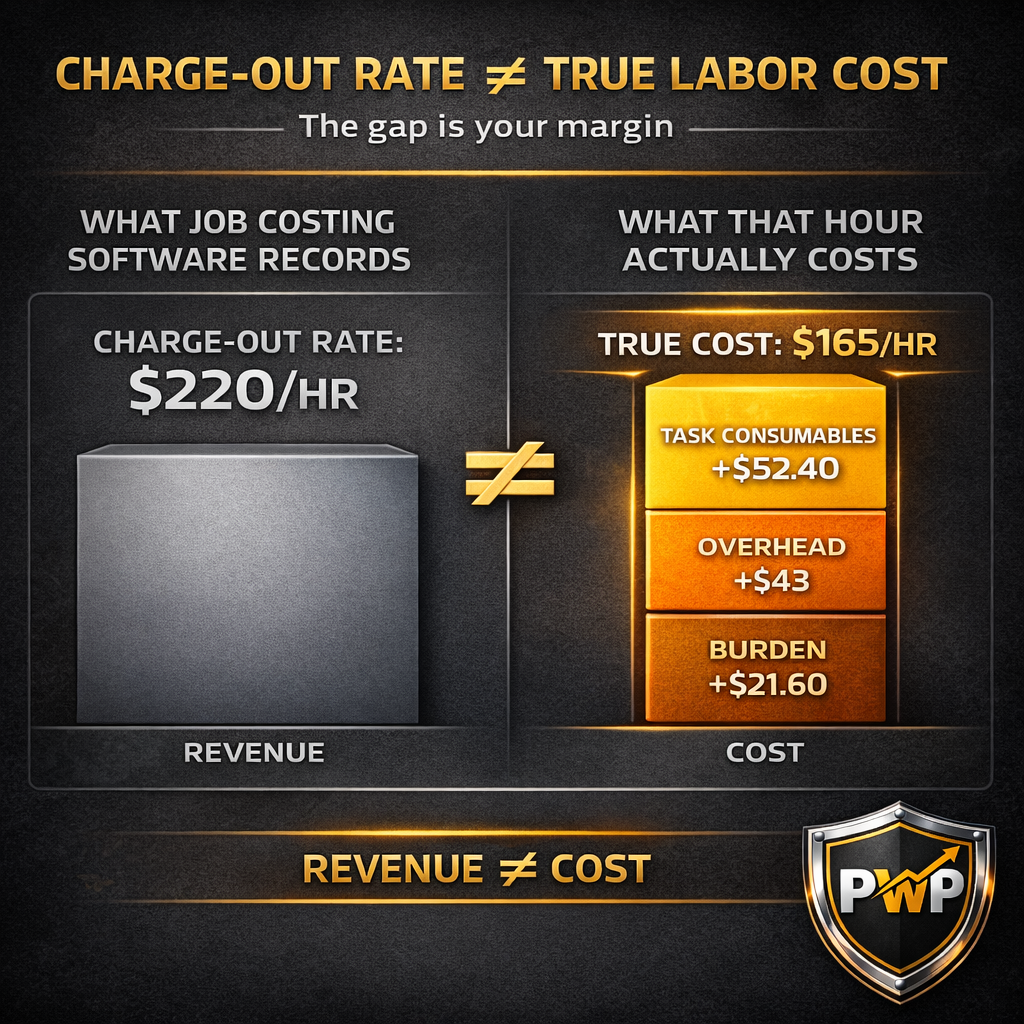
What the software records isn't your true labor cost. It's your charge-out rate applied to that time. Those are not the same number. The gap between them is your profit margin. And if you can't see both sides updating simultaneously, you don't actually know whether the job is profitable while it's running.
Real-time job costing means every cost layer — not just materials and invoices, but true fully-loaded labor cost — accumulates from the moment a worker clocks into a task, compared against the charge-out rate for that task in real time, so that profitability is a live number, not a calculation you run at closeout.
That definition eliminates most of what the industry currently calls "real-time."
Real-Time Job Costing: Why True Labor Cost Is the Missing Number
Real-Time" Job Costing Is a Marketing Term. Here's What It Actually Means.
What "Real-Time" Actually Means in Most Construction Software
Materials and Other Costs — These Do Update in Real Time
Labor — The Biggest Cost and the One That's Always Behind
The Deeper Problem — Charge-Out Rate Is Not True Labor Cost
H3: What Software Shows You When Time Is Recorded
The Method Is Wrong — Even When the Intent Is Right
The Layer Almost No Software Touches — Task-Specific Consumables
Why the Accumulated Error Shows Up at Closeout
Why Labor Is the Cost That Gets Out of Hand
The Variables That Move While the Job Is Running
What You Can't See Until the Task Closes — and What That Costs You
What True Real-Time Job Costing Requires
True Cost Must Accumulate at Clock-In — All 6 Layers
It Must Be Compared Against Charge-Out Rate Simultaneously
How ProjectWatchPRO Delivers Both Numbers at Once
Every Clock-In Triggers Cost Accumulation Across All Layers
What "Real-Time" Actually Means in Most Construction Software
Ask the sales rep at any major construction software company whether their platform offers real-time job costing. The answer will be yes.
Ask them to define it. That's where the answers diverge.
Materials and Other Costs — These Do Update in Real Time
To be precise: the "real-time" label isn't entirely wrong.
When a material invoice is posted, most modern job costing platforms update the job cost record immediately. When a subcontractor bill comes in, it hits the job cost report the same day it's entered. Equipment costs, rental charges, PO line items — all of these update when someone enters the data.
If you're looking at your job cost report on a Tuesday afternoon, your material costs reflect everything that's been entered through Tuesday afternoon. That part works.
This matters because it's the basis of the "real-time" claim. And it's real — for those cost categories.
Labor — The Biggest Cost and the One That's Always Behind
Labor is different.
Labor costs don't enter the system when work happens. They enter the system when someone records that the work happened.
In practice, that means one of three things:
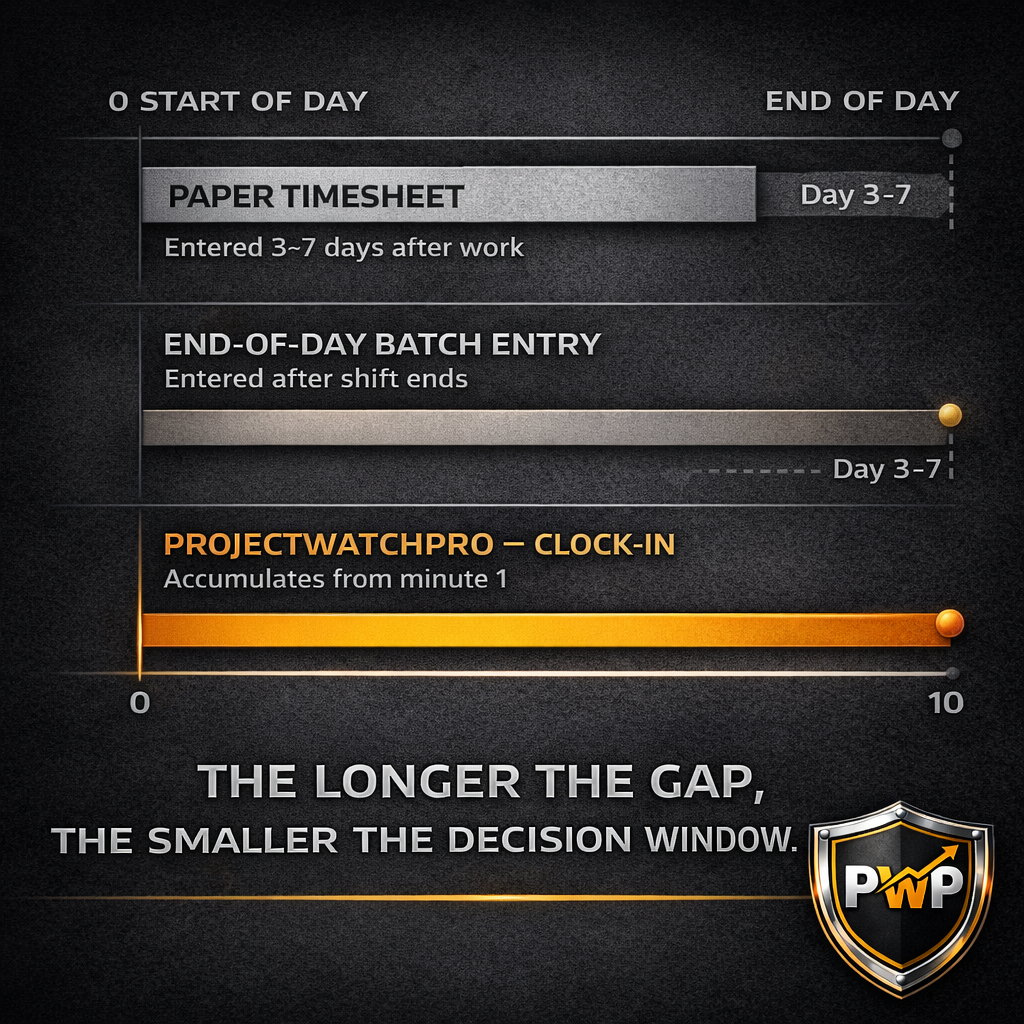
Scenario 1 — Task close batch processing. The employee's time isn't posted to the job cost record until they close the task they're clocked into. If they're 6 hours into an 8-hour sandblasting run, those 6 hours don't exist in your job cost data yet. The cost is accumulating on the job site. It's invisible in your system.
Scenario 2 — End-of-day entry. The crew finishes work. At the end of the day — or the end of the week — a supervisor, PM, or the workers themselves enter the hours worked. Everything that happened on Monday gets recorded on Monday evening, or Friday afternoon, or whenever the timesheet deadline falls. The Tuesday afternoon job cost report you're looking at shows Monday's labor at best.
Scenario 3 — Paper timesheets. Still standard at a large percentage of smaller contractors. Hours get written down in the field. Entered into the system by office staff. The lag between work performed and cost recorded can run 3 to 7 days. On a two-week job, you could be halfway through before the first labor cost hits the record.
In all three scenarios, labor — which typically represents 30–50% of total project cost and is the variable most likely to run — is the blindspot in your "real-time" dashboard.
Only 31% of construction projects stay within 10% of their original budget. Labor overruns are the most common reason. And they compound quietly, shift by shift, while the dashboard shows you a number that's already behind.
The Deeper Problem — Charge-Out Rate Is Not True Labor Cost
Here's where most conversations about real-time job costing stop short.
Even if you solve the timing problem — even if labor hours are recorded the moment they happen — there's still a number that almost every job costing platform gets wrong.
H3: What Software Shows You When Time Is Recorded
Most job costing software does attempt to record labor at cost — not at the billable charge-out rate. Hours are multiplied by a cost rate, and that figure appears on the job cost report as "labor cost."
The problem isn't what the software intends to show. The problem is how it calculates that cost rate — and what it consistently leaves out.
The Method Is Wrong — Even When the Intent Is Right
Here's how most job costing systems handle the layers beyond base wage:
Labor burden — the employer-side costs attached to a wage: payroll taxes, workers' compensation, benefits — is typically applied as a flat percentage of the employee's base wage. That sounds reasonable until you look at how burden actually works.
Workers' compensation rates are set by job classification and risk profile, not by wage level. Benefits costs are often flat per employee, not proportional to what they earn. A percentage-of-wage approach means a $40/hr employee gets a larger burden charge than a $20/hr employee — but the actual cost to employ them doesn't scale that cleanly. The percentage is an approximation. Sometimes it's close. Often it isn't.
Overhead burden — rent, insurance, vehicles, admin staff, software — is also commonly applied as a percentage of wage. This is structurally wrong. Overhead doesn't cost more for a higher-paid employee. Your office rent is the same whether a $20/hr laborer or a $60/hr foreman is out on the job. Both of them are drawing from the same pool of fixed costs. Overhead is a per-hour cost — not a wage-proportional one. Using a wage percentage overstates the overhead burden for your more experienced crew and understates nothing for anyone.
More expensive software handles this better — some platforms allow per-hour overhead rates or more granular burden tables. The general rule holds: the more sophisticated the system, the closer the number. But "closer" is not "correct."
Shift differential and overtime — some platforms calculate these. Many don't. If yours doesn't, the hours a crew works at 1.5× or on a night premium are recorded at straight-time rates. The cost in the system is wrong before the task even closes.
The Layer Almost No Software Touches — Task-Specific Consumables
This is where the gap between recorded cost and true cost becomes the largest — and where almost every job costing platform, at every price point, goes silent.
Your true labor cost has one more layer that isn't a percentage of anything:
Task-specific consumable burden. Blast media during sandblasting. Welding rods and shielding gas during welding. Grinder disks during surface prep. These materials are consumed at a known rate per hour of that specific task — and they are a direct cost of the labor, not a general overhead item.
Most software routes them to a materials line or buries them in overhead. Neither is correct. A sandblaster consuming $110/hr in blast media is generating $110/hr in task-specific cost that belongs to that task's labor record — not spread across the whole job or absorbed into a general overhead pool.
When task consumables are misallocated, every sandblasting task looks cheaper than it is. Every task that uses specialized consumables carries a hidden cost the system never shows.
Why the Accumulated Error Shows Up at Closeout
Each of these approximations and omissions is small in isolation. In aggregate — across every labor hour on a multi-week job — they produce a recorded cost figure that can be meaningfully different from what that labor actually cost you.
The problem doesn't show up on Monday. It shows up at closeout, when actual payroll runs, burden reconciliations, overhead allocations, and consumable invoices produce the real number — and it doesn't match the job cost dashboard you were watching all month.
This is why 85% of construction projects experience cost overruns. Not because the work ran badly. Because the cost data was built on approximations that looked close enough — until they weren't.
Why Labor Is the Cost That Gets Out of Hand
Labor is not just the largest cost on most jobs. It is the most variable, the hardest to predict, and the one most sensitive to real-time conditions.
The Variables That Move While the Job Is Running
Material costs are locked when the PO is issued. Subcontractor costs are set by contract. Equipment rental is fixed by the day or week.
Labor moves constantly.
Task mix changes. A scope that estimated 60 hours of welding and 20 hours of grinding runs into fit-up issues — now it's 40 hours of welding and 40 hours of grinding. The consumable burden is different. The productivity rate is different. The cost is different.
Overtime accumulates. A crew falls behind. Rather than extend the schedule, the PM authorizes OT for the last three days. Those hours cost 1.5× base — plus burden on top of the premium.
Crew size shifts. An extra hand is added mid-job to make up time. The headcount was in the estimate. The specific task assignment wasn't.
Every one of these moves changes the true cost of the labor on that job. None of them are visible in a system that records time at task close or end of day. And none of them are visible in a system that's tracking charge-out rate instead of true cost.
What You Can't See Until the Task Closes — and What That Costs You
The decision window on a labor overrun is narrow.
If you catch it in week 2 of a 6-week job, you can adjust sequencing, rebalance the crew, tighten the scope, submit a change order.
If you catch it at closeout, you can record the loss and move on.
The difference between those two outcomes is not the magnitude of the overrun. It's the timing of when you found out.
A system that records labor at task close gives you the information after the window has closed. On a task that runs 3 days, you find out on day 3. On a task that runs 2 weeks, you find out in week 2 — but by then every hour is already spent.
Real-time means the information arrives while the decision is still yours to make.
What True Real-Time Job Costing Requires
Real-time job costing isn't a feature set. It's a data architecture.
For cost to be genuinely live, two things must be true simultaneously:
True Cost Must Accumulate at Clock-In — All 6 Layers
The moment a worker clocks into a task, the cost clock starts. Not when the task closes. Not at end of day. At clock-in.
And what accumulates must be true cost — all six layers — not a charge-out rate.
Base wage ticking. Burden ticking. Overhead ticking. Task consumables ticking.
By minute 30, you can look at that task and see: 30 minutes of sandblasting has accumulated $52 in true labor cost, $55 in blast media, $21.50 in overhead — $128.50 total, against a charge-out rate of $250/hr pro-rated.
That number is real. It's the cost of the last 30 minutes, calculated correctly, already in the job record.
It Must Be Compared Against Charge-Out Rate Simultaneously
True cost alone isn't enough. You need both sides of the equation live.
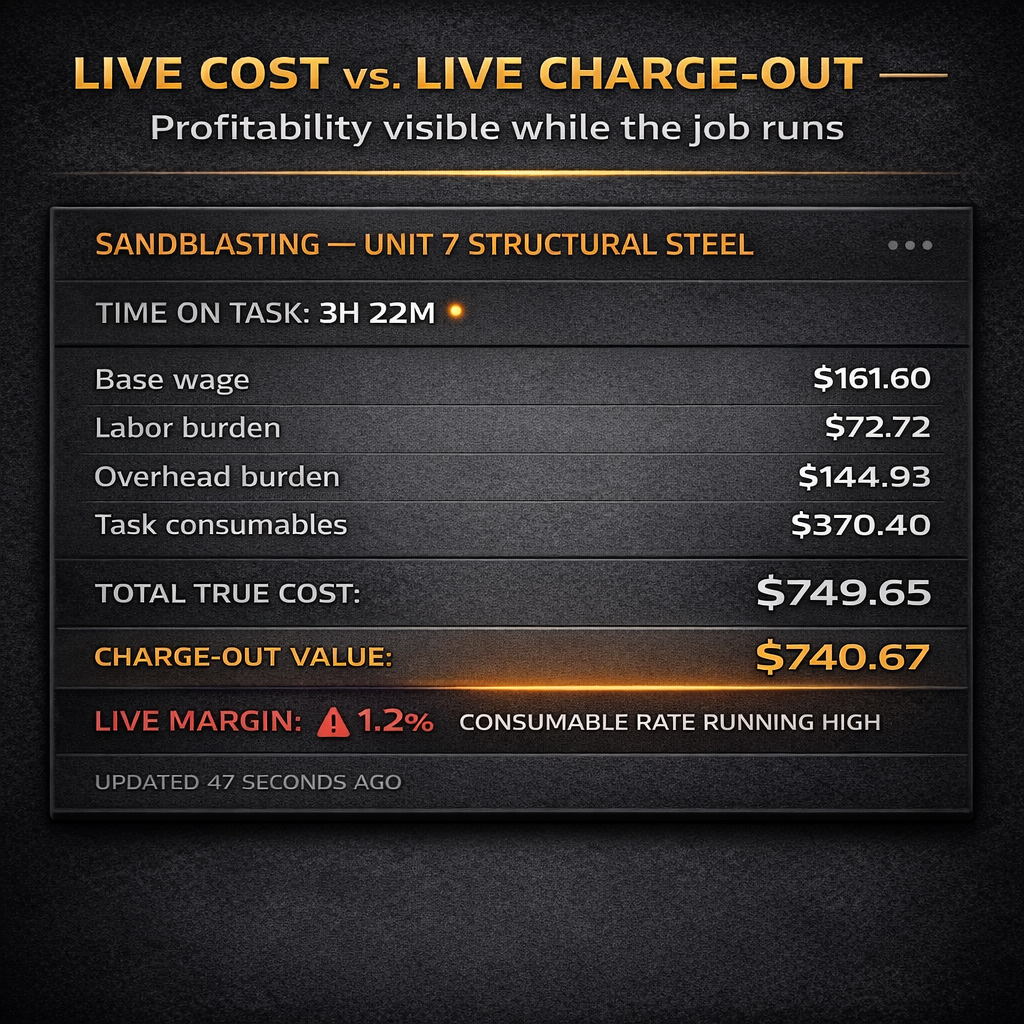
Live cost vs. live charge-out = live margin.
If your true cost for a sandblasting task is accumulating at $165/hr and your charge-out rate for that task is $250/hr, you are running a 34% gross margin on that scope — and you can see it, in real time, while the blast pot is still running.
If your true cost runs to $185/hr because media consumption is higher than estimated, your margin has moved to 26% — and the system shows you that, right now, while there's still time to recalibrate.
That is what real-time profitability looks like. Not a dashboard that updates when the task closes. A number that moves every minute the job runs.
How ProjectWatchPRO Delivers Both Numbers at Once
ProjectWatchPRO is built around a single architectural decision: cost accumulation starts at clock-in, not at clock-out.
Every Clock-In Triggers Cost Accumulation Across All Layers
When a field worker clocks into a task in ProjectWatchPRO, the system immediately begins accumulating cost across every layer simultaneously:
- Base wage — calculated per second against the worker's actual pay rate
- Labor burden — the employer-side cost (taxes, WC, benefits) calculated as a percentage of base wage, accumulating with it
- Overhead burden — the per-hour overhead rate allocated to every active labor hour
- Task-specific consumable burden — the consumable rate for that specific task (blast media for blasting, rod and gas for welding, disk cost for grinding), applied only to hours where that task is active
All four layers start the moment the clock-in registers. Not when the task closes. Not at end of shift. The moment the work begins.
This means that at any point during the job — mid-task, mid-day, mid-week — the job cost record reflects the actual true cost of every hour worked to that point. Not the charge-out rate. The cost.
Live Profitability — Not Just Live Billing
Because ProjectWatchPRO accumulates true cost at clock-in and simultaneously tracks the charge-out rate assigned to that task, the system produces a live profitability number for every active job — every minute it runs.
At 10:47 AM on a Tuesday, a PM can open a job record and see:
- True cost accumulated to date: $14,830
- Charge-out value accumulated to date: $19,200
- Live gross margin: 22.8%
- Estimated cost at completion (based on current burn rate): $31,600
- Estimated margin at completion: 21.4%
That number is not a projection built on last week's timesheet entry. It is built on what is actually happening on the job right now — and it updates every minute as workers clock in, run tasks, and clock out.
The charge-out rate is not the cost. The cost is the cost. And for the first time, you can see both numbers live — which means you can see your margin live.
When labor runs over, you see it before the task closes. When a task mix shifts and consumable costs change, the system adjusts. When OT kicks in, the burden on those hours reflects the premium — immediately, in the job record, while the work is still running.
That is what real-time job costing was always supposed to mean.
Key Takeaways
- Most construction software legitimately updates materials, subcontractor costs, and other direct expenses in real time — upon entry. The "real-time" claim is partially true.
- The gap is labor. Time entries are batch-processed — recorded at task close, end of day, or on paper timesheets — which means labor, the largest and most variable job cost, is always behind.
- Even when labor is recorded promptly, the cost figure is built on approximations: labor burden and overhead applied as a percentage of wage — a structurally incorrect method that overstates cost for higher-paid workers and understates the actual overhead per hour. Task-specific consumables are almost universally untracked. The number in the system is not wrong by design — it's wrong by method.
- Your true labor cost has 6 layers: base wage, labor burden (calculated correctly — not as a wage percentage), overhead burden (a flat per-hour allocation — not wage-proportional), task-specific consumable burden, shift differential, and OT premium. Approximations at any layer compound across every labor hour on every job.
- Labor is the cost that gets out of hand on most jobs because it's variable, task-sensitive, and invisible in batch-processing systems until the window to act has closed.
- True real-time job costing requires cost accumulation at clock-in — all 6 layers — compared against charge-out rate simultaneously. The result is a live margin number that updates every minute the job runs.
- ProjectWatchPRO begins accumulating all 6 cost layers the moment a worker clocks into a task — not when they clock out. Live cost vs. live charge-out means live profitability, visible mid-task, mid-day, mid-job.
Frequently Asked Questions
Q: What is real-time job costing in construction?
Real-time job costing means every cost layer — labor, burden, overhead, and task-specific consumables — accumulates from the moment work starts and is compared against the charge-out rate simultaneously, so profitability is a live number while the job is running. Most software updates materials on entry but batch-processes labor at task close or end of day, making the label only partially accurate.
Q: What is the difference between charge-out rate and true labor cost in construction?
Charge-out rate is what you bill the client per hour of labor — it includes your target margin and is a revenue number. True labor cost is what that hour actually costs your business: base wage plus labor burden (35–45%), plus overhead burden ($35–60/hr for most operations), plus any task-specific consumable costs. The gap between true cost and charge-out rate is your gross profit margin.
Q: Why is construction job costing software often inaccurate on labor?
Two reasons. First, most software records labor time at task close or end of day — not at clock-in — so labor cost is always behind actual work performed. Second, even when time is recorded on time, the cost calculation is built on flawed methods: labor burden and overhead applied as a percentage of wage rather than as accurate per-hour allocations, and task-specific consumables either missing entirely or buried in the wrong cost bucket. The number the system shows isn't fabricated — it's just built on approximations that compound into a meaningful error by closeout.
Q: How do I know if a construction job is profitable while it's running?
You need two live numbers simultaneously: your true accumulated cost (base wage + correctly calculated burden + flat per-hour overhead + task-specific consumables for every hour worked) and your accumulated charge-out value for those same hours. The difference is your live gross margin. If your system only updates labor at task close, or uses percentage-of-wage approximations for overhead, you cannot see live profitability — only an estimate of it.
Q: Why does labor cost get out of hand on construction jobs?
Labor is the most variable cost on a job. Task mix changes, overtime accumulates, crew size shifts, productivity varies — all of these move the true cost of labor without triggering an alert in systems that record time at task close or end of day. By the time the timesheet is entered, the shift that went wrong is already history. Real-time accumulation at clock-in is the only mechanism that surfaces labor overruns while there is still a decision to make.
Q: Does ProjectWatchPRO integrate with payroll systems?
ProjectWatchPRO's primary function is real-time cost accumulation at task clock-in — tracking true labor cost as work happens rather than after payroll is processed. The true cost data is built from your established labor rates, burden rates, overhead rates, and task consumable rates — not pulled from payroll after the fact. This means job profitability is live during the job, not reconciled after payroll closes.
Know Your True Cost Before You Track It in Real Time
If your job costing system is calculating labor cost from wage percentages and skipping task-specific consumables, real-time tracking gives you a live approximation — not live profitability. The missing piece is the true cost of each labor hour: all six layers, calculated correctly, specific to each task type and each worker's actual rate structure.
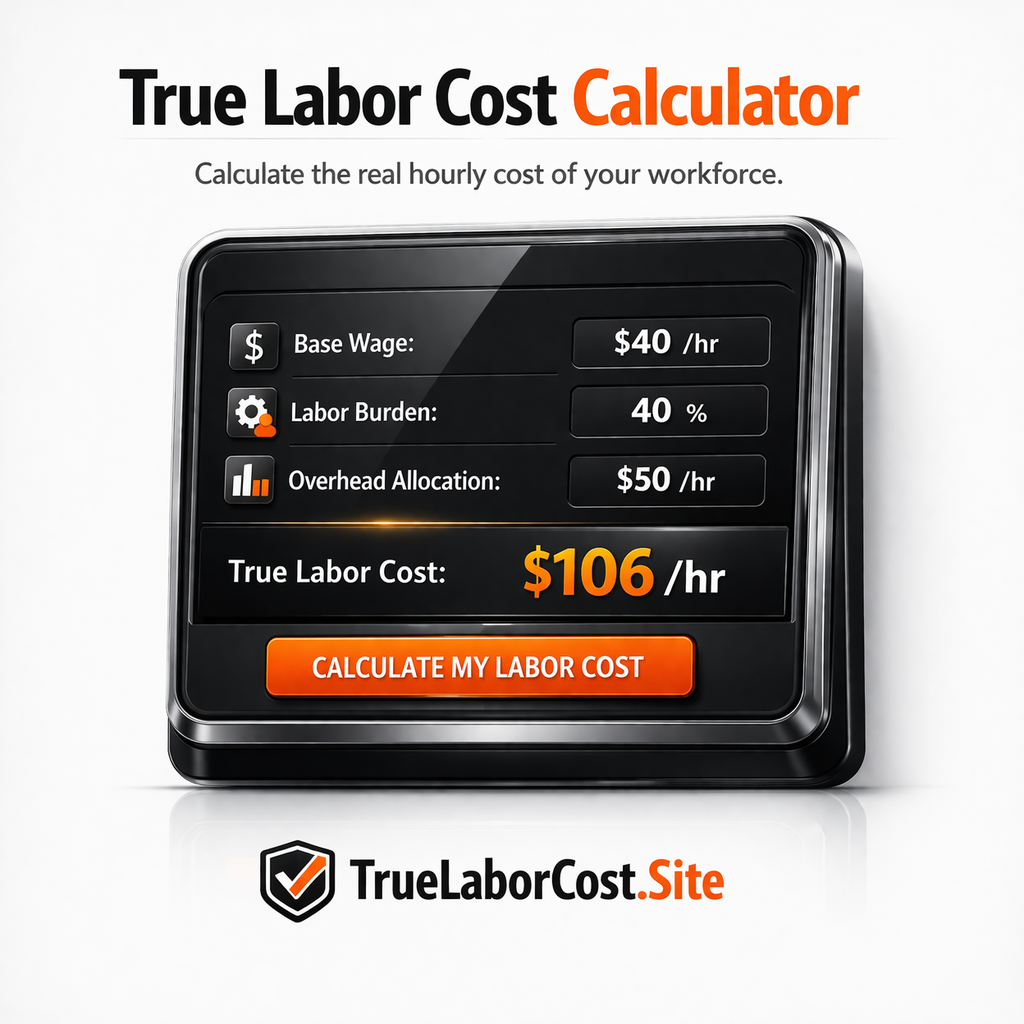
The True Labor Cost Calculator at truelaborcost.site walks you through all six layers using your actual numbers — base wage, burden rate, overhead allocation, and task-specific consumables. It takes about 8 minutes and gives you the number that has to be in the system before real-time accumulation means anything.
Once you know your true cost per task hour, ProjectWatchPRO accumulates it from the moment anyone clocks in — so the margin number on your dashboard is built on real cost, not billing rates.
→ Calculate Your True Labor Cost at truelaborcost.site