Real-Time Job Costing for Contractors: Stop Finding Out Too Late
Real-Time Job Costing for Contractors: Why Waiting Until Project End Is Costing You Everything
You finished the job.
Got paid. Moved on. Felt decent about it.
Then 45 days later, someone runs the numbers. And the job lost money.
Not a little. Enough to matter. Enough that if you'd known in week two — when labor started running hot — you could have made a call, adjusted the crew, submitted a change order, done something.
But you didn't know in week two. You found out in month three. And by then, the damage was done, the crew was gone, and the client had already left a five-star review on a job that quietly killed your margin.
This is the 45-Day Profit Blind Spot. And it's not a software problem. It's not an estimating problem. It's a timing problem. Contractors aren't losing money because they can't run a job — they're losing money because they find out too late to do anything about it.
Real-time job costing for contractors is the system that closes that gap. Here's what it actually means, why most businesses don't have it, and what changes when you do.
Real-time job costing for contractors: a cost tracking system where every dollar spent — labor, burden, overhead, and materials — accumulates against the project budget as work happens, not after payroll closes or the job wraps. The result is a live profit number you can see and act on while the job is still running.

Real-Time Job Costing for Contractors: Stop Finding Out Too Late
Real-Time Job Costing for Contractors: Why Waiting Until Project End Is Costing You Everything
Why You Won't Know a Job Lost Money Until It's Already 45 Days Gone
What Is Real-Time Job Costing for Contractors?
Why Monthly Reporting Is the Enemy of Profit
The Three Reasons Project-End Reviews Keep Killing Your Margin
Why Do Construction Projects Go Over Budget?
The Hidden Cost Gap Between What You Estimated and What You Spent
What Real-Time Job Costing Actually Changes — Step 3 of the Profit Defense System
One Version of Reality: What It Means and Why It Matters
How Do I Track Profit on a Construction Project While It's Running?
Your Next Move — How to Stop Finding Out 45 Days Too Late
Step 1 — Build Your True Cost Baseline
Step 2 — Track by Task, Not by Job
Step 3 — Create One Version of Reality Across the Whole Business
Why You Won't Know a Job Lost Money Until It's Already 45 Days Gone
The contractor who finishes a job and finds out 45 days later that it lost money didn't make one big mistake. He made a series of small ones — and he found out about all of them at the same time, when it was too late to fix any of them.
That's not incompetence. That's the structure of how most project-driven businesses collect and report financial data.
Here's how it works:
Work happens. Hours get logged — at end of day, at task close, or on paper timesheets handed in Friday afternoon. Materials invoices take 2–3 weeks to arrive and get entered. Overhead allocations run monthly. Payroll closes bi-weekly. Someone pulls a job cost report at the end of the month or, more likely, at project close.
By the time that report exists, the job has been over for weeks. The profit number it shows is historically accurate. It is also completely useless for making decisions.
The contractors who recover margin fastest aren't the ones who do better post-mortems. They're the ones who stop managing by hindsight and start managing by real-time data.
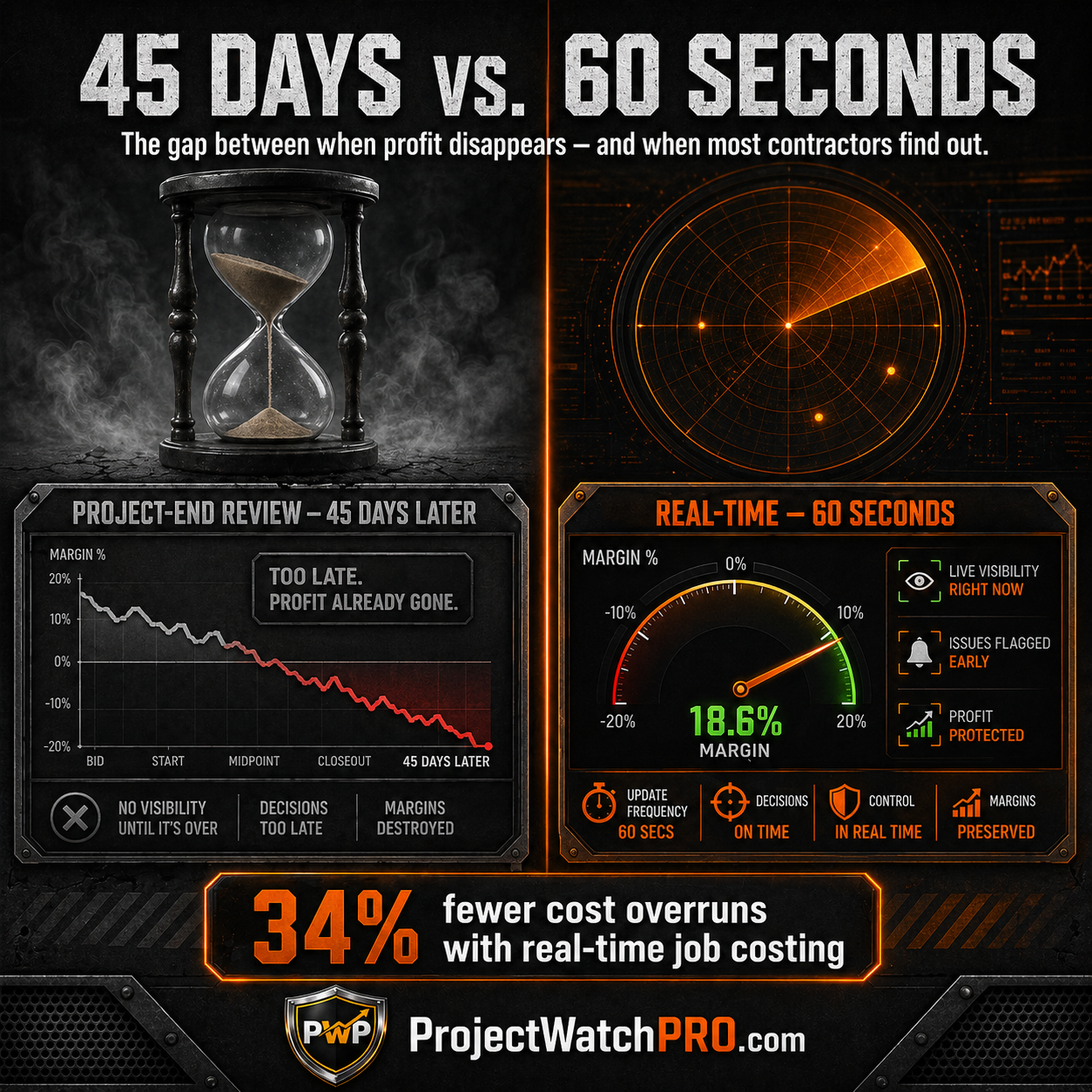
According to industry benchmarking data, contractors who implement dedicated real-time job costing reduce cost overruns by 34% and improve project margins by 3–5 percentage points on average — a difference worth $300,000–$500,000 annually on a $10M operation.
That is not a rounding error. That is the cost of finding out too late.
What Is Real-Time Job Costing for Contractors?
Real-time job costing means your cost data updates while the job is running — not after it closes.
Every labor hour accumulates the moment it's worked. Every material cost hits the job record when it's consumed, not when the invoice arrives. Every overhead dollar is allocated as it's earned. And all of it is compared against your budget continuously, so you can see the gap — if one is forming — while there's still time to act.
This is different from what most contractors have. Most have project-end job costing: costs collected throughout the job, totaled at close, compared to estimate. The comparison tells you what happened. Real-time job costing tells you what is happening.
Why Monthly Reporting Is the Enemy of Profit
Monthly reporting feels organized. It isn't.
A monthly report tells you the financial state of a job as of the last day of last month. If the job is 8 weeks long, your first report comes at the halfway point. Your second report comes when it's done.
You had exactly one chance to course-correct. And that chance was built on data that was 30 days old the moment the report printed.
The Profit Defense System calls this the Decision-Speed Gap — the lag between when something goes wrong on a job and when the information reaches someone who can do something about it. On a monthly cycle, that gap is measured in weeks. By then, the labor has been spent. The scope has drifted. The margin has bled.
Closing that gap is what Stage 1 of the Profit Defense System is built to do.
The Three Reasons Project-End Reviews Keep Killing Your Margin
Most owners know their numbers are late. They've accepted it as the cost of doing business.
It isn't. It's a choice — one that costs most contractors between $10,000 and $50,000 every month in unrecovered margin. Here's what drives it.
Why Do Construction Projects Go Over Budget?
The short answer: because nobody saw it coming in time to stop it.
The longer answer: project budgets go over because costs move during a job — task mix shifts, overtime accumulates, material prices change, scope creeps — and the systems most contractors are running don't surface those movements until it's too late to respond.
Labor is the biggest culprit. It represents 30–50% of total project cost on most jobs, and it is the most variable line item on the estimate. Task sequences change. A foreman adds a hand to make up time. Two crew members swap roles mid-week. None of these trigger an alert. They just quietly change the cost of the job, day by day, until the project closes and the number comes in wrong.
The Arizona kitchen remodeler who bid $340,000 and lost $18,000 on the job didn't make a bad estimate. He just had his job costing living in a spreadsheet nobody updated until near closeout. By then, every dollar was spent.
The Hidden Cost Gap Between What You Estimated and What You Spent
There's a second problem underneath the timing problem.
Most contractors are tracking the wrong number.
Your estimate is built on what you expect things to cost. Your invoices show what vendors charged you. But neither of those numbers is your true cost — the fully loaded cost of every labor hour, including wages, employer-side burden, overhead allocation, and any consumables specific to the task being worked.
The true labor cost multiplier for most project-driven businesses is 3.1× base wage. A $40/hr welder doesn't cost $40/hr. He costs closer to $122/hr when you factor in payroll taxes, workers' comp, benefits, overhead, and task-specific consumables like welding rod and shielding gas.
Most job cost systems don't track all six layers. They use a charge-out rate — what you bill the client per hour — and compare it to base wages or a rough burden estimate. The result is a gap between what the system shows and what the job actually cost. That gap doesn't show up until payroll runs and overhead allocates and the real number finally lands.
By then: 45 days gone.
What Real-Time Job Costing Actually Changes — Step 3 of the Profit Defense System
Here's the shift that changes everything.
You used to find out a job lost money after the job was over, after the crew was paid, after the client had moved on. The only thing left to do was record the loss.
Now you can see the margin moving while the job is still running. You can see it at 10:47 AM on a Tuesday, mid-task, before a single decision window has closed.
That is what Step 3 of the Profit Defense System — One Version of Reality — delivers.
One Version of Reality: What It Means and Why It Matters
One Version of Reality means every person in your business — owner, GM, project manager, foreman — is looking at the same live number. Not last week's spreadsheet. Not the PM's estimate versus the bookkeeper's actuals. One number. Live. Shared.
This sounds simple. It almost never exists.
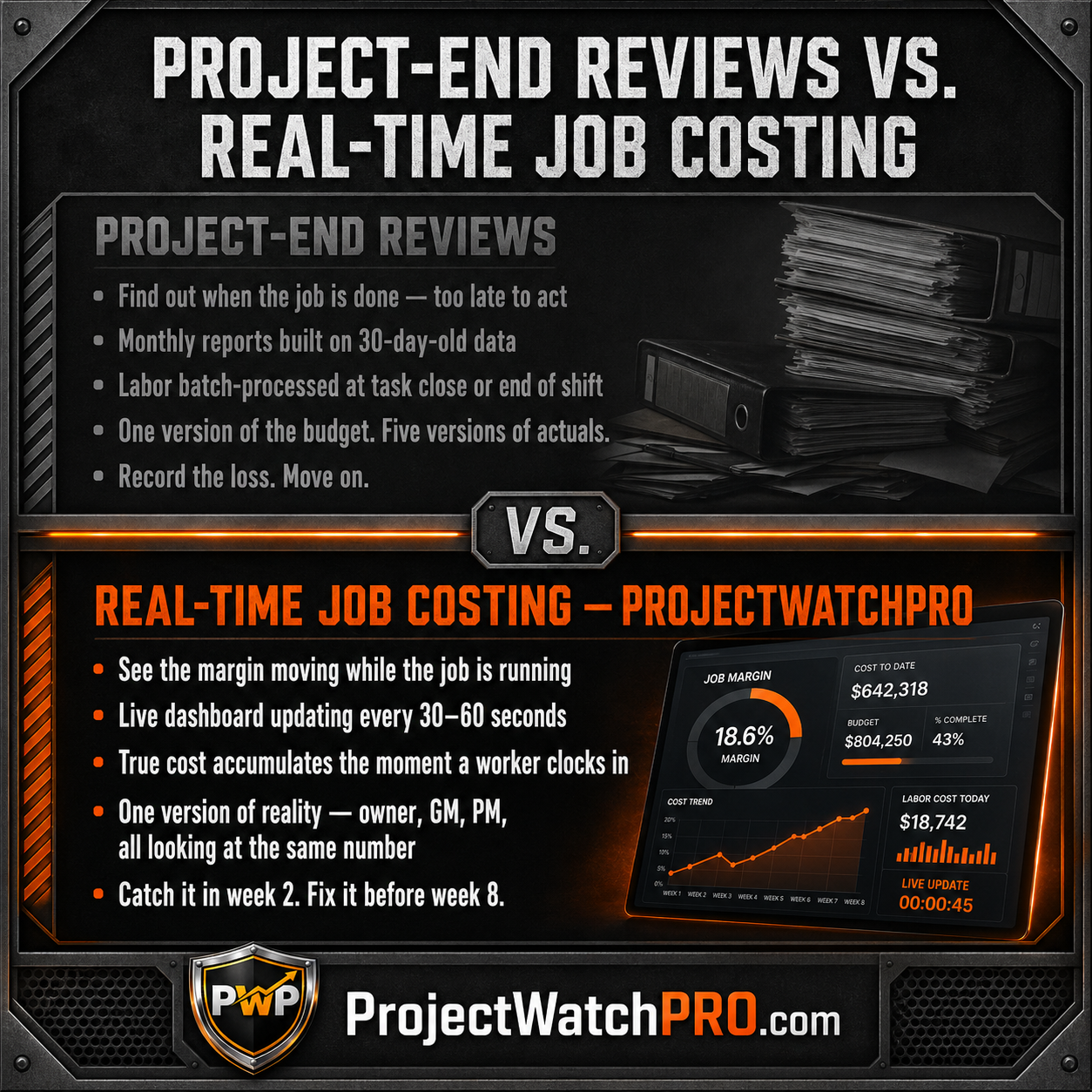
Most project-driven businesses have four or five versions of financial reality running at once: the estimate in the quoting system, the actuals in the accounting software, the hours in the payroll system, the field notes in a text chain, and the gut feel in the owner's head. They don't sync. They don't reconcile until someone forces a meeting.
One Version of Reality collapses all of those into a single live dashboard that everyone is pulling from, at any time, without waiting for a report.
When a cost starts running, everyone sees it at the same time. When a task goes over budget, the PM knows before the owner has to ask. When a job is trending toward a loss, you find out in week 2 — not week 8.
How Do I Track Profit on a Construction Project While It's Running?
Three things have to be true simultaneously:
1. Cost accumulates at the moment work happens — not at task close or end of shift. The moment a worker clocks into a task, the true cost of that hour starts accumulating. Every layer: base wage, burden, overhead, consumables. Not when they clock out. Not when the timesheet is entered Friday. The moment the work begins.
2. True cost is tracked — not charge-out rate. Charge-out rate is a revenue number. It's what you bill the client. True cost is what the hour costs you. If your system is comparing charge-out to charge-out, you're tracking billing, not profitability. You need both sides of the equation live: what it cost and what you're charging — so you can see the spread between them.
3. One dashboard. No reconciliation required. The live margin number needs to be visible without pulling a report, without waiting for payroll, without a finance meeting. Available on any device, to anyone with access, at any moment the job is running.
These three elements together are what makes job costing genuinely real-time. Each one alone is useful. All three together give you something most contractors have never had: the ability to see a problem forming and make a decision before the window closes.
Your Next Move — How to Stop Finding Out 45 Days Too Late
Knowing the problem isn't enough. Here's the sequence that changes it.
Step 1 — Build Your True Cost Baseline
Before any real-time system can give you accurate numbers, you need to know what your labor actually costs.
Not your charge-out rate. Not your base wage. Your true loaded cost per hour, per task type, per employee.
That means calculating all six layers: base wage, labor burden (employer taxes, workers' comp, benefits — not as a wage percentage, but as actual dollar amounts per hour), overhead burden (total fixed costs divided by total billable hours), task-specific consumables (blast media, welding rod, grinder disks — cost per hour of each task that consumes them), shift differential, and overtime premium.
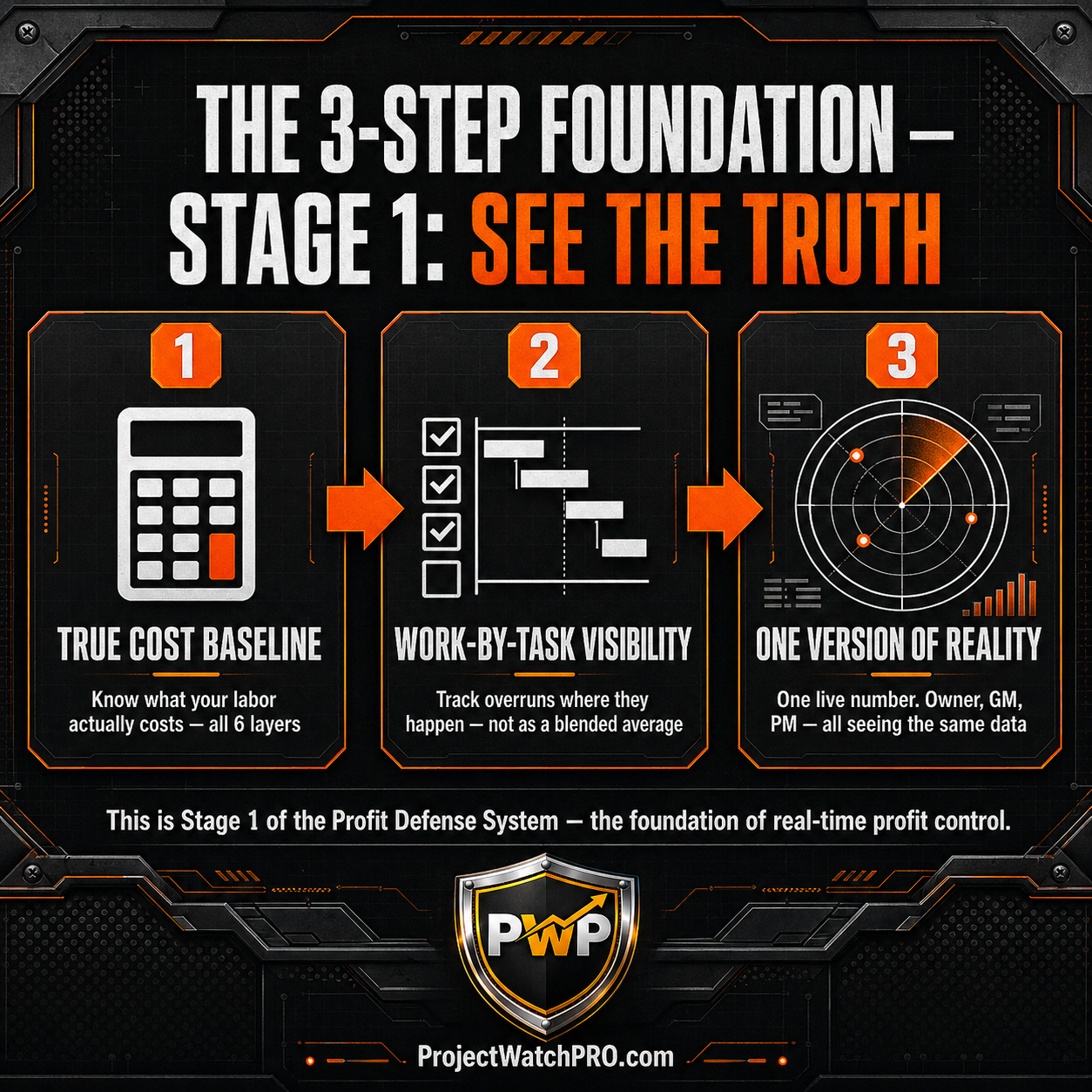
This is Step 1 of the Profit Defense System: True Cost Baseline. Without it, your real-time dashboard is displaying a live approximation of the wrong number.
Step 2 — Track by Task, Not by Job
Job-level cost tracking tells you that the job is running over. Task-level tracking tells you which task, why, and by how much.
The difference matters because the fix is different.
A job-level overrun is a vague problem. A task-level overrun is an actionable one: this sandblasting task is running 22% over on labor hours because the surface prep wasn't complete when the blast crew arrived.
Step 2 of the Profit Defense System — Work-by-Task Visibility — breaks every job into discrete cost buckets at the task level, so overruns surface where they're occurring, not as a blended average across the whole job.
Step 3 — Create One Version of Reality Across the Whole Business
Once you have the right cost baseline and task-level tracking, the final move is centralizing the data so everyone is looking at the same live number.
No more version conflict between the PM's spreadsheet and the bookkeeper's actuals. No more waiting for month-end reconciliation. One system. One number. Visible to every stakeholder who needs it, at any time, without asking.
This is Step 3: One Version of Reality. It's the point where real-time job costing stops being a tracking exercise and starts being a management system — one that surfaces problems while decisions can still be made.
Key Takeaways
- The 45-Day Profit Blind Spot is a timing problem, not a costing problem. Most contractors aren't losing money because they're bad at estimating — they're losing it because they find out too late to fix it.
- Monthly reporting and project-end job cost reviews give you historically accurate data that is completely useless for course-correcting a job that's already over.
- Labor is the cost that gets out of hand on most jobs — it represents 30–50% of project cost, moves constantly throughout a job, and is the slowest-updating line item in most tracking systems.
- Your true labor cost is 3.1× base wage when all six layers are included: base wage, labor burden, overhead, task-specific consumables, shift differential, and overtime premium. Most job cost systems undercount this.
- Real-time job costing requires three things: cost accumulating at clock-in (not task close), true cost tracked (not charge-out rate), and one shared live dashboard visible without running a report.
- Contractors who implement real-time job costing reduce cost overruns by 34% and recover $300,000–$500,000 in annual margin on a $10M operation — not by working harder, but by finding out sooner.
- Steps 1–3 of the Profit Defense System — True Cost Baseline, Work-by-Task Visibility, and One Version of Reality — are the foundation. Without all three, you're tracking activity, not defending profit.
Frequently Asked Questions
Q: What is real-time job costing for contractors?
A: Real-time job costing means every cost — labor, burden, overhead, and materials — accumulates against the project budget as work happens, not after payroll closes or the job ends. The result is a live profit number you can read and act on while the job is still running, instead of discovering losses 45 days after the fact.
Q: How do I track profit on a construction project?
A: You need three things working together: a true cost baseline (all six labor cost layers, not just base wage), task-level tracking so you can see where overruns are forming, and a single live dashboard that updates as work happens without waiting for a report. Most contractors have one of the three. Profit tracking requires all three simultaneously.
Q: Why do construction projects go over budget?
A: Costs move during a job — task mix shifts, overtime accumulates, scope creeps — and most tracking systems don't surface those movements until after the job closes. Labor is the primary culprit: it's the largest and most variable cost on most jobs, and it's the slowest-updating line item in batch-processing systems. By the time the overrun shows up in a report, the window to act has been closed for weeks.
Q: How do you prevent cost overruns before it's too late?
A: The only reliable method is catching overruns while the job is running, not after it closes. That requires cost to accumulate at clock-in — the moment work starts — so a task that's running hot surfaces the overrun in real time, not at close. Task-level tracking sharpens the signal further: instead of a blended job-level variance, you see exactly which task is running over and by how much, while there's still time to make a call.
Q: What is the average profit margin for a contractor?
A: Most project-driven businesses operate at 3–5% net margin before implementing real-time cost visibility. After closing the 45-Day Profit Blind Spot and tracking true costs in real time, margins typically recover to 13–16%. The gap — 8–11 points — represents profit that was always being earned but never captured, because it was bleeding out between when costs occurred and when anyone saw the number.
Q: What is the Profit Defense System?
A: The Profit Defense System is a 9-step operational framework for project-driven businesses that closes the gap between when profit disappears and when you find out about it. Stage 1 — Steps 1 through 3 — covers the foundation: building a true cost baseline, implementing work-by-task visibility, and creating one shared version of financial reality across the business. It's the methodology behind ProjectWatchPRO, documented fully in the book Profit Defended.
---
The system for closing the 45-Day Profit Blind Spot — all 9 steps, all three stages, with the operational logic behind each one — is laid out in full in Profit Defended.
Not theory. Not a software pitch. The actual framework: how to build your true cost baseline, how to track by task instead of by job, how to create one version of reality, and how to defend the margin that's already yours — before it disappears into a report you'll read 45 days from now.
If this post landed — if you recognized your business in the 45-day problem — the book is the logical next move. It's the thinking behind everything covered here, laid out step by step, built for the owner or GM who is done finding out too late.