Does Time Tracking Software Actually Improve Profitability? Only if it Does This One Thing.
Does Time Tracking Software Actually Improve Project Profitability?
You bought the software. Your crew clocks in and out. The hours go into the system.
And the job still came in under margin.
If that's happened to you, you're not alone — and you're not doing it wrong. The software did exactly what it promised. It tracked the time. What it didn't do — what almost no time tracking tool does by default — is tell you whether those hours were profitable. Or cost you what you thought they did.
Time tracking and profit defense are not the same thing. Contractors who understand the difference start protecting margins before jobs close. Contractors who don't keep finding out 45 days too late.
You're not the problem. The operating model is.
Here's what's actually happening — and what to do about it.
Time tracking software is a tool that records when workers start and stop on a job, task, or cost code. It captures labor hours. What most time tracking software does not do — without additional configuration and the right cost inputs — is calculate whether those hours cost what you estimated, at the task level, in real time.
Does Time Tracking Software Actually Improve Profitability?
Does Time Tracking Software Actually Improve Project Profitability?
The Honest Answer — Yes, But Only If You Fix Two Things First
Why Contractors Who Track Every Hour Still Lose Money at Closeout
Hours Tracked Is Not the Same as Margin Defended
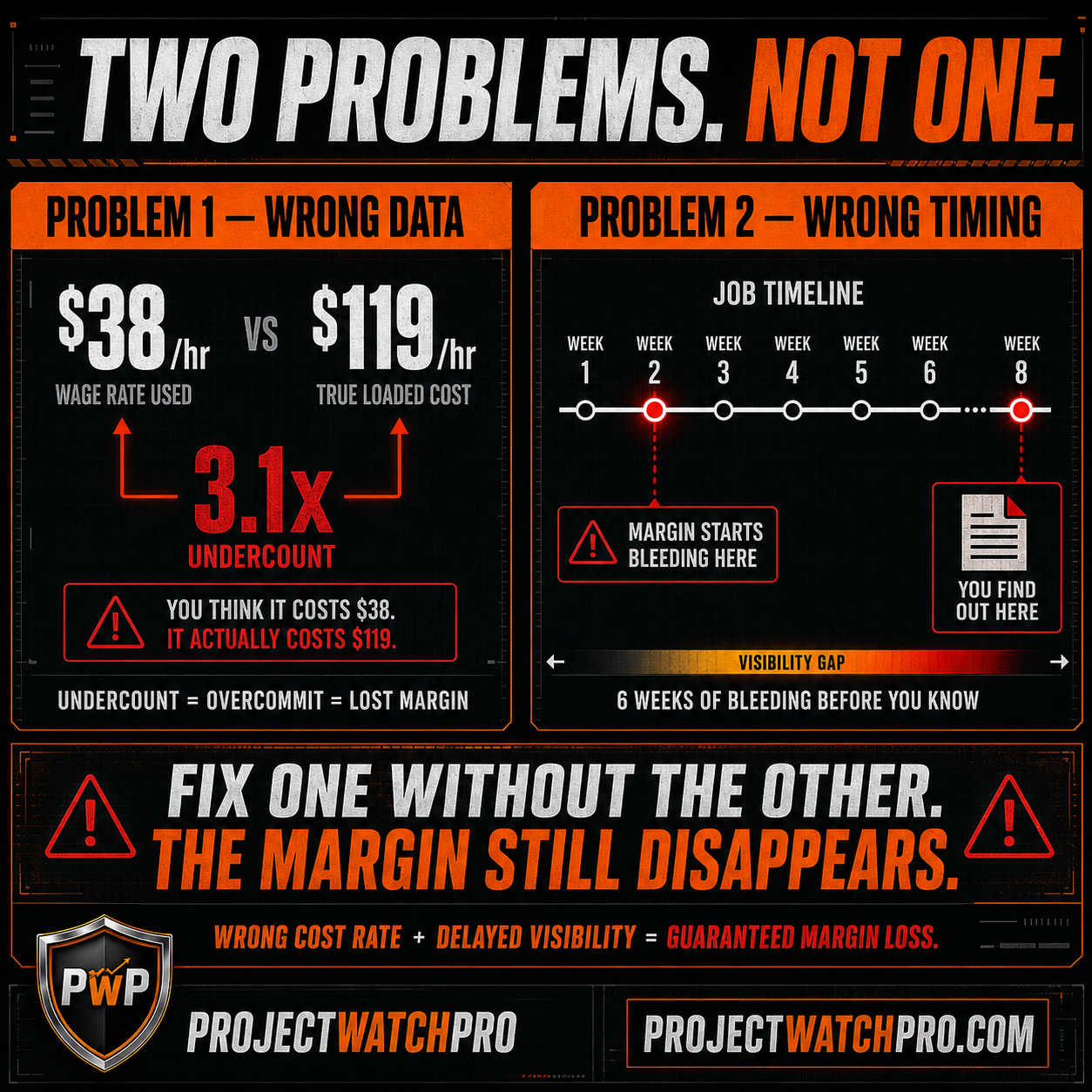
Two Problems Killing Your Margin — Wrong Numbers and Wrong Timing
Problem 1 — The Data Is Wrong Before Timing Even Matters
Problem 2 — Even the Wrong Data Arrives 45 Days Too Late
What Actually Moves Profitability — True Cost Compared to Actuals at the Task Level
The First Fix — Know What an Hour of Your Labor Actually Costs
The Second Fix — Compare True Cost Against Estimated Cost by Task, During the Job
The Third Fix — Flag the Variance Fast Enough to Act
Rearview Operator vs. Profit Defender — Same Software, Different Results
The Honest Answer — Yes, But Only If You Fix Two Things First
Time tracking software can improve project profitability. The research is clear on this. Construction companies that move from paper timesheets to digital tracking consistently see better data, faster payroll, and fewer billing disputes.
But here's what the software vendors won't tell you.
The contractors who still lose margin after implementing time tracking — and there are a lot of them — didn't fail because the software stopped working. They failed because they tracked hours at the wrong rate. And because they looked at the numbers too late to do anything about it.
Two problems. Not one.
Fix both, and time tracking becomes the foundation of real margin defense. Fix only one — or neither — and you've bought yourself better data on a loss you couldn't have stopped anyway.
Why Contractors Who Track Every Hour Still Lose Money at Closeout
Here's a scenario that plays out every week in contracting businesses.
A mechanical contractor running $5M in annual revenue implements a time tracking app. Every tech clocks in by job and phase. The hours are accurate. The data is clean.
Closeout arrives on a $420,000 retrofit. Final margin: 5.1%. Estimated margin: 19%.
The contractor pulls the hours report. The hours are all there. Every single one was tracked. And the job still lost $58,000 in expected margin.
The hours weren't the problem. The rate applied to those hours was wrong. And the comparison between actual cost and estimated cost was only made at closeout — when there was nothing left to do.
Tracking hours is not the same as defending margin. Most time tracking implementations stop at the data collection step. Margin defense requires two more steps that almost no software sets up automatically.
Hours Tracked Is Not the Same as Margin Defended
The job cost equation most contractors are running looks like this:
Hours logged × charge-out rate = labor cost
That's the number going into the report. That's the number being compared to the estimate.
The problem: charge-out rate is not the true cost of that labor. In most contractor operations, it's not even close.
The number that actually determines whether a job is profitable is the true loaded cost — every dollar it costs to put that worker on site, including costs that never appear on a timesheet.
When those two numbers diverge — and they almost always do, by 2x to 3x — the time tracking data is telling you a story that isn't real.
Two Problems Killing Your Margin — Wrong Numbers and Wrong Timing
Before time tracking can improve profitability, you need to understand why it so often doesn't. It's not one failure. It's two — stacked on top of each other.
Problem 1 — The Data Is Wrong Before Timing Even Matters
Most contractor operations estimate labor on base wage or a standard charge-out rate. A tech at $38 per hour. A foreman at $52. That's what goes into the bid. That's the number used to calculate estimated cost per task.
But the actual cost of that labor — when you add every layer it takes to put that person on site legally, safely, and operationally — is dramatically higher.
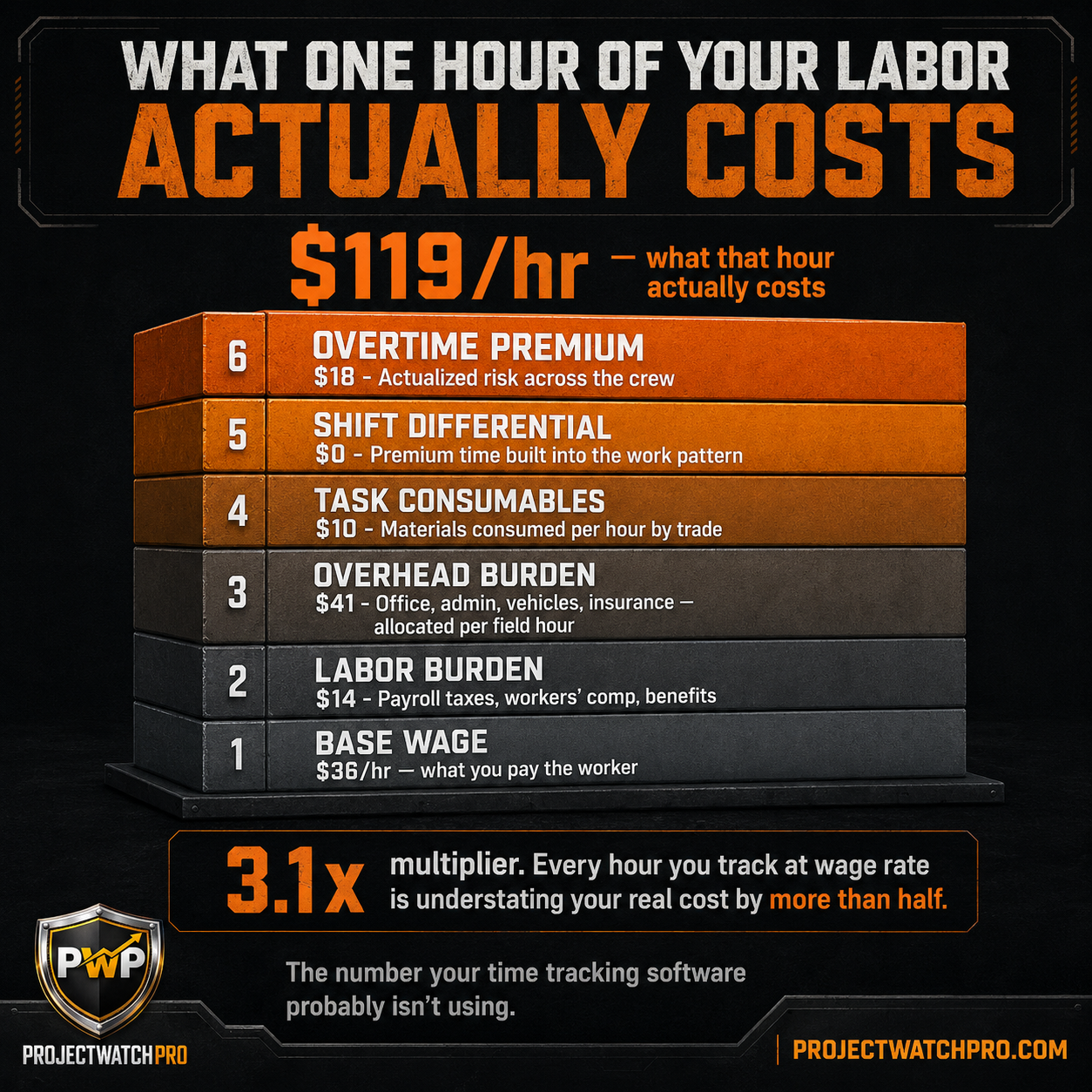
The Profit Defense System uses a six-layer True Cost Model to calculate real loaded labor cost:
1. Base Wage — the hourly rate paid to the worker
2. Labor Burden — payroll taxes, workers' comp, benefits, FICA
3. Overhead Burden — your operating cost allocated per field hour (office, admin, vehicles, insurance)
4. Task-Specific Consumables — materials and consumables consumed per hour by trade
5. Shift Differential — premium time built into the work pattern
6. Overtime Premium — actualized overtime risk across the crew
When all six layers are applied, a $36-per-hour base wage often carries a true cost of $119 per hour fully loaded. That's a 3.1x multiplier. And that multiplier doesn't appear anywhere in most time tracking reports.
The result: your time tracking data shows labor running at estimated cost. Your actual cost is running at 2–3x that number. The gap is invisible — until the job closes and the accountant calls.
This is not a timing problem. This is a data problem. You are tracking the wrong number precisely.
Problem 2 — Even the Wrong Data Arrives 45 Days Too Late
Here's where the second failure compounds the first.
Even if you solve the cost calculation problem — even if you build the right rate into your tracking system — most contractor operations only compare actual to estimated at month-end. Or at closeout.
Month-end reporting was built for a slower era. Jobs ran for a year. Cost movements were gradual. A 30-day feedback lag was acceptable.
In 2026, the average commercial trade job in the $500K–$2M range runs four to eight weeks. Month-end reporting arrives after the job is half done — or finished. By the time the comparison between actual and estimated cost shows up in a report, the margin is already gone.
Two broken inputs: the wrong cost basis, delivered too late to act on.
That's the operating model that's costing contractors margin on jobs they tracked perfectly.
What Actually Moves Profitability — True Cost Compared to Actuals at the Task Level
The contractors who consistently protect margin on time-tracked jobs aren't using more sophisticated software. They've fixed two things: the cost calculation, and the comparison cadence.
The First Fix — Know What an Hour of Your Labor Actually Costs
Before you can compare actual cost to estimated cost, you need the real rate.
Not the wage. Not the charge-out. The true loaded cost — every layer — for one hour of field labor on your jobs.
That's the number that goes into your estimate. That's the number your time tracking system should be multiplying by actual hours. And that's the number that tells you whether a task is running profitably or bleeding margin.
For most contractors, finding this number is a revelation. The True Labor Cost Calculator at truelaborcost.site runs through all six layers in about two minutes. No signup. No pitch. Just the real number — and for most operators, it's two to three times what they've been estimating on.
Once you know your true loaded cost, every hour tracked becomes a real cost signal instead of a data point. That's the foundation the rest of margin defense is built on.
The Second Fix — Compare True Cost Against Estimated Cost by Task, During the Job
With the right rate in place, the next step is where and when you make the comparison.
Not at the job level. Not at month-end. At the task level — while the task is still running.
A job isn't one unit of work. It's framing, rough-in, finish, punch list — each with its own labor hours, estimated cost, and actual cost. A job can track fine at the job level while bleeding on a single task that went sideways in week two.
The comparison that matters is:
True labor cost × actual hours on this task vs. estimated cost for this task
When that comparison runs at the task level during the job, you can see which tasks are running clean and which are drifting — while there's still crew on site, scope to negotiate, and margin left to defend.
When it runs at the job level at month-end, you get a detailed explanation of margin that's already gone.
The Third Fix — Flag the Variance Fast Enough to Act
The comparison alone doesn't protect margin. The flag does.
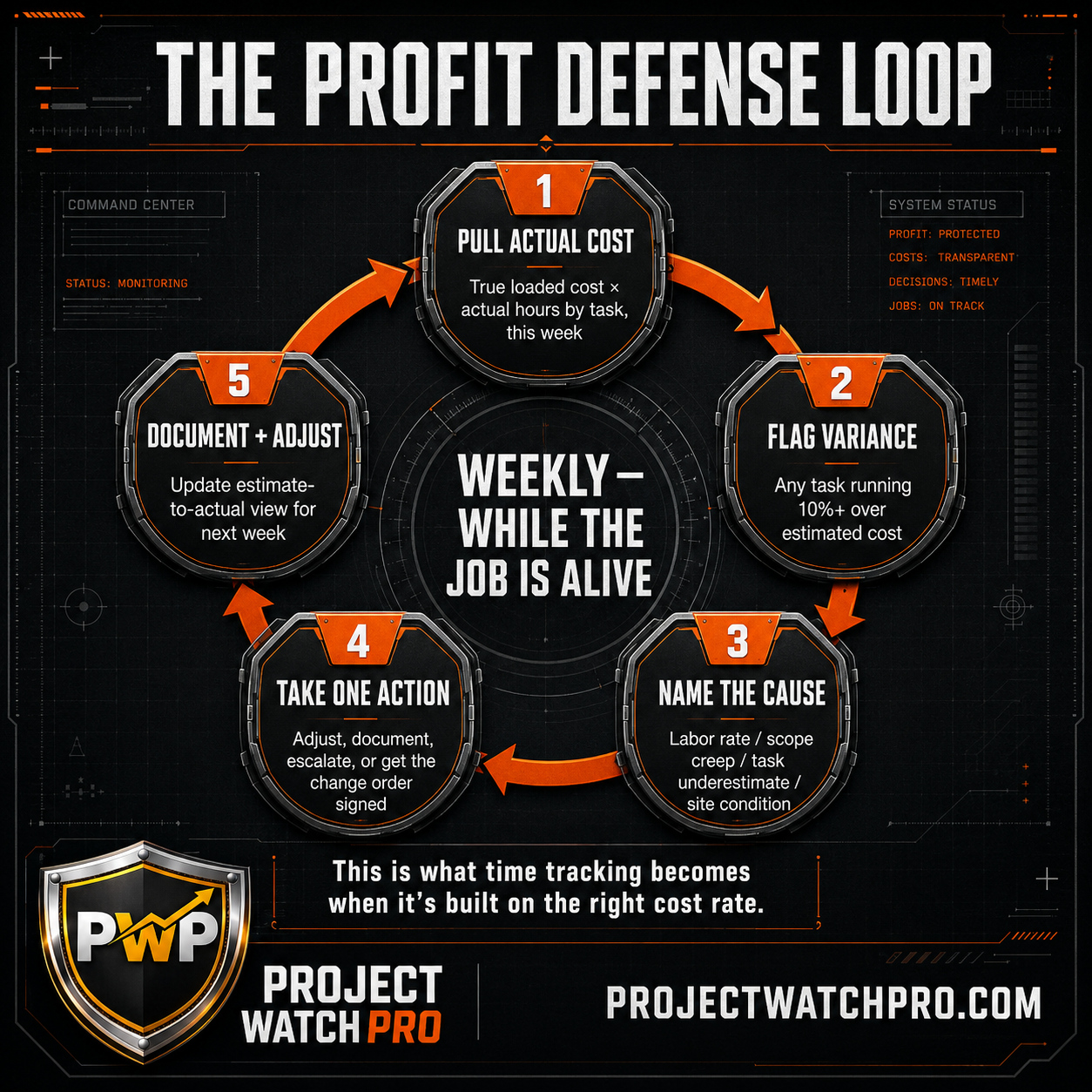
In the Profit Defense System's Step 7 — Margin Drift Detection — any task running more than 10% over estimated cost triggers a review. Not a panic. A review: What caused the drift? Labor rate variance, scope creep, task underestimate, or site condition?
Name the cause. Take one action: adjust the task sequence, address the crew mix, document the scope change, get the change order signed.
That is the Profit Defense Loop. Five steps. Run weekly on every active job. It does not require reviewing every job every week — only the jobs showing signal.
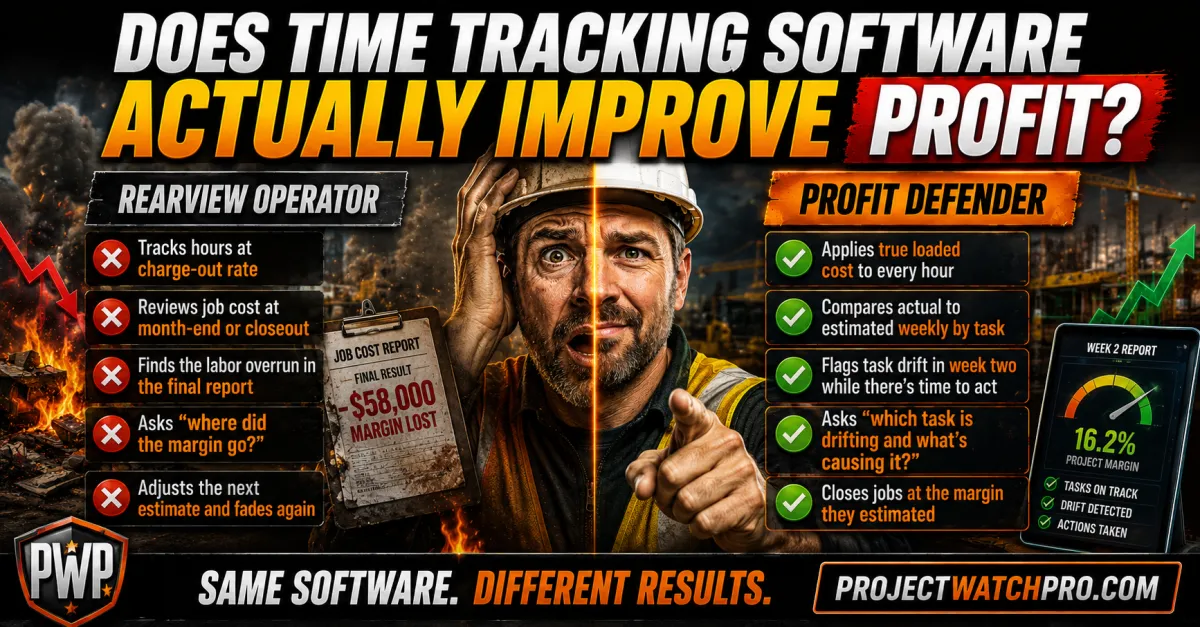
A Rearview Operator finishes the job and reviews the timesheet data at closeout. The hours are all there. The margin is not.
A Profit Defender compares true labor cost to estimated cost by task in week two — and acts while $320,000 of labor budget is still ahead of them.
Same time tracking software. Completely different operating model.
Rearview Operator vs. Profit Defender — Same Software, Different Results
The divide between contractors who use time tracking to improve profitability and those who don't isn't about which app they bought. It's about what they do with the data.
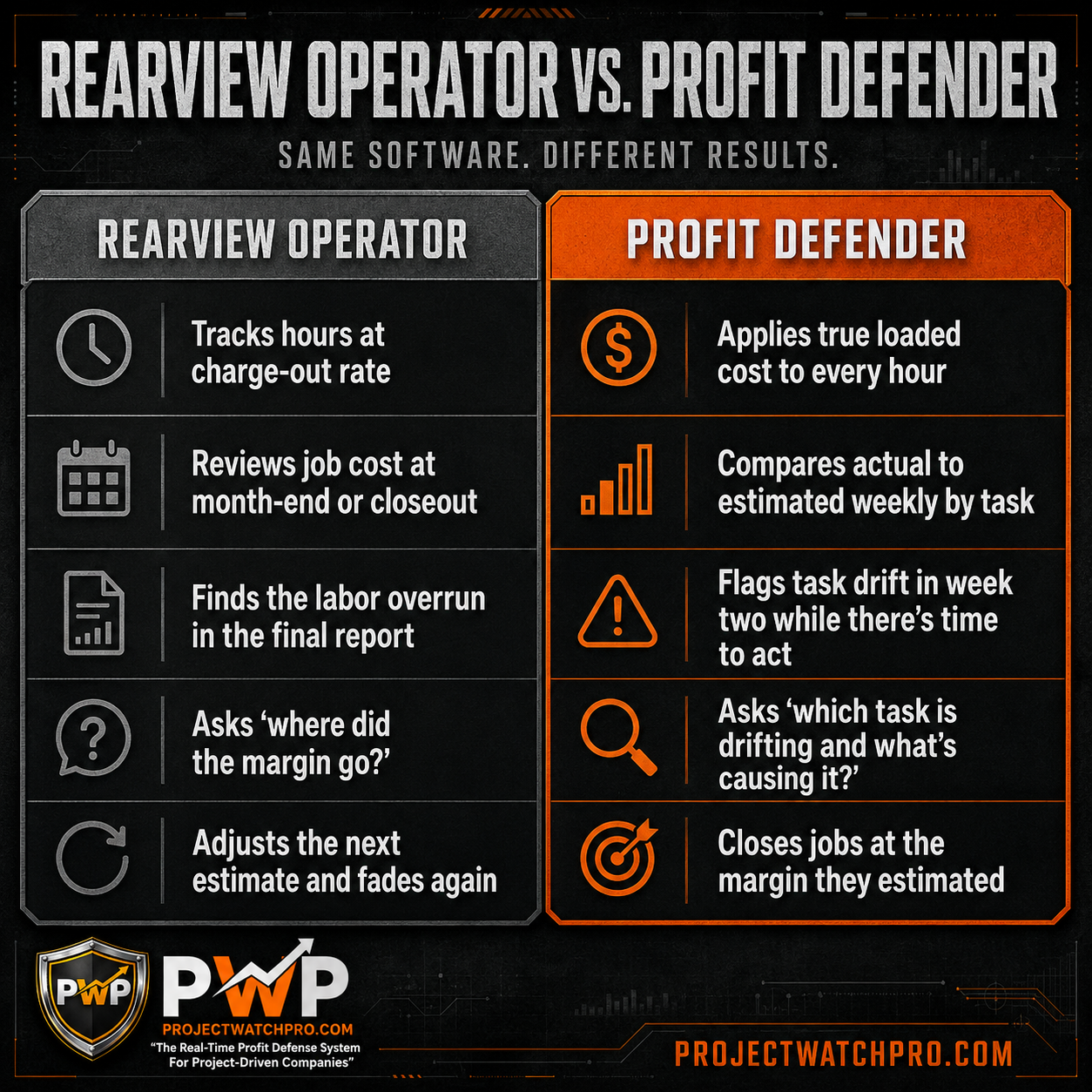
The contractors moving from 3–5% net margins to 13–16% aren't better estimators. They've built the right cost baseline — so the rate in the estimate matches the real rate — and they've built a comparison cadence that runs while the job is still alive.
Time tracking is the data source. True cost calculation is the foundation. Task-level real-time comparison is the mechanism. And the Profit Defense Loop is what makes it a weekly discipline instead of a one-time fix.
Key Takeaways
- Time tracking alone does not improve profitability. It collects hours. Profitability depends on what rate is applied to those hours and when the comparison to estimated cost is made.
- The first failure is the cost calculation. Most contractors track hours at base wage or charge-out rate — not true loaded cost. With a 3.1x multiplier separating wage from true cost, the gap is baked in before the job starts.
- The True Cost Baseline fixes the first failure. Six layers — base wage, labor burden, overhead burden, task consumables, shift differential, overtime premium — produce the real rate your tracking should use.
- The second failure is timing. Month-end job cost reports arrive after the job is done. The margin is already gone. A weekly comparison cadence closes the gap.
- The comparison that matters is task-level, not job-level. A job can look fine at the top while bleeding on one task. Task-level comparison surfaces the drift while it's still correctable.
- The Profit Defense Loop is the operating discipline. Pull actual cost → flag variance → name the cause → take one action → document. Weekly. On active jobs only.
- Contractors running real-time task-level comparison against a true cost baseline achieve 15–25% better relative margins than those who wait until closeout, according to CFMA research. On a $2M job, that's $30,000–$50,000 more profit per job.
Frequently Asked Questions
Does time tracking software really improve project profitability?
Yes — but only when it's built on a true loaded cost baseline and used to compare actual cost to estimated cost at the task level during the job, not at closeout. Time tracking that captures hours at a base wage or charge-out rate and reports at month-end can actually create false confidence: the data looks clean while the margin is disappearing.
What's the difference between time tracking and job costing?
Time tracking captures when workers start and stop on a job or task. Job costing compares what that time actually cost — using a fully loaded labor rate including burden, overhead, and overtime risk — against what was estimated for each task. Time tracking is the input. Job costing is the comparison. Margin defense requires both, with the right cost rate applied to the tracked hours.
How do you catch margin loss before it's too late on a construction job?
By comparing true labor cost — not base wage or charge-out rate — against estimated cost at the task level every week while the job is running. When a task is running 10% or more over estimated cost, that's a drift signal. Name the cause — labor rate variance, scope creep, underestimate, or site condition — and take one corrective action while the job is still active. At closeout, no corrective action produces a result.
Can time tracking prevent scope creep?
Time tracking can surface scope creep faster than no tracking at all — but only if hours are tracked at the task level and compared to estimated task cost in real time. Scope creep that gets documented and escalated in week two — while the change order conversation is still possible — has a recovery rate above 50%. Scope creep identified at closeout, after the work is installed and paid for, has a recovery rate below 50%, according to constructionbusinessowner.com.
What's the true cost of one hour of labor for a contractor?
Far more than the wage rate. When you add payroll taxes, workers' comp, benefits, overhead allocation, task-specific consumables, shift differential, and overtime risk, the true loaded cost of a $36-per-hour base wage is typically $97–$119 per hour — a 2.7 to 3.1x multiplier. If your time tracking system is applying the wage rate to tracked hours, every labor report is understating your actual cost — often by more than half. The True Labor Cost Calculator at truelaborcost.site runs this calculation in two minutes.
What ROI should contractors expect from job costing with real-time tracking?
CFMA research shows contractors using real-time cost tracking achieve 15–25% better relative margins than those who wait until closeout. On a $2M job running at 18% estimated gross margin, that difference represents $30,000–$50,000 in protected or recovered profit per job. The ROI depends on the cost baseline accuracy, comparison cadence, and how consistently the Profit Defense Loop is run on active jobs.
If you've been tracking time and still watching margins disappear at closeout — the data isn't lying. It's just telling you an incomplete story. Hours tracked at the wrong rate, compared to the estimate at the wrong time, will show you a clean report right up until the day the job closes and the real number surfaces.
The True Labor Cost Calculator at truelaborcost.site shows you the real cost of one hour of your labor — every layer, no estimates, no guessing. Two minutes. No signup.
Once you know your actual rate, the comparison that actually defends margin becomes possible. That's where the Profit Defense System starts — and where the margin that's been disappearing stops.


