
Why Is My Construction Business Busy But Not Profitable?
Your Revenue Is Up. So Why Isn't Your Profit?
More jobs. More billing. Same result at the end of the year.
You booked more jobs last year than the year before. You billed more. You hired another person. The shop stayed busy — maybe the busiest it's ever been.
Then your accountant showed you the numbers. Profit was flat. Maybe a little worse than last year.
You look at what you billed and you can't make it add up. The crew worked. The jobs ran. Nothing blew up. The money just isn't there.
Here's what's happening: more jobs at a bad number isn't growth. It's the same problem, running faster. And the bigger your revenue gets, the harder it is to see — because the business looks fine from the outside while something quiet eats every job from the inside.
A construction business that is busy but not profitable is running jobs priced off an incomplete cost number — usually wage alone, without labor burden, overhead, or task costs. When those layers are missing, every job looks like it will pay more than it does. When you grow, the problem gets bigger, not better. More jobs at the wrong price means more revenue and the same margin — or less.
More Jobs at a Bad Number Is Not Growth
Say your costs on a job are $100,000. You mark it up 30% and quote $130,000. The job runs clean. You invoice and collect.
That feels like a 30% margin. But look at what you actually kept: $30,000 on a $130,000 invoice is 23%, not 30%. If labor was priced off the wage alone and not the full cost, some of that $30,000 was already spent before the crew showed up. The bigger the job, the bigger the gap. The more jobs you run, the more it adds up.
Here's the number that makes this real. A construction coaching firm shared a case where a $150,000 job went fine. No disasters, no big overruns. Forty percent gross margin — $60,000 profit on paper. But the job took 750 hours of crew time. That's $80 per crew-hour kept after everything was billed.
Sounds okay — until you check what that crew actually cost per hour once burden and overhead are counted. If the real cost is $85 per hour, the job lost money, and nothing went wrong. That's the busy-but-not-profitable problem. The revenue was up. The crew worked. The number at the end didn't match — because the number at the start was built wrong.
The Number That Actually Tells You If a Job Paid Off
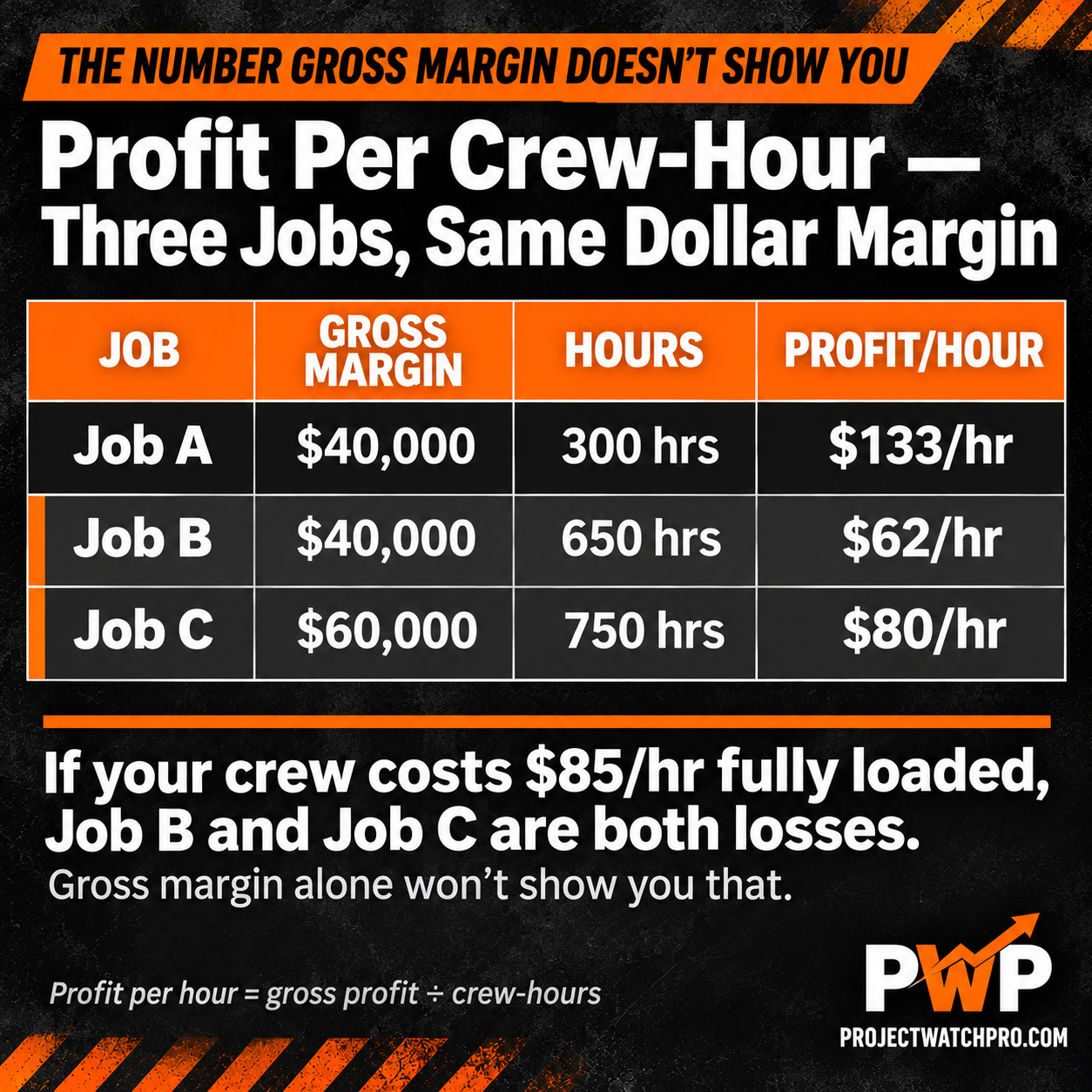
Here's what most contractors get wrong: they look at gross margin and call it good, without ever checking how many hours went into earning it. A $40,000 gross margin on a 300-hour job is a very different business than a $40,000 gross margin on a 650-hour job. They look the same on a report.
Gross margin tells you the gap between cost and price. Profit per crew-hour tells you if the gap was worth the work.
Same dollar figure, completely different businesses. If your crew costs $85/hr fully loaded, Job B and Job C are both losses — even though the revenue looks fine and nothing went wrong.
Why Growth Makes the Problem Worse, Not Better
Revenue going up while profit stays flat has a cause. Usually three of them, running at the same time.
Labor is priced off the wage, not what it actually costs. Wage is only 30 to 40% of what an employee costs per hour once labor burden, overhead, and all the layers are counted. When you price a job off $38 per hour and the real cost is $74 per hour, you're giving away a third of every hour before the crew shows up. Run more hours, lose more money.
Overhead isn't in the quote. Most contractors load some overhead into their pricing. But when the business grows — another truck, more insurance, another person in the office — overhead goes up and the quote doesn't follow it. The price was right for a $1.2M shop. It's wrong for a $2M shop. No one checked.
Nobody finds out until the job is closed. The 45-Day Profit Lag is the gap between when profit is lost and when you find out. When a job runs long, overhead is underloaded, or labor cost was wrong — you don't know until the invoice is out and the job is in accounting. By then, there's nothing left to do about it.
Add those three things together and you get this: a business that grows revenue every year while profit sits flat or quietly gets worse.
According to the Construction Financial Management Association, net margins for general contractors typically run 5–6% when things are working. When those three problems are present, 2–4% is common. On a $3M business, the difference between 3% and 6% is $90,000 a year — and you don't get that back by booking more jobs.
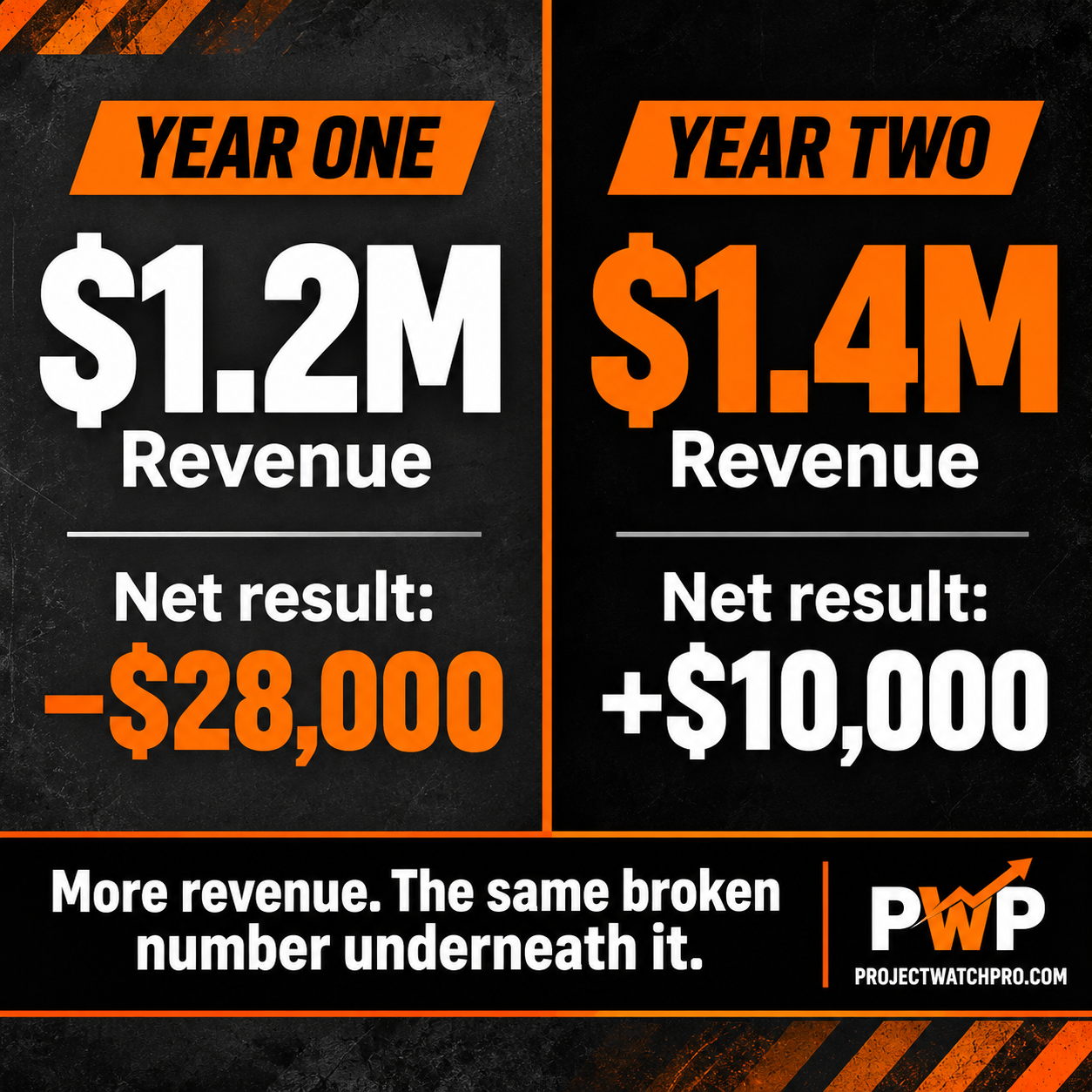
The coaching firm working with contractor Travis Bosse documented his situation on the Profitable Tradie podcast: in one year his business did $1.4 million in revenue and made $10,000 in net profit. The year before, at $1.2 million in revenue, he lost $28,000. More revenue. More loss. That's not bad luck — that's what happens when jobs keep running on a bad cost number and nobody catches it.
The Fix Is Not More Jobs — It's Better Numbers Before the Job Goes Out
The business doesn't need more revenue. It needs to make money on the revenue it already has.
That starts with two checks — one before the quote goes out, one after the job closes.
Before the quote: does the sell price include all six cost layers? Wage, labor burden, overhead, task burden, shift differentials, and overtime risk are all real costs. When a quote is built off wage alone, the other five are gaps. See what all six layers actually add up to before you set any markup.
After the job: did you keep what you planned? Not "did you bill it" — did the crew cost what the quote assumed, and did the hours match what was scoped? If you can't answer that until 45 days after the job closes, you're running the same problem on the next job.
John McCabe, who has spent 20+ years inside contractor financials, sees this in almost every Profit Recovery Review: the business was busy, the jobs ran, and the margin came back 5–8 points light on every one. Not because anyone did anything wrong — because the cost number at the start was built on the wrong math and nobody found out until the year was over.
The Profit Pulse System — the nine-step way of doing this built into ProjectWatchPRO — starts at building the real cost number before the quote goes out, and ends with seeing actual vs. quoted margin while the job is still running. The software makes it easier to run this consistently. But the first step is a number, not a login.
This is not another SaaS tool that replaces your accounting system. It is a system first — built around a methodology of knowing your real costs before you quote, not after the job closes. ProjectWatchPRO is the software that runs it. Profit Defense Advisory Services is there when you need a person alongside the numbers, not just a dashboard. The investment is in getting the profit that's already leaving your jobs back into your pocket — not adding a subscription to your overhead.
What to Do Before the Next Job Goes Out
1. Check your true labor cost per hour — not the wage, the full number with burden and overhead included. The True Labor Cost Calculator does it in under 10 minutes.
2. Check if your overhead rate is current — if the business has grown in the last 12 months, the overhead rate from last year is probably wrong. See how to calculate your overhead rate.
3. Pick one recent job and run the profit-per-hour check — take the profit on that job and divide it by the crew-hours it took. Is that number worth your crew's time?
4. Run the 6-question Profit Health check at profithealthroadmap.com — it tells you which of the three problems above is hitting you hardest, in under 60 seconds.
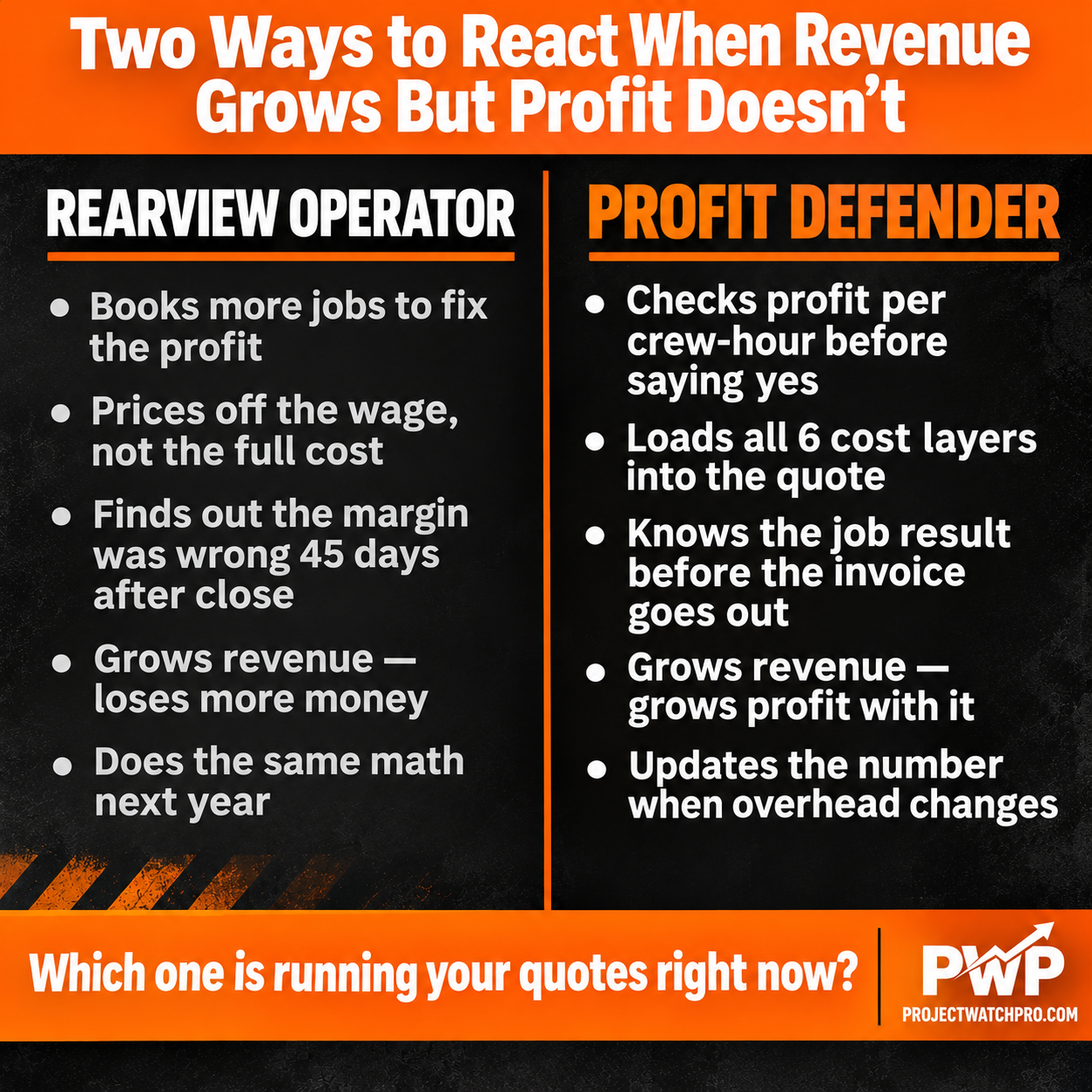
One prices by habit. The other prices by math. The difference shows up in the annual total.
Swap those steps for whatever you run — electrical, HVAC, landscaping, fabrication, concrete. The numbers change by trade. The check is the same: what did you actually make per hour of work you delivered? If you don't know, the revenue number isn't telling you the whole story.
Key Takeaways
- Busy but not profitable is not a revenue problem — it means jobs are priced off the wrong cost number, and more jobs just means more of the wrong math running
- Profit per crew-hour is the real signal: a $40,000 gross margin on 300 hours and $40,000 on 650 hours look identical on a report but are completely different businesses — gross margin alone doesn't show you the difference
- Labor is priced off wage in most quotes, but wage is only 30 to 40% of what an employee actually costs — the rest is labor burden, overhead, and task costs that need to be in the number before the quote goes out
- Growth multiplies the problem: running more revenue at a bad margin means more money lost, not more money made — documented cases show businesses going from $1.2M at a loss to $1.4M at a bigger loss
- The 45-Day Profit Lag means you don't find out the job was underpriced until it's already closed and there's nothing left to do about it.
- Net margins for GCs run 5–6% when things are working — when these three problems are present, 2–4% is common, and on a $3M business the difference is $90,000 per year
- The fix starts before the quote — specifically with what your labor actually costs, which the True Labor Cost Calculator gives you in under 10 minutes
Frequently Asked Questions
Why is my construction business busy but not profitable?
The most common cause is that jobs are priced off an incomplete cost number — usually wage alone, without labor burden, overhead, or task costs. When those layers are missing, every job looks like it will pay more than it does. More jobs at that price just means more of the same gap. The fix is building the real cost number before the quote goes out, not after the job closes.
Where does profit disappear in a construction business?
Profit leaves between the quote and the invoice in three main places: labor cost was priced off the wage and not the full cost (wage is 30–40% of what an hour actually costs), overhead wasn't loaded into the quote or hasn't been updated as the business grew, and no one caught the difference until the job was already over. The 45-Day Profit Lag is the gap between when profit is lost and when you find out.
Why isn't my profit growing even when I'm busier than ever?
Busy and profitable are not the same thing. A $150K job at 40% gross margin that takes 750 crew-hours earns $80 per hour. If that crew costs $85 per hour fully loaded, the job lost money — and nothing went wrong. More jobs at that number means more loss, not more profit. The check that matters is profit per crew-hour, not gross margin alone.
What does a healthy construction profit margin look like?
For general contractors, net margins typically run 5–6% when things are working, with top performers hitting 10–12%. When labor is priced off wage alone and overhead isn't loaded, 2–4% is common. On a $3M business, the difference between 3% and 6% is $90,000 a year — without adding a single new job. See how overhead actually affects your margin for the full calculation.
How do I know if my crew cost is priced right?
Divide the profit from one of your recent jobs by the crew-hours it took. If that number is less than what you need per hour to cover real costs and return something to the business, the job was underpriced — even if it ran clean. The True Labor Cost Calculator gives you the real per-hour cost in under 10 minutes, so you have a real number to check against.
Why do some construction businesses grow revenue and lose more money?
It's the same math at a bigger scale. If overhead is underloaded and labor cost is based on wage alone, every dollar of revenue has the same margin problem baked in. More revenue means more dollars running through that broken number. The business looks busy and healthy — until the accountant shows the year-end result. The 6-question check at profithealthroadmap.com tells you which control is driving the gap, in under 60 seconds.