
Why Are My Crews Working All Day But Production Is Behind?
Your Crews Are on the Job. Why Isn't the Work Moving?
Three crews. Full days. Time cards showing 8 hours each. And a job that's already three weeks past where it should be.
That's what John walked into when an electrical sub running $3.2 million a year called him in. The foremen weren't slacking. The time records looked fine. The guys were showing up and staying on site all day. But the job was falling apart on the schedule, and the owner couldn't explain why.
Here's the thing: a timesheet tells you how long someone was on site. It does not tell you how much actual work got done. Those are two different numbers. And the gap between them is where your labor budget goes when a job starts to bleed.
You're not the problem here. Most time tracking tools were built to get accurate payroll, not to show you whether the hours your crew logged actually moved the job forward. That's a different question — and it requires a different kind of data.
Why crews work all day but production falls behind is a field labor accountability problem — the gap between hours recorded on a timesheet and hours that actually advanced specific, measurable work on the job. When a crew logs 8 hours but only moves 4 to 5 hours of real work, the difference is time spent waiting, dealing with work that wasn't ready, or doing tasks out of sequence. That gap burns your labor budget and doesn't show up until the job is behind schedule and over hours.
Logged Hours and Completed Work Are Not the Same Thing
Pull up any timesheet from last week. You'll see start time, end time, and job number. What you won't see: how much of those hours actually went toward work that moved the job.
That's the problem. Most job site time tracking is built around one question — was this person on the clock? It's not built around a second, more important question: what did they actually complete?
The result is that you can have a job running full crews every day, with a clean timesheet record, and still have a job falling weeks behind. Nothing looks wrong in the payroll system. But on the ground, the hours are burning and the job isn't moving.
Here's what most people get wrong: they assume that if the hours look right, the productivity is fine. But hours-on-site and hours-producing are two completely different things. A crew can be fully present and fully paid while doing work that produces nothing billable — and until you break the job into specific tasks with expected completion targets, you can't see that gap from the office.
What the Timesheet Shows vs. What Actually Happened
Here's what the electrical sub's records showed when John sat down with them.
Three crews. 8 hours each, every day. Job code all assigned to the same commercial build-out. Total hours for the week: 120.
Here's what actually happened across those 120 hours. Roughly 40 of them went to work that advanced the job. The remaining 80 broke down like this:
- Waiting on inspections: Rough-in was ready, but the city inspector wasn't available for two days. Crew stayed on site. Nothing moved.
- Wrong materials staged: Wire gauge pulled from stock didn't match the spec. Half a day lost pulling and re-staging.
- Work out of sequence: One crew started panel work before the structural framing was finished. They had to pull back and wait.
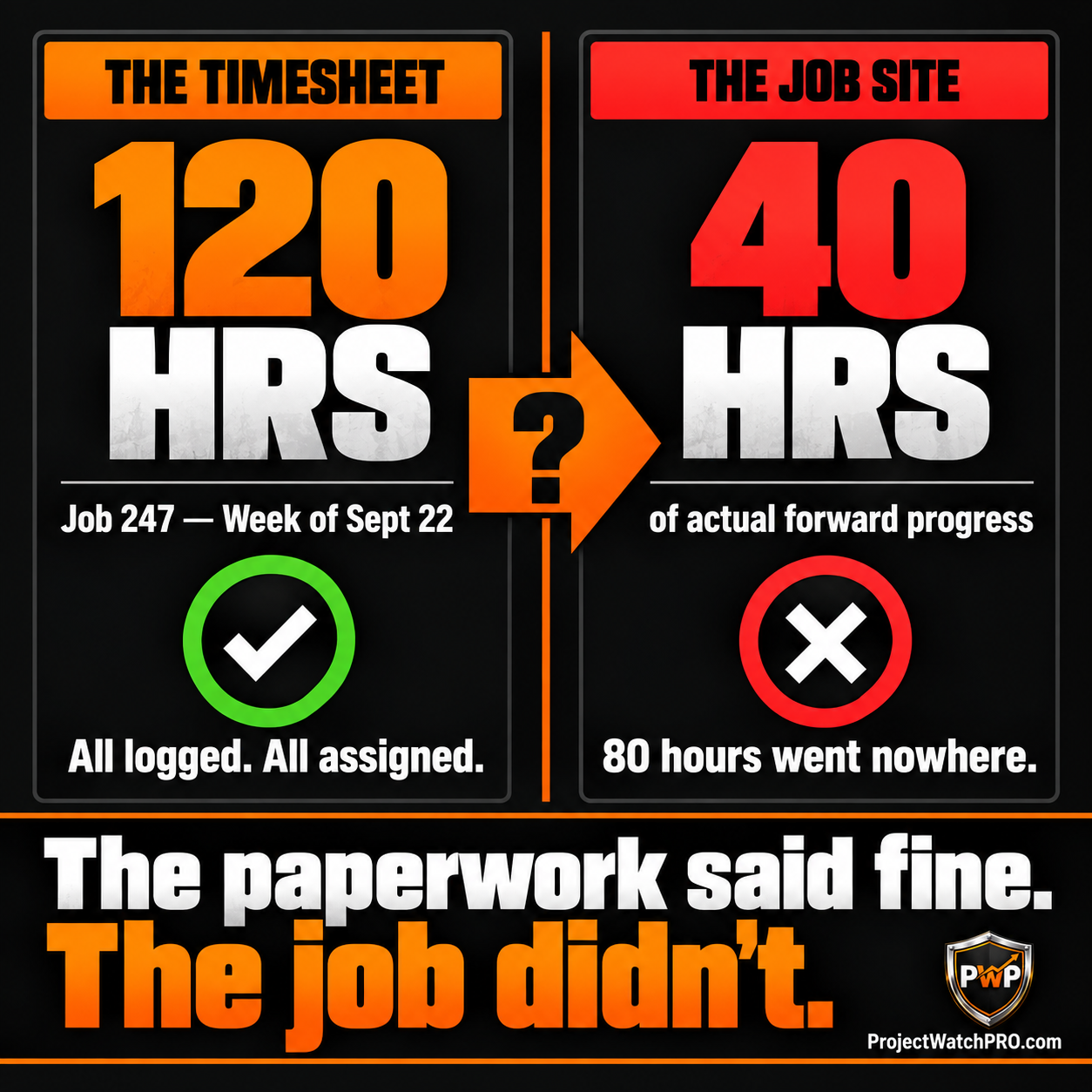
None of that shows up on a timesheet as anything other than paid hours. To a payroll system, it looks like a productive week. To the job, it's 80 hours of labor cost that bought nothing.
This is what inaccurate time tracking costs a construction business — not just wrong payroll data, but a completely invisible picture of where the hours actually went.
The Hours You're Paying For That Aren't Moving the Job
The 2 hours per day per crew that the electrical sub was losing isn't unusual. What's unusual is finding it.
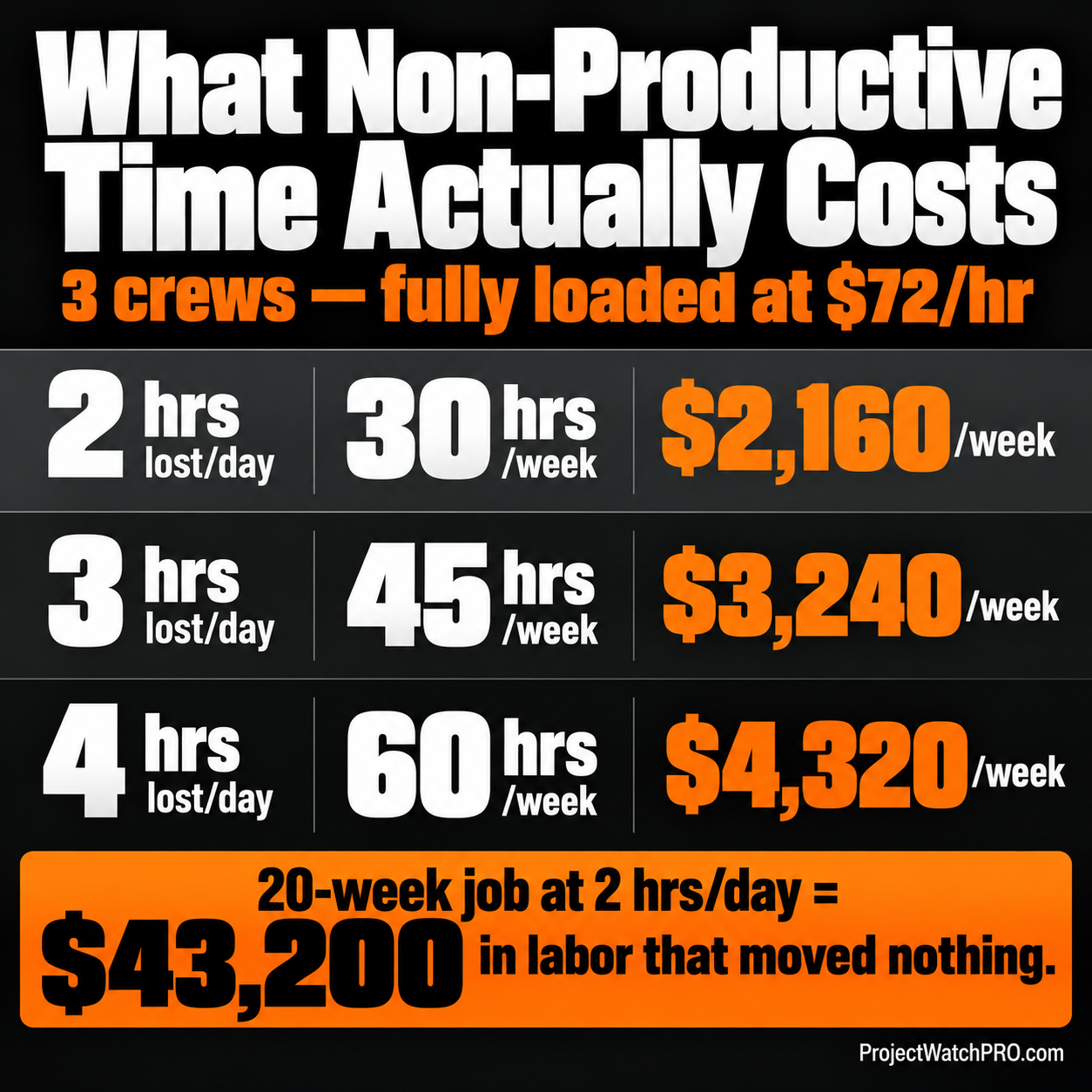
On a job with three 4-person crews, 2 hours of non-productive time per crew per day adds up fast:
For the electrical sub running a 20-week job at 2 hours per day of lost productive time, that's $43,200 in labor cost that went somewhere other than the work. The job wasn't over-crewed. It wasn't late because of bad estimating. It was late because the hours couldn't go anywhere until the job was ready for them.
There are three types of time that do this to a job. Every trade has them — whether it's electrical, plumbing, framing, HVAC, concrete, fabrication, or a coating crew waiting on a blast booth to clear.
The Three Types of Time That Kill a Job
Waiting time: The work is ready to go, but something isn't. The inspector isn't scheduled. The prior trade hasn't finished. Materials aren't on site. The crew waits. The clock runs.
Rework time: Something was installed wrong or doesn't match the spec. It has to come out and go back in. The time hits twice — once to do it wrong, once to do it right.
Out-of-sequence time: A crew starts work before the upstream conditions are right. They get partway in and have to stop. The partial work may have to be undone. The job gets pulled backward.
What all three have in common: they show up on a timesheet as productive hours. Nothing flags them. The only way to see them is to compare the hours logged against specific tasks — did this task actually advance? How many hours did it take versus what was estimated?
When jobs run over on labor hours, this is usually where the overage lives — not in one big obvious event, but in hours that were never attached to the work they were supposed to move.
AGC research on construction labor productivity consistently identifies work sequencing gaps and material availability failures as the leading causes of schedule overruns and cost blowouts — not crew quality or bad estimating.
How to See the Gap Before the Job Falls Three Weeks Behind
Here's what the electrical sub changed after John sat down with them. The core change wasn't in who was working or how long. It was in what the hours were attached to.
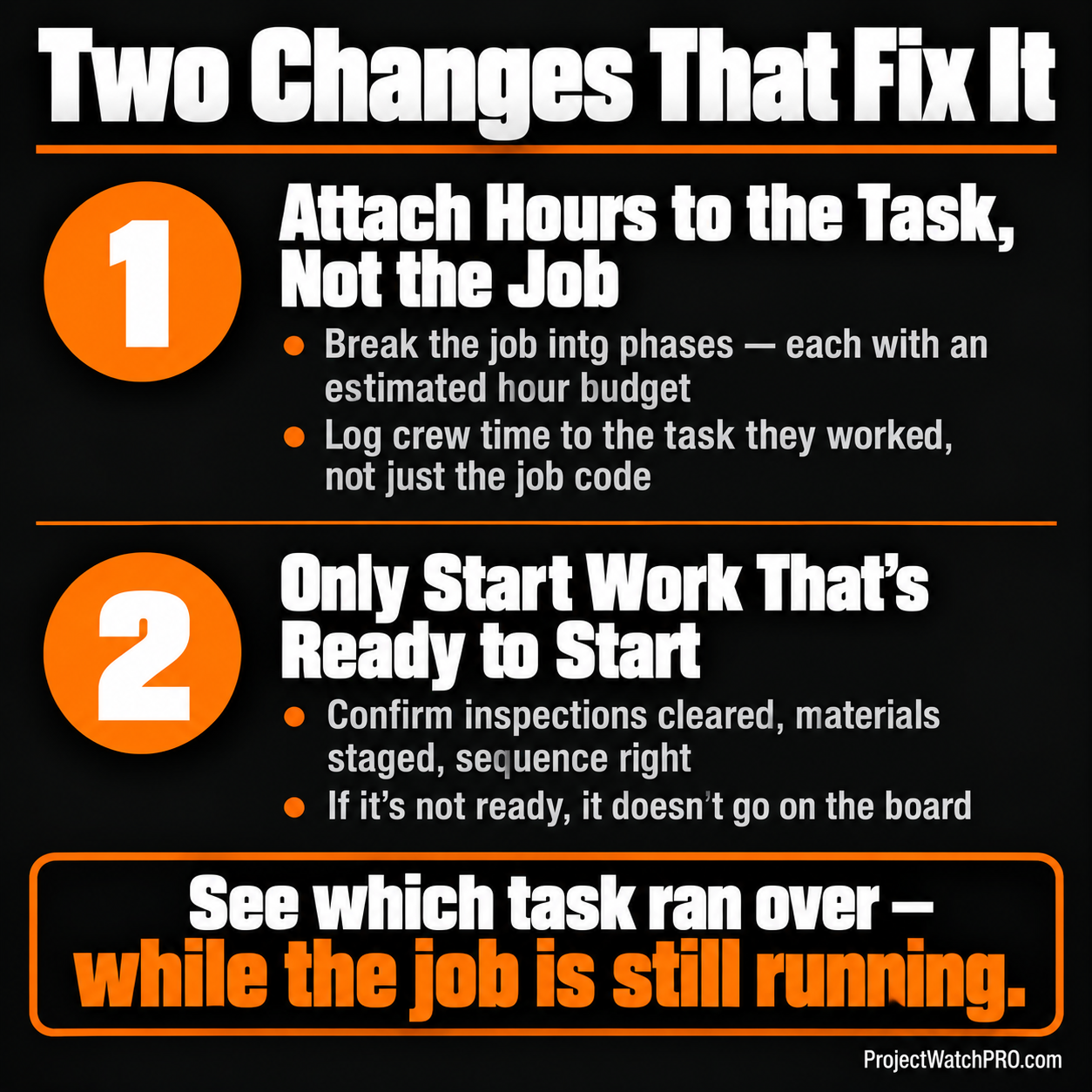
Attach the Hours to the Work, Not Just the Day
A timesheet that says "Job 247 — 8 hours" tells you someone worked. It doesn't tell you which phase of Job 247 moved and by how much.
The fix is breaking the job into specific tasks — rough-in, panel installation, device fit-out, trim-out, inspection prep — with a time estimate for each. Then when a crew logs their hours, those hours go to the task they were actually working, not to the job as a whole.
Now you have a different data set. Instead of "we logged 120 hours this week," you have "rough-in consumed 48 hours, estimated 30 — we're 18 hours over on that phase, and it's only 60% done."
That number tells you something is wrong while there's still work left to fix. The job hasn't closed. The budget isn't gone. You can ask the right question — why did rough-in run over? — and find the answer before it doubles.
This is what real-time job costing is actually for. Not collecting data for a month-end report. Seeing when a specific piece of work is running past its estimate while there's still time to act.
In the Profit Pulse System, this is Step 2: Task Visibility. The job gets broken into pieces that can be quoted, scheduled, and tracked individually. Without this, you have a job number. With it, you have a picture of the job as it actually is — task by task — not as a total summary weeks after the hours are already spent.
Don't Start Work the Crew Can't Finish
The second part of the fix is about out-of-sequence work.
The electrical sub had a crew starting panel work before framing was done. They were on the job, clocked in, burning hours — and none of it could move forward because the upstream work wasn't there.
The discipline is simple in principle, hard to hold in practice: don't put a crew on work that isn't ready to be worked. That means checking before the crew leaves in the morning that inspections are cleared, materials are staged, prior work is done, and the sequence is right.
Step 4 of the Profit Pulse System — Startable Work — is built exactly around this. A job is only on the active board when it's actually ready to start. Not when it's been scheduled. Not when it's been estimated. When everything the crew needs to execute that work is in place.
CPWR Center for Construction Research has documented that sequencing failures and material readiness gaps are among the most consistent causes of field crew downtime — a pattern that holds across trades, project types, and crew sizes.
Swap electrical for HVAC, framing, concrete flatwork, sandblasting, or a welding fab shop waiting on cut parts — the pattern is the same. A crew can only produce work when the work is set up for them. When it isn't, the hours burn and the job doesn't move. The trade changes. The problem doesn't.
The Rearview Operator finds out the job is three weeks behind when the deadline blows past. The Profit Defender sees a task running over in week two, finds the sequencing problem, and fixes it before the job loses another three weeks of hours that can't go anywhere.
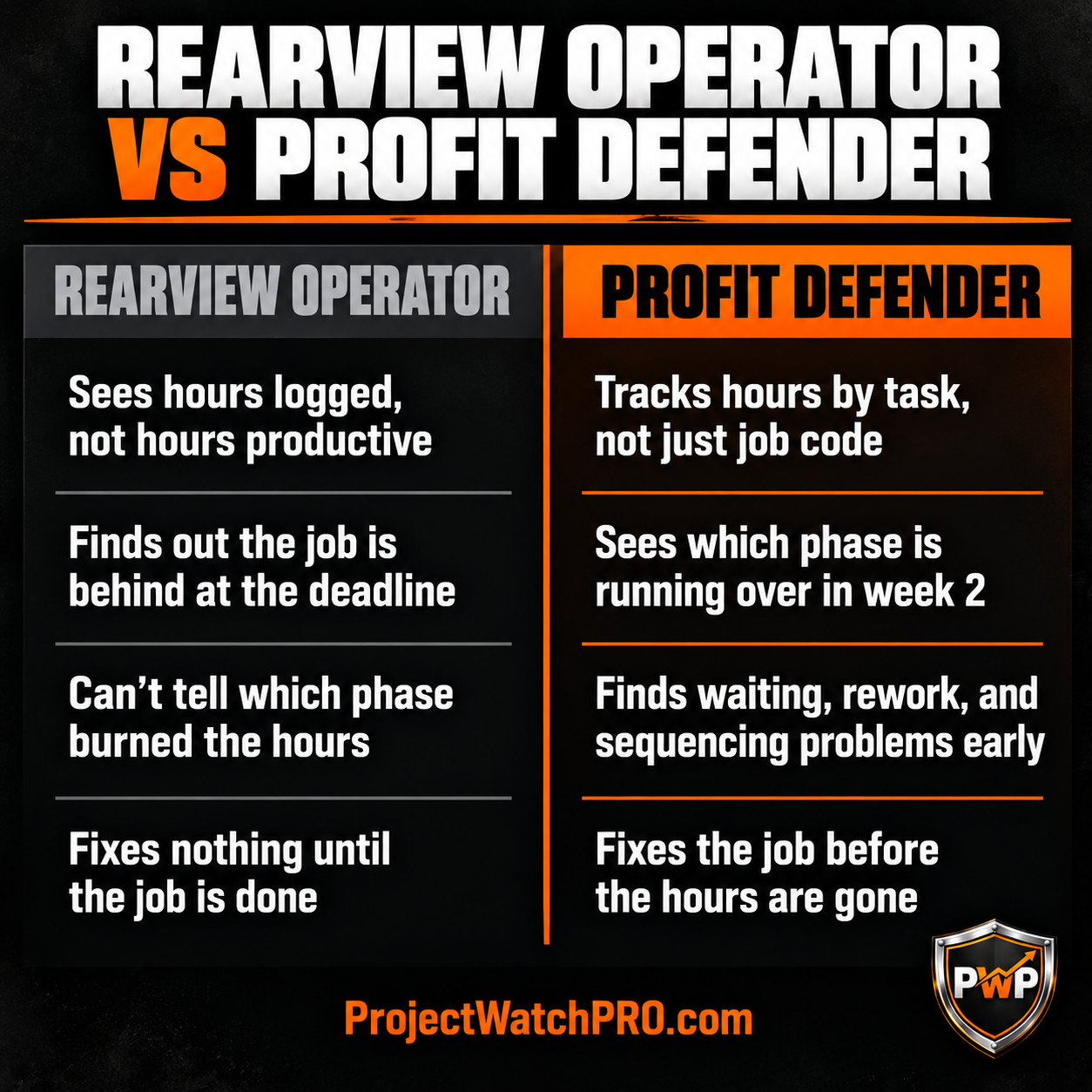
This is a method question as much as a software question. ProjectWatchPRO gives you the task-level view while the job runs — but changing how work gets set up before the crew arrives is a change in how you run jobs, not just what tool you're using. The Profit Defense Advisory Services team works directly with contractors on how to build the startable work discipline into the daily process, so the data has something real to compare against. A clear plan for what has to be true before a crew starts — and someone holding that line — is what makes the numbers mean something.
Key Takeaways
- Logged hours ≠ productive hours: a crew can clock 8 full hours and advance 4 hours of actual work. The difference is non-productive time — waiting, rework, and out-of-sequence starts — that a timesheet counts as labor but doesn't show as waste. See how this drives the real cost of inaccurate time tracking.
- Three types of non-productive time: waiting (inspector, prior trade, materials not staged), rework (wrong the first time), and out-of-sequence starts (upstream work isn't there yet). All three look like productive hours on a timesheet. None of them move the job.
- The math adds up fast: 2 hours of non-productive time per day across 3 crews at $72/hr loaded = $2,160 per week. Over a 20-week job: $43,200 in labor cost that moved nothing. See how labour hours running over budget trace to specific phases, not the job as a whole.
- Task-level tracking is the fix, not more time recording: when hours are attached to specific tasks with estimated durations, you can see which tasks are running over while the job is still running — not at closeout.
- Don't start work the crew can't finish: confirming before crew deployment that inspections are cleared, materials are staged, prior work is done, and sequence is right prevents waiting time and out-of-sequence waste before it starts.
- The estimate has to match the field: if the quote is a lump sum and the field tracks hours to a job code, there's nothing to compare. A job broken into tasks in the estimate and tasks in the field creates the comparison you can act on. See how man-hour estimates by trade phase builds that connection.
- Every trade has this problem: a fabrication shop with welders waiting on cut parts, a painting crew waiting on blast to clear, an HVAC team starting ductwork before the structural openings are ready — same non-productive time pattern, same labor cost burning with nothing to show. The trade in the story is an example. The problem isn't.
Frequently Asked Questions
Why are my crews working all day but production is behind?
Because time on site and productive time are two different numbers. Crews log hours to a job code, but those hours include waiting on inspections, missing materials, and out-of-sequence starts that look like work but don't advance anything. Until hours are tied to specific tasks with completion targets, none of that is visible. The hours look fine. The job falls behind.
How do I know if my construction crew is being productive?
Compare hours logged to specific tasks against how much of each task actually got done. If a crew logged 40 hours to rough-in but rough-in is only 60% complete at 80% of its estimated hours, something is wrong. That comparison isn't possible with a job-level timesheet — you need task-level tracking that ties hours to completed work, not just hours to a job number.
What is the difference between time tracking and task tracking in construction?
Time tracking records how long someone was on the clock. Task tracking records which specific work they were doing and how far it advanced. Time tracking answers "were they there?" Task tracking answers "what did they finish?" A job can have perfect time tracking records and still be three weeks behind if no one is comparing hours to task progress.
How do I find where my labor hours are going on a construction job?
Break the job into tasks — phase by phase — with an estimated hour budget for each. Then have crews log time to the specific task they're working, not just the job. When a task starts running past its estimated hours, that's where you look. Most of the time you'll find waiting, rework, or sequencing as the cause. See how labour hours over budget typically trace to one or two phases, not the whole job.
Why is my construction job behind schedule even though crews are working full days?
Full days on the clock doesn't mean full days of forward progress. Inspection waits, wrong materials, and out-of-sequence starts can eat entire days without moving a single phase. The fix is making sure work is ready before you put a crew on it — and tracking hours by task so you can see which phases are consuming more time than they should.
How much does non-productive crew time actually cost?
At a fully loaded labor rate of $72/hr, 2 hours of non-productive time per day across 3 crews costs $432/day — $2,160 per week, $43,200 across a 20-week job. That's labor paid out that produced nothing. The true loaded cost per hour — including wage, overhead burden, labor burden, and overtime — is what makes this number real. Wage alone understates it by 60 to 70%.