
Job Costing Software for Contractors 2026: The One Feature Most Platforms Don't Have
Job Costing Software for Contractors: What Most Platforms Get Wrong — And What Actually Fixes the Margin Problem
You quoted 20% margin. The job closed. You landed at 4%.
Nobody could explain where the rest went.
Maybe you tried switching software. Spent a month migrating data, got the team trained, bought the seats — and watched the same thing happen on the next job. The platform was different. The result wasn't.
If that's your story, the problem isn't which software you chose. The problem is the category.
Most job costing software for contractors is built to track what happened. It does that very well. But tracking where money went and preventing where money is going are two completely different problems — and standard platforms are only built to solve one of them.
You're not the problem. The operating model the software sold you on is.
Here's what's actually happening — and what a $1M–$20M contractor actually needs to fix it.
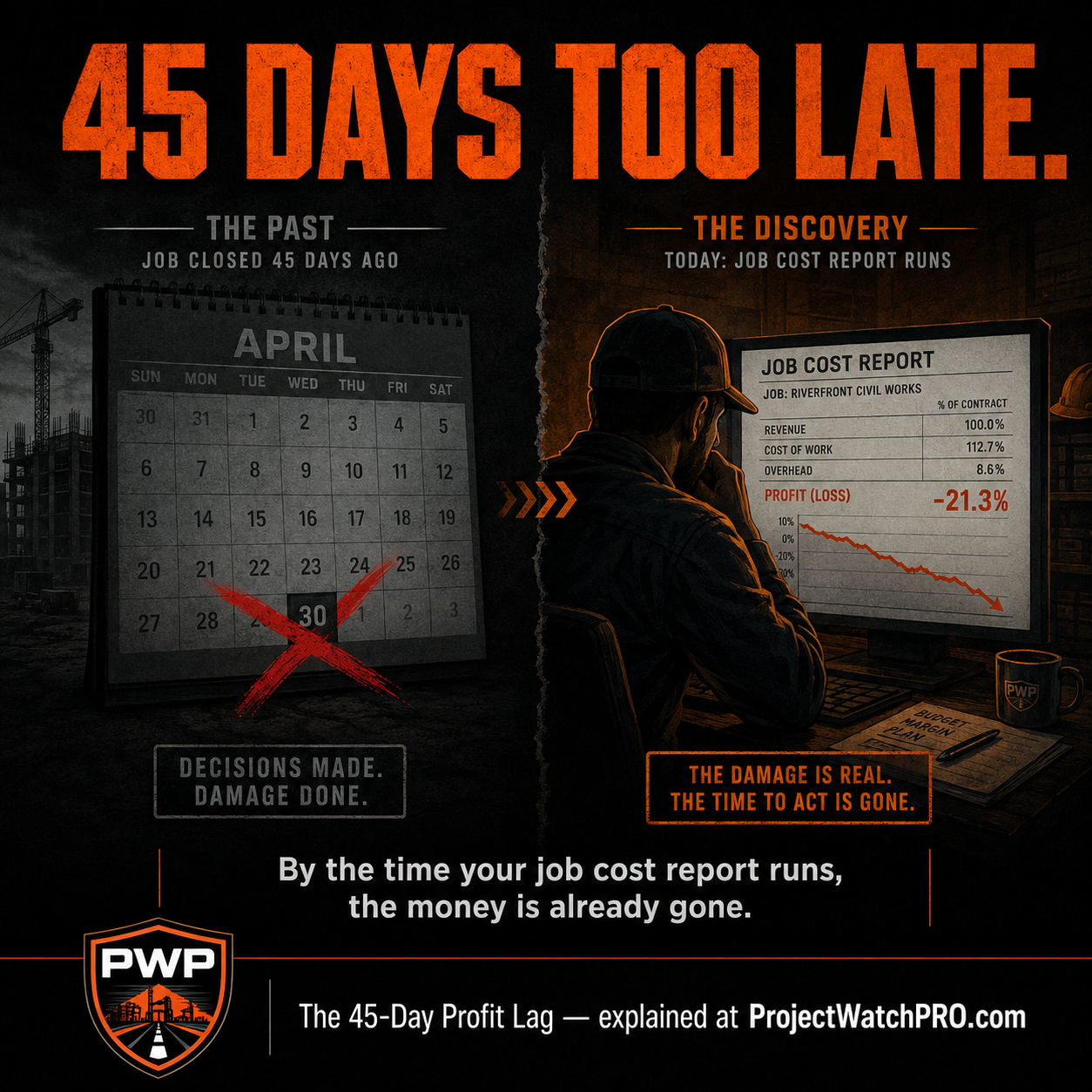
The 45-Day Profit Lag: The gap between when margin erosion occurs on a live construction or fabrication job and when it surfaces in a job cost report — averaging 30 to 45 days in standard accounting reporting cycles. By the time the report runs, the crew is gone, the invoice is sent, and every decision that could have changed the outcome has expired. The 45-Day Profit Lag is not a costing problem. It is a timing architecture problem.
Job Costing Software for Contractors: What Most Get Wrong
Why Job Costing Software Usually Fails Contractors at $1M–$20M
The SaaS Delusion — You Get a Tool, Not a System
The 30–45 Day Window Where Profit Disappears Without a Warning
Five Things Your Job Costing Software Probably Isn't Doing — But Should Be
Done-For-You Onboarding vs. a Blank Template
How Labor Burden Is Actually Calculated
When the Dashboard Updates — 60 Seconds or 45 Days
Is There a Business Operating System Behind the Software?
Who the Platform Is Accountable To
Job Costing Software for Contractors — The 2026 Field Guide
Who Each Platform Is Actually Built For — And Why the Fit Matters
The One Column Where Every Competitor Shows the Same Answer
The Three-Part Framework That Closes the Gap Standard Software Can't
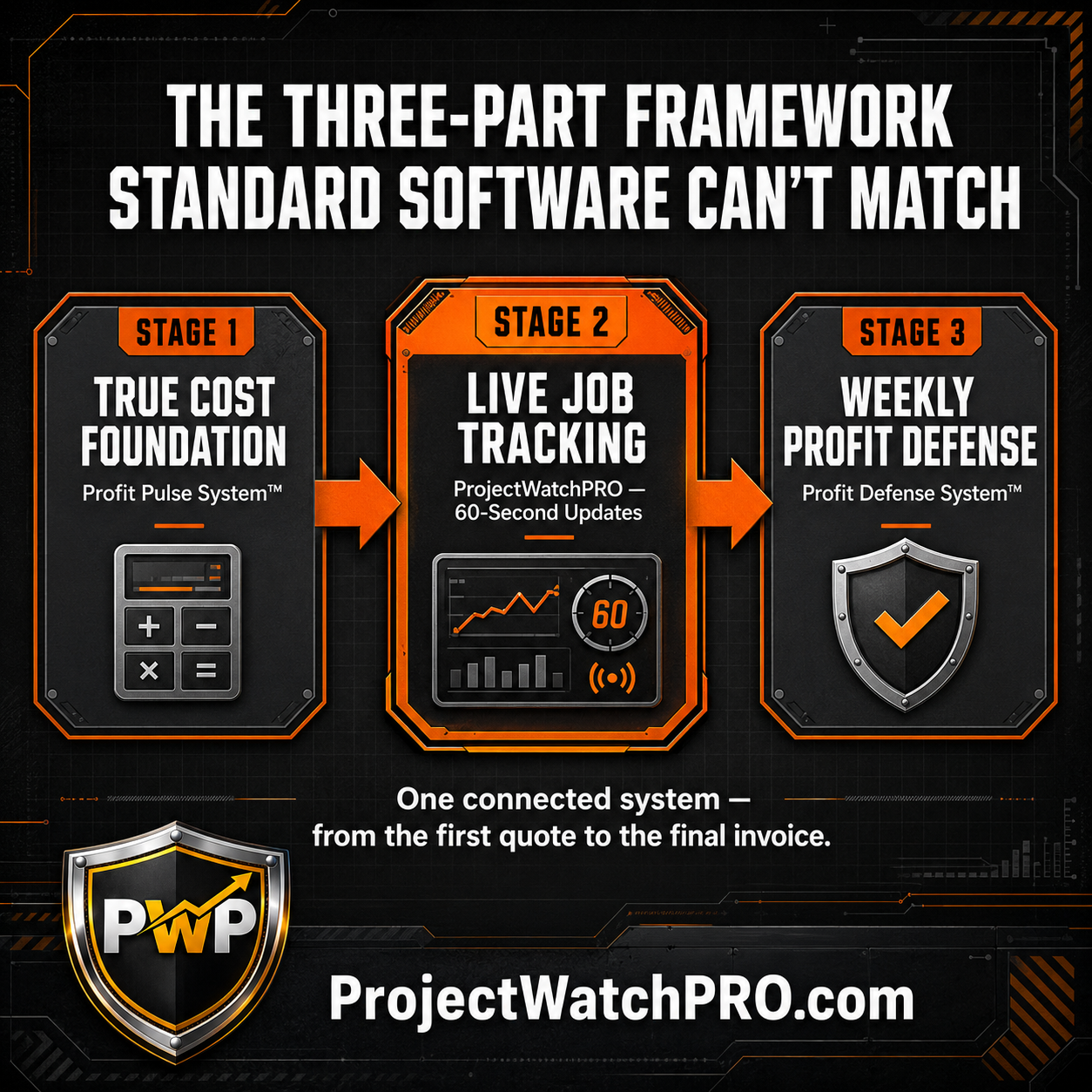
Stage 1 — Build the True Cost Foundation Before You Quote Anything (The Profit Pulse System)
Stage 2 — Automate the Numbers While the Job Runs (ProjectWatchPRO)
Stage 3 — Run the Weekly Rhythm That Prevents the Same Problem Twice (The Profit Defense System)
H3: Rearview Operator vs. Profit Defender — Two Different Operating Models, One Job
Why Job Costing Software Usually Fails Contractors at $1M–$20M
Most platforms on this list work exactly as advertised. That's the problem.
They were designed to do specific things: track time, log expenses, sync with QuickBooks, store project files. They do those things. But none of that is the same as protecting your margin while a job is still running. And for a contractor who needs to know what a job is making before the invoice goes out, that distinction is the difference between a profitable company and one that's always explaining the shortfall.
The SaaS Delusion — You Get a Tool, Not a System
Here's what the standard onboarding experience actually looks like.
You pay for the subscription. You get a login, a link to a tutorial library, and maybe a setup call. Then you're on your own: importing data, mapping cost codes, training field staff, and hoping your existing financial logic is sound enough to build on.
That last part is the problem.
John A. McCabe, founder of ProjectWatchPRO and a 20-year operational consultant to trades, fabrication shops, and industrial services, has seen this play out hundreds of times. If your labor burden is a flat 20% estimate rather than a real calculation, the software tracks that estimate with precision. If your overhead rate was set three years ago and never updated, the software applies it to every job without question.
Standard job costing software doesn't know your numbers are wrong. It automates whatever math you feed it.
A contractor who's been underpricing labor for years and adopts a new platform isn't fixing the problem. They're running the same mistake faster.
The 30–45 Day Window Where Profit Disappears Without a Warning
The deeper failure is structural.
Most job costing platforms run on a reporting cycle tied to your accounting software. Invoices get logged. Time entries get approved. Bills go through accounts payable. Then, somewhere between job closeout and month-end — 30 to 45 days after the real cost decisions were made — a report shows you what happened.
That is the 45-Day Profit Lag.
By the time the dashboard tells you a job is over budget, the crew has moved to the next project. The subcontractor has been paid. The scope negotiation window closed weeks ago. You're not managing a job anymore — you're reading its autopsy.
On a $2M annual revenue operation, five simultaneous profit leaks — the True Cost Gap, Scheduling Waste, Material Creep, Data Fragmentation, and Billing Lag — compound to erode 10% of total revenue, equivalent to $200,000 per year in unrecoverable profit. Every dollar of that loss was preventable. None of it was visible in time to stop it. Full breakdown at projectwatchpro.com/profit-leaks.
Put that in context: industry financial put the average net profit margin for general contractors at 5 to 6% of revenue. On a $2M operation, that's $100,000 to $120,000 in annual net profit. A 10% revenue leak doesn't just reduce profit — for most contractors, it eliminates it entirely.
---
Five Things Your Job Costing Software Probably Isn't Doing — But Should Be
Before evaluating any specific platform, here are the five criteria that actually determine whether a contractor makes or loses money on a job.
Done-For-You Onboarding vs. a Blank Template
The difference between a tool that works and one that collects dust is what happens on Day 1. Most platforms hand you a blank spreadsheet and a video library. Your data — messy, inconsistent, built on years of operational assumptions — goes in however you format it.
If it's wrong going in, it's wrong on every job that follows.
A profit defense system does the heavy lifting first. Historical data gets extracted, cleaned, and structured before the software is ever turned on. The goal is that on launch day, you have a working system — not a setup project.
How Labor Burden Is Actually Calculated
This is the most expensive line item on the comparison — and almost no one talks about it.
Standard platforms apply a flat burden percentage on top of base wage. A company-wide multiplier. Fast, simple, and consistently wrong.
The U.S. Bureau of Labor Statistics reports that construction employers paid an average of $50.93 per hour in total employee compensation in Q4 2025 — wages and benefits combined. That figure doesn't include a single dollar of overhead burden. Once overhead is factored in, the true per-hour cost climbs significantly higher.
No two workers cost the same. A veteran with 15 years of service has a different true cost than a new hire. Workers' comp rates vary by task type. Statutory tax caps roll off mid-year. And paid coffee breaks — 15 minutes per shift, every shift — don't show up in a flat multiplier at all.
ProjectWatchPRO calculates true labor cost through the 6-Layer True Cost Stack, applied per individual worker: base wage, shift differential, overhead burden, labor burden (payroll taxes, WCB, benefits — Layer 4, one of six), task-specific burden, and overtime premium. At a $40/hr wage, that produces a minimum true cost of $102/hr and a peak of $129/hr — a 3.1x multiplier versus the wage alone.
Quote from a flat guess and 30–40% of your true labor cost disappears into every estimate you send.
See the complete 6-layer true cost breakdown →
When the Dashboard Updates — 60 Seconds or 45 Days
This is the clearest dividing line on the comparison table.
Most job costing dashboards update when time entries are manually logged, when an accounting sync fires, or at project milestones. You see costs after they've been approved — which is after they've been incurred — which is days or weeks after the decision that created them.
ProjectWatchPRO updates every 60 seconds. The moment a field hand taps into a task on their phone, the true burdened cost hits the dashboard. If a senior technician is burning hours on work that was quoted at a junior rate, the alert is visible at 10:01 AM — not at month-end.
Why the 60-second update changes what decisions you can still make →
Is There a Business Operating System Behind the Software?
Every platform on this list is a software utility. That's not a criticism — it's a design choice.
But software doesn't teach a field supervisor how to catch cost drift during a shift. It doesn't build a weekly management rhythm that stops problems from compounding. It doesn't tell you when your overhead rate needs recalibration because your team size changed.
The Profit Pulse System is the nine-step operational methodology that runs underneath ProjectWatchPRO — covering overhead calculation, individual labor burden, task architecture, bulletproof quoting, scheduling, real-time monitoring, drift detection, and weekly profit loops. It exists before, inside, and after the software.
No other platform on this list has an equivalent. That gap is what the full system is designed to close. Full architecture at projectwatchpro.com/the-system.
Who the Platform Is Accountable To
VC-backed platforms answer to investors. Their growth metric is seats sold, not clients profitable. Every product decision — pricing, onboarding depth, support response time — flows from that incentive structure.
ProjectWatchPRO is 100% self-funded. The business model only works if contractors recover margin. That alignment shows up in done-for-you onboarding, Front-of-Line Zoom support on launch day, and ongoing weekly check-ins through the Profit Defense System.
Job Costing Software for Contractors — The 2026 Field Guide
Here is how the major platforms compare across the criteria that actually determine whether a contractor makes or loses money on a job.
Quick Comparison — The Five Criteria That Matter Most
Full Comparison — All 15 Dimensions
Who Each Platform Is Actually Built For — And Why the Fit Matters
Workyard is a GPS-based field time tracking tool. It does one thing: confirm when workers are on site and for how long. It was not designed as a profit management system, and it doesn't claim to be. If your primary problem is time theft, it addresses that. If your problem is margin compression, it doesn't.
Knowify is a QuickBooks integration layer for trade contractors. It organizes costs so bookkeepers have cleaner data to work from. That's useful — but it's backwards. Clean books are a result of controlled costs, not a substitute for them. It doesn't tell you what a job is making while the job is running.
JobTread is a project document and file organizer for growing construction businesses. Estimating, budgeting, and schedule tracking are handled well. Financial intelligence stops at the budget check level.
Procore is an enterprise compliance and documentation platform built for general contractors running $10M+ in commercial volume. Implementation alone typically runs 6 to 12 weeks and requires dedicated admin resources. For a crew under 100 people managing $1M to $20M in annual revenue, it is a corporate solution to a small-business problem.
Buildertrend is a residential remodeling platform. Its entire information architecture is built around client-facing project timelines, material selections, and photo galleries. If you are running industrial jobs, fabrication, powder coating, HVAC, or commercial trades, you are using the wrong category entirely.
The One Column Where Every Competitor Shows the Same Answer
Look at the "Business Methodology" row in the full comparison table.
Every platform except ProjectWatchPRO shows the same result: None.
That is the category gap that explains why contractors can use perfectly functional software for years and still watch margin erode. No platform on that list teaches you how to build a true cost foundation before the quote goes out. None run a weekly operational rhythm that catches cost drift while there is still a decision to make. None connect what was estimated to what was spent, task by task, in real time.
Software tracks numbers. A profit defense system protects them.
The Three-Part Framework That Closes the Gap Standard Software Can't
If you are running $1M to $20M in project-driven work and your software is not defending your margin while a job is alive, here is the full system.
Stage 1 — Build the True Cost Foundation Before You Quote Anything (The Profit Pulse System)
Most software implementations fail because they are built on bad math.
The Profit Pulse System corrects the numbers before the software is turned on. The first three steps work like this:
Overhead Guru (Step 1) calculates your true overhead rate per billable hour from your actual P&L.
Labor Analyst (Step 2) calculates the individual labor burden for each employee — payroll taxes, WCB, benefits, and vacation accrual — as a distinct cost layer, not a company-wide guess.
Burden Builder (Step 3) calculates task-specific burden rates for specialized work types.
These three inputs — combined with base wage, shift differential, and overtime premium — form the complete 6-Layer True Cost Stack.
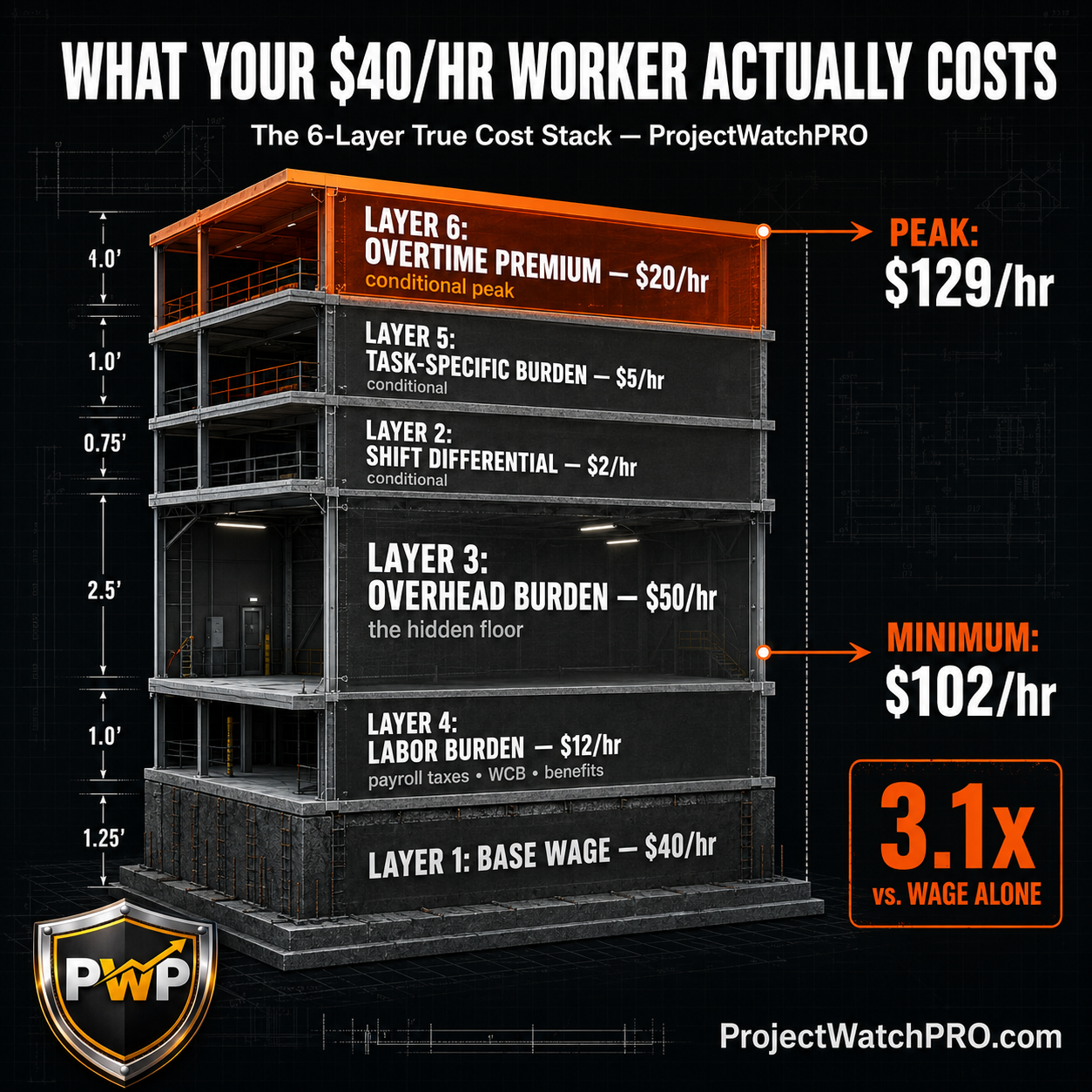
At a $40/hr base wage, a fully loaded employee costs between $102/hr and $129/hr once all six layers are applied. Most contractors are quoting from $40. The gap between those two numbers — running on every productive hour, every day, every job — is where the margin goes.
This is the True Cost Trap. It is Leak 01 of the five structural profit leaks documented at projectwatchpro.com/profit-leaks and accounts for −3.2% margin erosion alone on a $2M company — $64,000 per year, silently.
Stage 2 — Automate the Numbers While the Job Runs (ProjectWatchPRO)
Once the cost foundation is correct, the software applies those numbers in real time, on every job, without waiting for month-end.
When a worker clocks in from the field via the iOS, Android, or tablet app, ProjectWatchPRO applies their individual true cost profile — not a company average, not a flat multiplier — and updates the profit dashboard within 60 seconds. If a senior technician is assigned to a task quoted at a junior rate, the margin deviation is visible immediately.
The Drift Detector (Step 8 of the Profit Pulse System) gives you the visibility to catch this while it still matters. The dashboard shows true task costs accumulating against your charge-out rate in real time — so when a job starts trending over budget, you can see it happening while the crew is still on site, while reallocation, a scope adjustment, or a client conversation is still an option. Automated drift alerts and AI-powered cost intelligence — including a native Profit Defense Advisor that proactively flags margin events and guides decisions — are on the product roadmap.
Change orders do not corrupt the original budget. They spin out into linked sub-projects with isolated quotes and trackers — so the baseline math stays clean and the variation is tracked separately against its own target.
See how this works in practice at projectwatchpro.com/how-it-works.
Stage 3 — Run the Weekly Rhythm That Prevents the Same Problem Twice (The Profit Defense System)
Software tracks numbers. Management discipline prevents the decisions that create bad ones.
Stage 3 is the Profit Defense System — a weekly operating cadence that forces active review of job variances, enforces crew accountability on task codes, and builds a repeatable rhythm between what was estimated and what was actually spent. Step 9 — the Profit Pulse Loop — converts single-job corrections into permanent company standards. The same cost assumption error, scheduling failure, or charge-out rate gap does not get to repeat on the next project contract.
H3: Rearview Operator vs. Profit Defender — Two Different Operating Models, One Job
The Rearview Operator runs their business the way most job costing software is designed to support: track costs, close the job, run the report, and find out 45 days later that the margin didn't survive.
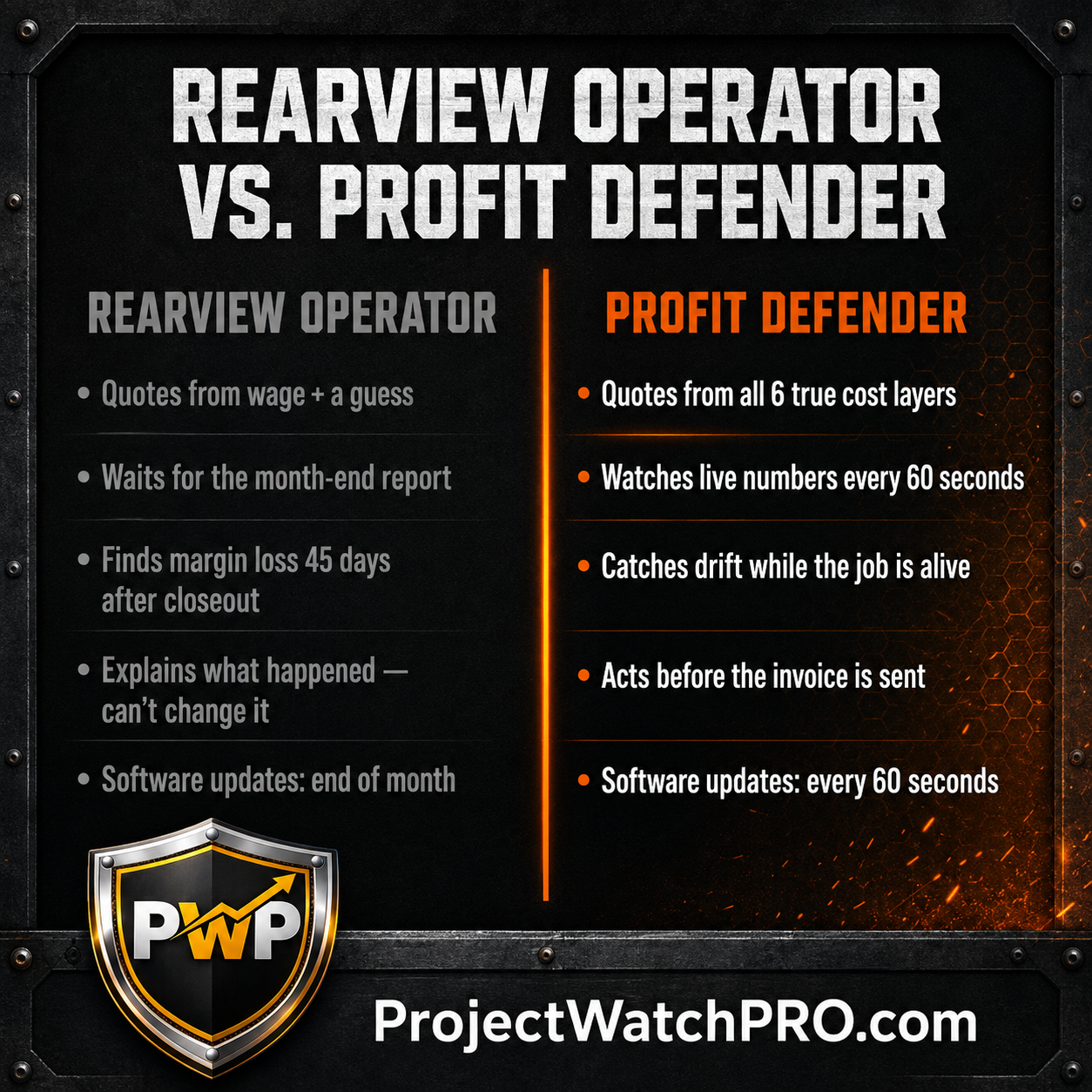
The Profit Defender runs it differently. The cost foundation is correct before the first quote goes out. The dashboard updates every 60 seconds while the job is alive. The weekly rhythm catches drift in time to act. And when a job underperforms, the fix becomes a permanent standard — not a one-time surprise.
The software didn't change. The operating model did.
Key Takeaways
- Most job costing software for contractors is a reporting tool, not a profit defense system. It shows you what happened — not what's happening right now.
- The 45-Day Profit Lag is the real mechanism: margin erosion occurs on a live job, and the accounting system doesn't surface it for 30 to 45 days — after every viable decision window has closed.
- A flat labor burden multiplier captures approximately 30–40% of what an employee actually costs per hour. The remaining 60–70% disappears into every estimate that uses it.
- At a $40/hr base wage, the fully loaded 6-Layer True Cost Stack produces a minimum of $102/hr and a peak of $129/hr — a 3.1x multiplier vs. wage alone.
- Real-time dashboard updates (every 60 seconds) fundamentally change what decisions you can still make on an active job. End-of-month updates give you zero options.
- Done-for-you onboarding matters more than the feature list. A powerful tool built on incorrect input data produces precisely wrong output.
- Every platform on this comparison except ProjectWatchPRO has no business operating methodology. That gap is what the Profit Pulse System closes.
- On a $2M operation, five simultaneous profit leaks compound to erode $200,000 per year. Every dollar of that is visible — and recoverable — in real time. None of it is visible 45 days later.
Frequently Asked Questions
What is the best job costing software for small contractors?
The best job costing software for a contractor running $1M to $20M depends less on features and more on two things: whether the software shows your margin while the job is running, and whether there is an operational methodology behind it — not just a subscription. Most platforms are reporting tools; they show you what happened after the job closes. ProjectWatchPRO updates every 60 seconds and is backed by the nine-step Profit Pulse System.
What's the difference between Procore and smaller job costing platforms like JobTread or Knowify?
Procore is an enterprise compliance and project documentation platform designed for general contractors running $10M+ in commercial volume. Implementation typically takes 6 to 12 weeks. JobTread and Knowify serve smaller contractors — JobTread focuses on file and document organization; Knowify connects to QuickBooks for bookkeeping. Neither calculates individual labor cost across six financial layers or updates profit margins in real time during an active job. They address different problems at different company scales.
How does real-time job costing software actually work for contractors?
Task-level real-time job costing works by connecting field time-clock entries — via mobile app on iOS, Android, or tablet — directly to specific task codes. The system applies the 6-Layer True Cost Stack per person per task, compares the resulting true labor cost against the active charge-out rate, and updates the job's margin figure every 60 seconds. The practical result: when a cost deviation occurs — a high-cost technician on a low-rate task, an overtime trigger, a task running over estimated hours — you can see it accumulating on the dashboard while the job is still open, while crew reallocation, scope adjustment, or client communication is still possible. This is the only operating architecture that keeps the decision window open on a live job.
Why doesn't my job costing software fix my margin problem?
Because most job costing software assumes your financial input data is correct. If your true labor cost is estimated from a flat burden percentage rather than built from the full 6-Layer True Cost Stack — if your overhead rate hasn't been recalculated from your actual P&L in years — the software tracks those errors with full confidence. It automates whatever math you give it. The fix is not a better interface. It is correcting the cost foundation the software runs on. That is what the first three steps of the Profit Pulse System are designed to do before the software is ever turned on.
How do I choose job costing software for a contracting business under 100 employees?
Evaluate five things: (1) Who handles data migration — do they clean and upload your history, or do you format blank templates yourself? (2) How is labor burden calculated — flat company-wide percentage or 6-layer individual true cost per worker? (3) When does the margin dashboard update — every 60 seconds while the job runs, or 30 to 45 days after it closes? (4) Is there an operating methodology behind the software, or is it a standalone utility subscription? (5) Who does the company answer to — investors tracking seat growth, or clients tracking margin recovery? Those five criteria separate a profit defense system from a digital filing cabinet.
What is the true fully loaded cost of a construction or fabrication employee per hour?
At a $40/hr base wage, the fully loaded true labor cost in a construction or fabrication operation ranges from $102/hr to $129/hr depending on which cost layers are active. The 6-Layer True Cost Stack breaks down as: Layer 1 (Base Wage, $40/hr) + Layer 3 (Overhead Burden, $50/hr, derived from total P&L operating cost divided by billable hours) + Layer 4 (Labor Burden, $12/hr, covering payroll taxes, WCB, benefits, and vacation accrual) = $102/hr minimum. The conditional layers — Layer 2 (Shift Differential, $2/hr), Layer 5 (Task-Specific Burden, $5/hr), and Layer 6 (Overtime Premium, $20/hr) — bring the peak to $129/hr. This represents a 3.1x multiplier versus the wage figure alone. Run your own numbers at truelaborcost.site in under 10 minutes.
If you have been using job costing software and still cannot explain where your margin went, the platform is not the problem.
You are solving a visibility problem with a reporting tool. Those are different tools for different jobs.
The Bulletproof Quote Calculator shows you the real gap between what you are quoting and what your labor actually costs — across all six layers, for your actual operation — in under ten minutes. No pitch. Just the number you need before the next quote goes out.
→ Get the Bulletproof Quote Calculator — free