
How Do I Know If a Construction Job Is Profitable?
Which of Your Jobs Are Actually Making Money Right Now?
John walked into an HVAC sub running $2.8 million a year. Twelve active jobs on the board. Three felt like they were going well. Two felt behind. The other seven — no one could say.
The owner knew what every job was billed at. He knew what every job was contracted for. What he didn't know was what each job was actually costing him in real time, with labor calculated at its true loaded rate. He found out at month-end, or sometimes at closeout. By then, the money was already gone.
One job came in at 8% profit instead of 19%. The $31,000 gap lived in the mechanical room rough-in — a task that ran at 2.2 times the estimated hours for three weeks before anyone noticed. If someone had caught it at the end of week three, the owner still had time to look at crew assignment, material staging, and whether a subcontractor was holding up a phase. He caught it at closeout instead. Nothing left to change.
That's the actual problem. Not that contractors lose money on jobs — but that they find out too late to do anything about it.
Knowing which construction jobs are making money before they finish means comparing what each job is actually costing you in real labor — loaded rate, all six layers — against what you charged for it, broken down by task, while the work is still happening. If you're seeing that number after the job closes, you're managing the rearview mirror. If you're seeing it in week three, you still have something to work with.
Why Most Owners Can't Answer the Question Right Now
Most construction business owners can tell you the contracted value of every job they're running. A lot of them can tell you what's been invoiced and what's been collected. What almost none of them can tell you — in real time, today — is which of their active jobs are ahead of their labor budget, which are behind, and by how much.
The HVAC owner above isn't an outlier. He's the norm. The way most construction operations are set up, job profitability is a lagging number. It comes out at month-end reporting, or at job closeout, or when the accountant runs a job cost summary that's already 30 to 45 days behind real time.
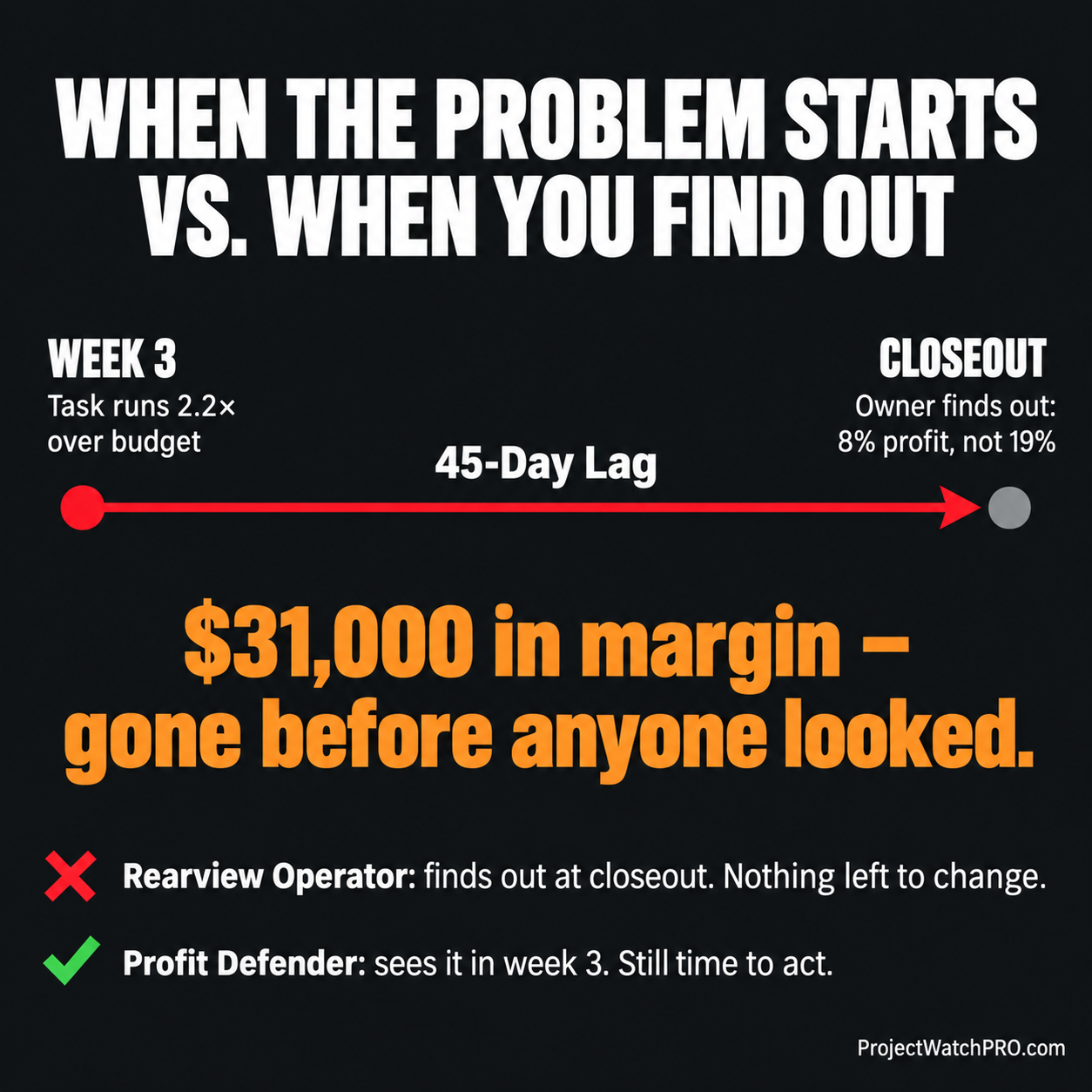
In a business where a $2.8 million shop might have 12 jobs running at once, that lag means you're flying in the dark on the ones that matter most. You know which jobs feel busy. You know which superintendents call you more than others. What you don't know is which job is bleeding $4,000 a week in labor that you're not charging for.
The tools most contractors use are part of why this gap exists. Understanding what each one actually shows — and doesn't — is the fastest way to see where the blind spot is in your operation.
What Your Current Tools Actually Show (And What They Don't)
Most contractors are running some combination of accounting software, project management software, and spreadsheets. Each of those tools was built for a specific purpose. Job profitability in real time wasn't it.
Here's an honest breakdown:
QuickBooks
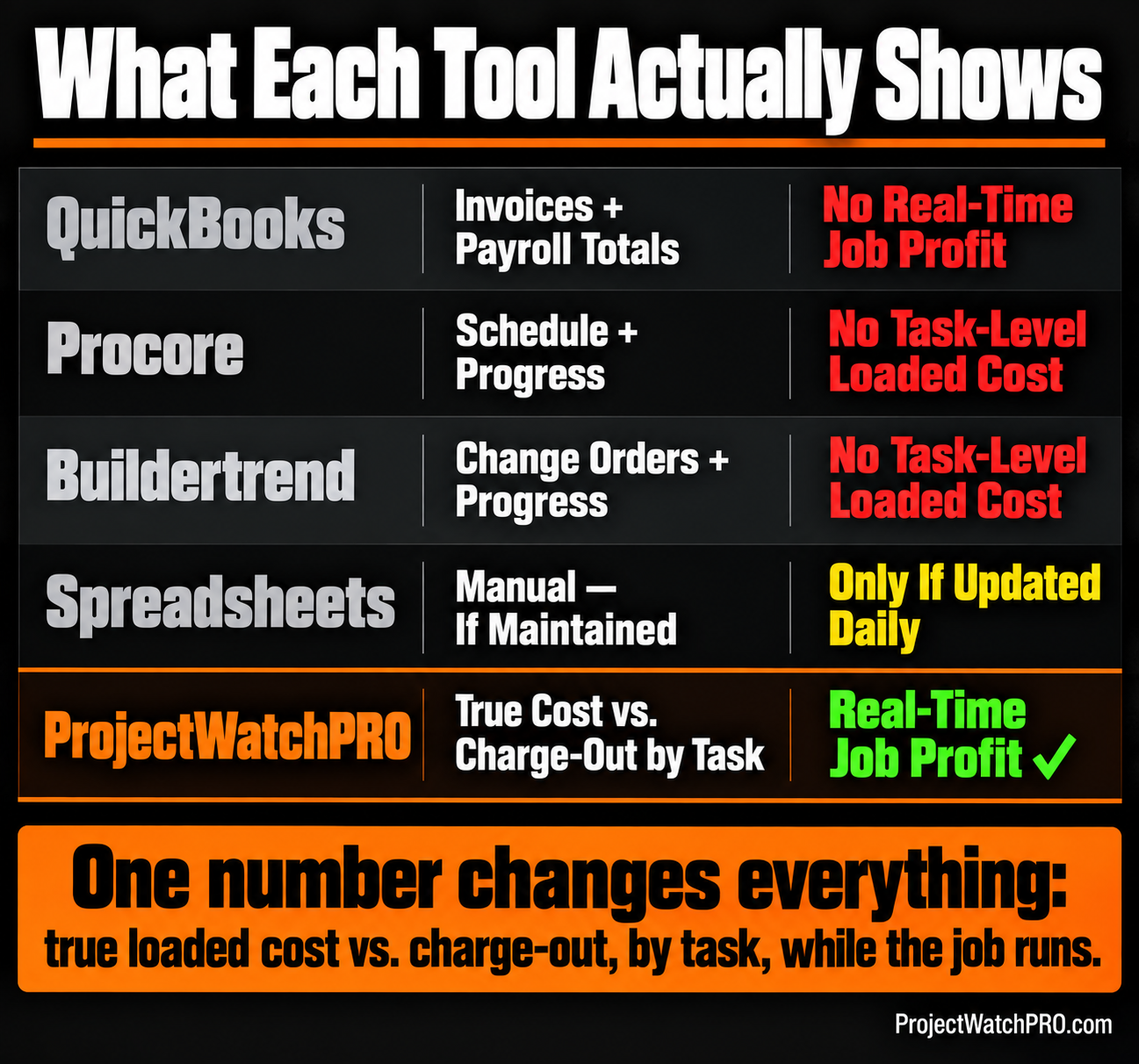
QuickBooks is accounting software. It's very good at what it's built for: tracking invoices, payments, expenses, and payroll totals. What it doesn't do is calculate your true loaded labor cost per hour. It records what you paid — the wage. The overhead burden, the labor burden, the task-specific burden, the shift differential, the overtime premium — those don't roll into the per-hour figure QuickBooks uses when it reports your job labor cost.
That means every "job cost report" QuickBooks produces is understating your real labor cost. The jobs that look profitable inside QuickBooks may not be, once the actual loaded rate replaces the wage rate.
QuickBooks also doesn't show you what's happening on a specific task inside a job. You get total job expense. You don't get: this task is running at 2.2x estimated hours as of Tuesday. That number doesn't exist in QuickBooks — because QuickBooks doesn't think in tasks.
Procore / Buildertrend
Project management platforms like Procore and Buildertrend are purpose-built for construction — scheduling, drawings, RFIs, change orders, subcontractor coordination. They're valuable for that. Where they fall short is on the labor cost side of the profitability question.
Procore has budget tracking features. Buildertrend has job costing reports. But both of them depend on you entering your true cost per hour manually — which almost no one does correctly, because that number requires running through all six layers of labor burden. What most users enter is a wage rate, or sometimes an estimated labor cost from the original quote. The comparison between that number and what the job is actually costing in real time is either manual or doesn't happen.
Neither platform flags that a specific task is running over its hour budget in week two, before the damage compounds. The reporting exists, but the live task-level alert — the number that gives you time to act — isn't what these platforms are designed to surface.
Spreadsheets
Spreadsheets work. If you've built a detailed job cost tracker in Excel or Google Sheets, you can get close to what you need — if you update it daily, if someone is maintaining it, and if you've built the loaded cost formula correctly.
The problem isn't that spreadsheets can't do this math. The problem is what it takes to keep them current: manual entry, consistent discipline across crews and foremen, and someone who knows how to build a true loaded rate calculation from scratch. Most spreadsheet-based job cost tracking is updated weekly at best, often at month-end. The HVAC owner's mechanical room rough-in would still have run three weeks before anyone caught it — because the spreadsheet only gets updated when someone has time to update it.
ProjectWatchPRO
ProjectWatchPRO is built specifically to answer the question this post is about: which jobs are making money right now, and which ones aren't. The architecture is built around the job, not around payroll or invoicing.
Hours are logged against tasks — not job codes, not days worked, but specific tasks inside the job. The loaded labor cost per hour is calculated from all six layers — wage, overhead burden, labor burden, task-specific burden, shift differential, overtime premium — and that number is what runs against the charge-out rate in real time. When a task runs over its estimated hours, the system shows it. Not at closeout. Not at month-end. In the week it happens.
That's what makes the comparison with other tools meaningful: it's not that ProjectWatchPRO has better software features. It's that it measures a different number — actual true cost vs. estimated charge-out, by task, while the work runs. That's a fundamentally different input than wage-vs.-invoice at job closeout.
The Number That Actually Tells You Which Jobs Are Making Money
The specific comparison that answers the question is this: true loaded labor cost vs. charge-out rate, by task, as it accumulates.
Not total job cost versus total job contract. That number tells you how much you made after the job is done. The number you need tells you how the job is tracking right now — this week, this task, this crew — against what you quoted it at.
Here's what that looked like for the HVAC sub:
Mechanical Room Rough-In — Week 3 Status:
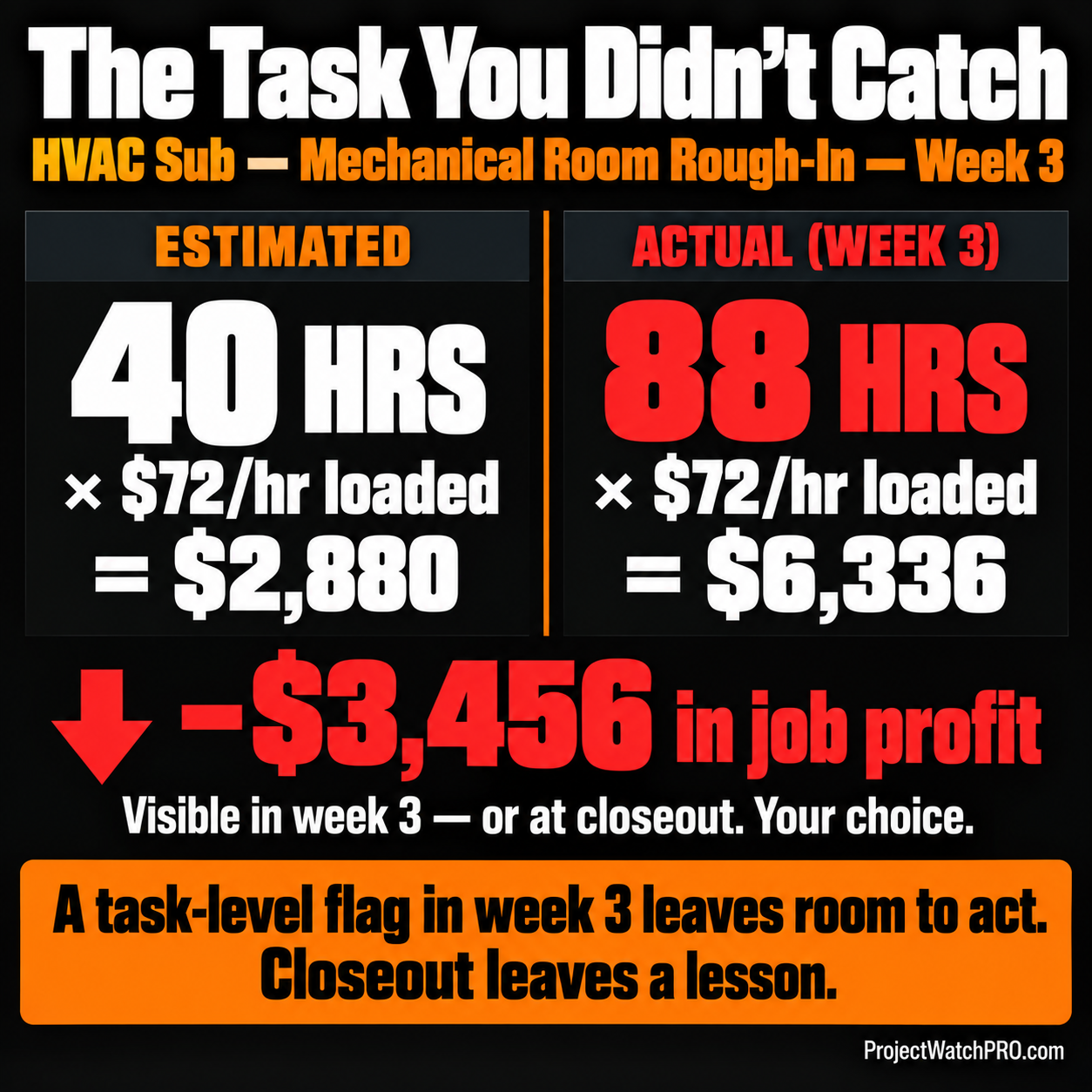
Without task-level tracking against the loaded cost, that $3,456 gap isn't visible until the job closes. The owner doesn't know which task ate the hours. He doesn't know when it started running over. He can't ask the foreman what changed in week two, because the data doesn't exist at that level.
With task-level tracking, the question is answerable: the mechanical room rough-in ran to 2.2 times estimated hours. You find out in week three. You still have the rest of the job to run.
That's the difference between real-time job costing and month-end reporting. Not a different report — a different point in time when you can still do something about it.
The Rearview Operator finds out the HVAC job came in at 8% instead of 19% at closeout. He adds a note to requote mechanical room rough-in higher on the next bid. The Profit Defender sees the mechanical room task running at 2.2x estimated hours at week three. He asks why. He finds an inspection hold that's been stalling the crew for six days. He clears the hold. The rest of the job runs at estimate. The margin difference between those two outcomes is the 45-day gap between when the problem started and when anyone noticed it.
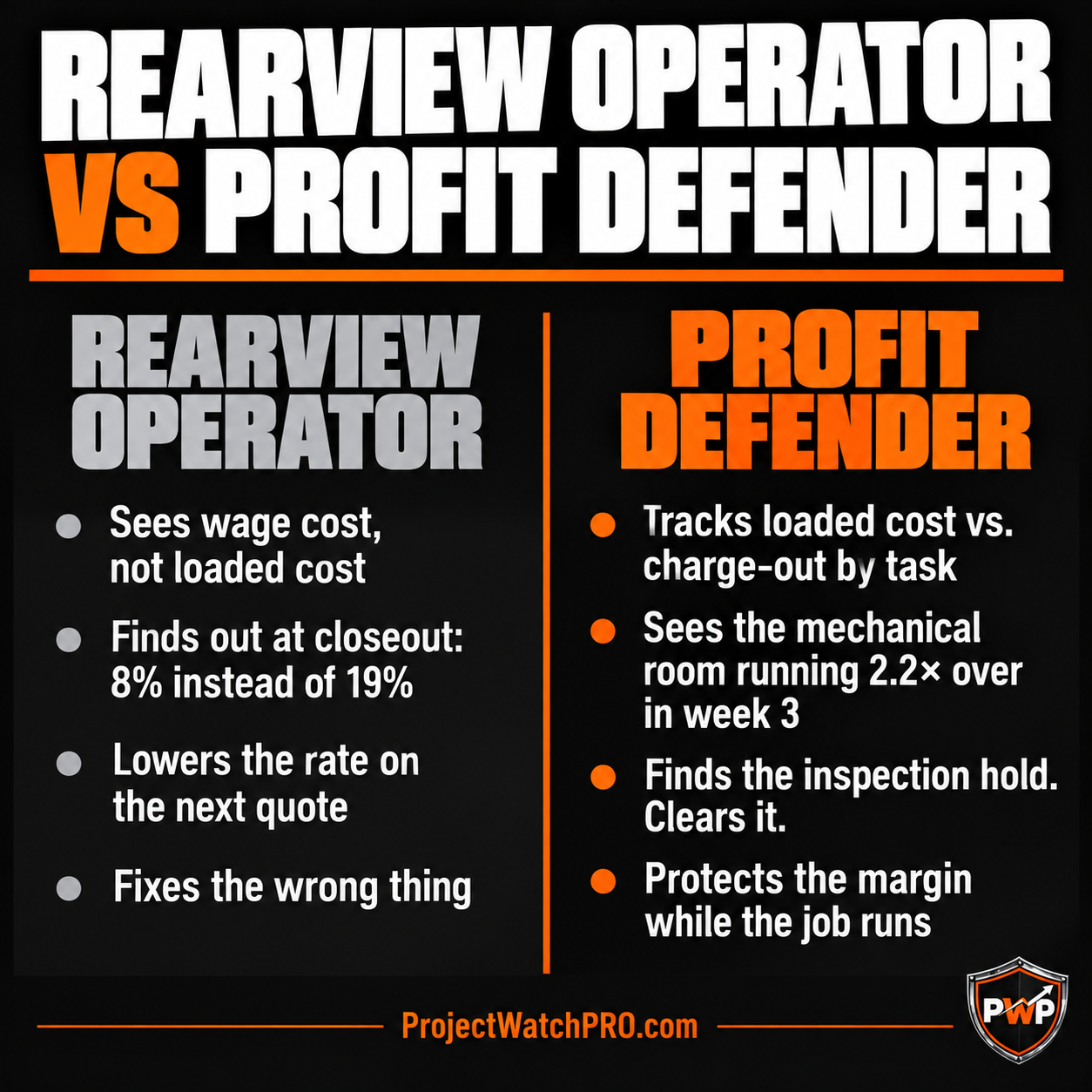
This is exactly how construction profit fade compounds — small task overruns that no one catches until the total job cost comes back wrong.
How to See Which Jobs Are Making Money Before They Close
The method is straightforward, but it only works if the inputs are right.
Step 1: Know your true loaded labor cost per hour. Not your wage rate. Not what you think it costs. The number that includes overhead burden, labor burden, task-specific burden, and any contingent costs like shift differential and overtime. For most construction operations, this is 2.5 to 3 times the base wage. If you're using $28/hr because that's what you pay the journeyman, and the true loaded cost is $72/hr, every job profitability number in your system is wrong before you start comparing. See how to build that number with the six-layer true labor cost calculation.
Step 2: Log hours by task, not just by job. A time entry that says "8 hrs on Job 247" tells you someone worked. It doesn't tell you what they were doing, whether that task is running over its budget, or which phase the overrun is coming from. Task-level logging is what creates a number worth comparing. Without it, you can track total hours on a job — you can't track which part of the job is running over. See how inaccurate time tracking hides the specific problem from the owner.
Step 3: Compare loaded cost to charge-out rate, by task, in real time. Once you have the right labor rate and task-level entries, you can run the comparison that actually answers the question: is this task running over or under? Is this job still inside its estimated labor budget? What is the projected job profit at current run rate?
If you're a fabrication shop, this means welding hours by job number versus your standard labor budget per piece. If you're a painting sub, it means task hours on each phase — surface prep, application, cleanup — against your estimated hours per phase. If you're a framing crew, it means rough framing hours by section against your manpower budget. The task names are different. The comparison is the same. Construction labour hours over budget — wherever it happens — shows up the same way: estimated hours versus actual hours, at the task level, before it's too late to change something.
Key Takeaways
- The question most owners can't answer: which of your active jobs are profitable right now, today, before they close — and the reason you can't answer it is the combination of wrong labor rate and no task-level tracking.
- The tool comparison: QuickBooks tracks invoices and payroll totals — not loaded cost, not task hours. Procore and Buildertrend track progress and schedule — not loaded cost per task in real time. Spreadsheets can be built to do this but require constant manual discipline. ProjectWatchPRO is built specifically to compare loaded labor cost against charge-out rate, by task, as the job runs.
- The labor rate error: if your system uses wage as your labor cost, every job profitability number is understated. True loaded cost includes overhead burden, labor burden, task-specific burden, shift differential, and overtime premium — and for most trades, it runs 2.5 to 3x base wage. The gap is not a rounding error.
- Task-level vs. job-level tracking: a time entry logged to a job tells you someone worked. A time entry logged to a task tells you which part of the job is running over. That distinction is the entire difference between seeing a problem in week three and finding out at closeout.
- The 45-day lag: most construction operations find out a job is over budget 30 to 45 days after the overrun starts. That lag is the window you lose to act. Task-level loaded cost tracking closes that window.
- The HVAC comparison: same job, same hours, same crew — one owner sees an $3,456 overrun on the mechanical room rough-in at week three. The other sees an 8% margin instead of 19% at closeout. The difference is a single comparison: estimated hours × loaded rate vs. actual hours × loaded rate, run weekly.
- The fix applies across trades: fabrication shops, painting subs, framing crews, HVAC, electrical — the task names change, the comparison is the same. Estimated loaded cost vs. actual loaded cost, tracked while the job runs, not after.
Frequently Asked Questions
How do I know if a construction job is profitable before it is finished?
Compare your estimated hours by task against actual hours logged to that task, multiplied by your true loaded labor cost per hour — not your wage rate. When actual labor cost on a task exceeds what you quoted for that task, the job is running over. If you see it in week two or three, you still have time to act. If you see it at closeout, the money is gone. The comparison only works if you have task-level time entries and a correct loaded rate.
Why can't I just use QuickBooks to see which jobs are making money?
QuickBooks is designed for accounting — invoices, expenses, payroll totals. It records your wage cost, not your true loaded cost. The overhead burden, labor burden, and task-specific burden that make up 60–70% of what an employee actually costs per hour don't flow into QuickBooks' job cost reports unless you manually engineer them to. Most operators don't. That means QuickBooks job cost reports systematically understate your real labor cost — which makes every profitable-looking job on paper less profitable in practice. Learn how to build the true loaded rate with the six-layer true labor cost calculation.
Does Procore or Buildertrend show real-time job profitability?
Both platforms have budget tracking and cost reporting features. But they depend on you entering a correct labor cost per hour — which most users don't, because it requires a full six-layer loaded rate calculation. What most users enter is a wage rate or an estimated cost from the original quote. The result is that Procore and Buildertrend job cost reports have the same underlying problem as QuickBooks: they understate real labor cost. Neither platform is designed to alert you when a specific task inside a running job is exceeding its estimated hours at loaded cost. That's a different architecture than what either tool provides.
What is the difference between charge-out rate and true labor cost in construction?
Your charge-out rate is what you bill a client per hour of labor — the rate in your quote. Your true loaded labor cost is what that hour of labor actually costs your business — wage plus all six burden layers. The gap between these two numbers is your actual labor margin on that task. If your charge-out rate is $85/hr and your true loaded cost is $72/hr, you have $13/hr of margin per hour worked. If a task runs 48 hours over estimate at $72/hr loaded cost, that's $3,456 in margin you won't see — unless you're tracking it by task while the job runs.
How often should I be checking job profitability on active jobs?
Weekly is the minimum that lets you act on what you find. A daily check is better on longer or higher-value jobs. What matters more than frequency is what you're checking: not total job cost vs. invoice, but task-level hours vs. estimate vs. loaded cost. A 30-second check that shows task X is at 140% of estimated hours is more useful than a detailed month-end report that shows total job cost is $8,000 over — because one gives you something to look at while you can still look.
What does it actually look like when a job tracks profitability in real time?
The HVAC owner above had the mechanical room rough-in task flagged at week three: 88 hours logged against a 40-hour budget, at $72/hr true loaded cost. That's a $3,456 overrun visible as it happens. He asks the foreman what changed. An inspection hold has had the crew staging and restaging for six days. He clears the hold. The rest of the job runs at estimate. Without task-level tracking against the loaded rate, that conversation doesn't happen in week three — it happens six weeks later at closeout when there's nothing left to change. See how this type of profit drift detection works in practice.
My margin seems fine at month-end but the cash always feels tight — what am I missing?
This is one of the most common signals that the job cost numbers you're seeing don't reflect true loaded labor cost. When wage is used instead of full loaded cost, the job looks profitable on paper but the actual cash available — after covering overhead, insurance, and all the costs that burden doesn't capture in the wage line — is less than what the report shows. The fix is running the comparison with real loaded cost, not wage. A Profit Recovery Review will show you where the gap lives in your specific operation.