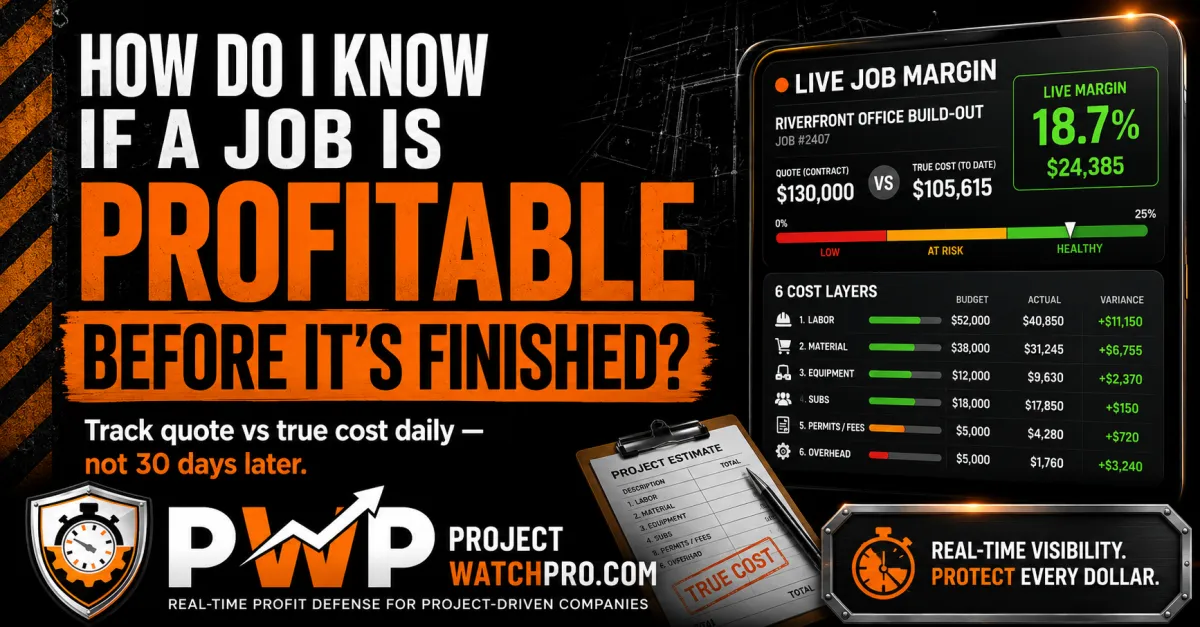
How Do I Know If a Job Is Profitable Before It's Finished?
How Am I Supposed to Know If a Job Is Making Money Before It's Over?
You're three weeks into a job. Crew's on site. Work is moving. Someone asks you — maybe your wife, maybe your foreman, maybe just the voice in your head at 10 p.m. — "are we making money on this one?"
And the honest answer is: you don't know.
You've got hours on a timesheet. You've got materials receipted. You know roughly what you quoted. But you don't know if the hours your crew has put in are eating through the margin you built into that quote — or if you're still inside it. That's not unusual. It's how most contractors run. But it's also how most contractors find out too late.
Here's what usually happens. The job wraps up. You invoice. Three or four weeks later your bookkeeper runs the numbers. That's when you find out you were under on materials but over on labor. That the last two weeks of the job burned through the profit you'd earned in the first four. That the margin you quoted — maybe 18%, maybe 22% — landed somewhere around 5% by the time everything was accounted for. And by then, the crew's three jobs down the road. The invoice is out. The client's moved on. There's nothing left to fix.
The 30 to 45 day gap between when something goes wrong on a job and when you find out is where most of your quoted profit disappears.
The answer isn't a better report. It's knowing while the job is still running. And to do that, you need two things: your charge-out rate has to be built on what a crew member actually costs you — not just his wage — and that cost has to update against your quote while the job is moving. Here's how both of those work.
Job profitability tracking during construction means comparing the actual true cost of labor — built from all 6 layers, not just wage — against the quoted budget, task by task, while work is still in progress. It requires a charge-out rate that reflects what a crew member genuinely costs per hour, and a system that runs that number against your quote in real time so you still have time to act on what you find.
Why Tracking Hours Still Doesn't Tell You If a Job Is Making Money
Take a commercial mechanical job — pipe fitting, HVAC rough-in, whatever you run. You're three weeks in. The timesheet says 186 hours. Your quote called for 220. On paper, you're ahead. But "ahead" compared to what?
186 hours at what cost? If your crew is logging those hours on overtime — or if your charge-out rate doesn't cover what those hours are genuinely costing you to deliver — you could be underwater on every single one of them while the timesheet looks fine. Hours are just a count. They don't tell you the dollar story underneath.
You know how many hours you've used — you don't know what those hours are costing you
The timesheet tells you 186 hours were worked. It doesn't tell you what those 186 hours cost you to deliver. It doesn't separate the burden costs, the overhead per billable hour, or the task-specific consumables the guys burned through. It's a count of clock ticks, not a cost statement.
If your charge-out rate was built on wage plus a rough percentage — "he's $44/hr so I'll charge $72 and that should cover it" — you may not know whether $72 covers the real cost until the books close. And if it doesn't, you've been losing money on every hour while the timesheet told you the job was running fine.
If overtime hit, your cost shifted and nobody caught it
Say the owner needed the job done by a hard deadline and you put the crew on nights for two weeks. Those night hours aren't the same cost as day hours. The premium stacks on top of wage, on top of burden, on top of everything else. The effective cost per hour on those shifts is materially higher than what you built the charge-out rate on.
Your quote assumed straight time. The job ran on overtime. The margin you built into that labor block may have evaporated completely — and the only place that shows up is the final job cost report, six weeks after the fact.
According to a 2026 Buildertrend analysis, 33% of contractors identify labor costs as the biggest challenge to staying on budget — and 28.6% still go over budget despite tracking hours. The tracking isn't the problem. The disconnect between hours tracked and cost understood is the problem.
By the time the report shows up, the job is closed and there's nothing left to fix
When the bookkeeper runs the job cost report and the margin is 5% instead of 19%, what do you do with that? You can write it off. You can use it to inform the next quote. But you can't go back to the client and open a change order conversation on a job that's been invoiced. You can't move the crew faster through work that's already done. The decision window closed the day the job wrapped.
This is what month-end job costing produces — a historical record of what happened, not a live signal you can act on. The report isn't a management tool. It's an autopsy.
Swap mechanical for whatever you run — roofing, electrical, fabrication, concrete, painting. The story doesn't change. You quote the job as one number, the crew runs the hours, and nobody can tell you whether those hours are inside the margin or outside it until the invoice is already out the door.
What Your Charge-Out Rate Has to Cover — And How to Check It Right Now
Most contractors set their charge-out rate by instinct. They take the wage, add some percentage for "overhead and profit," and go to market with a number that feels right. The problem is that "feels right" is usually about 30–40% short of what the crew member is actually costing.
There are 6 layers between what you put on a timesheet and what an hour in the field genuinely costs you. If your charge-out rate doesn't cover all 6, the job is losing money on every hour — and you won't see it until the books close.
The 6 layers between what you put on the timesheet and what that guy actually costs you
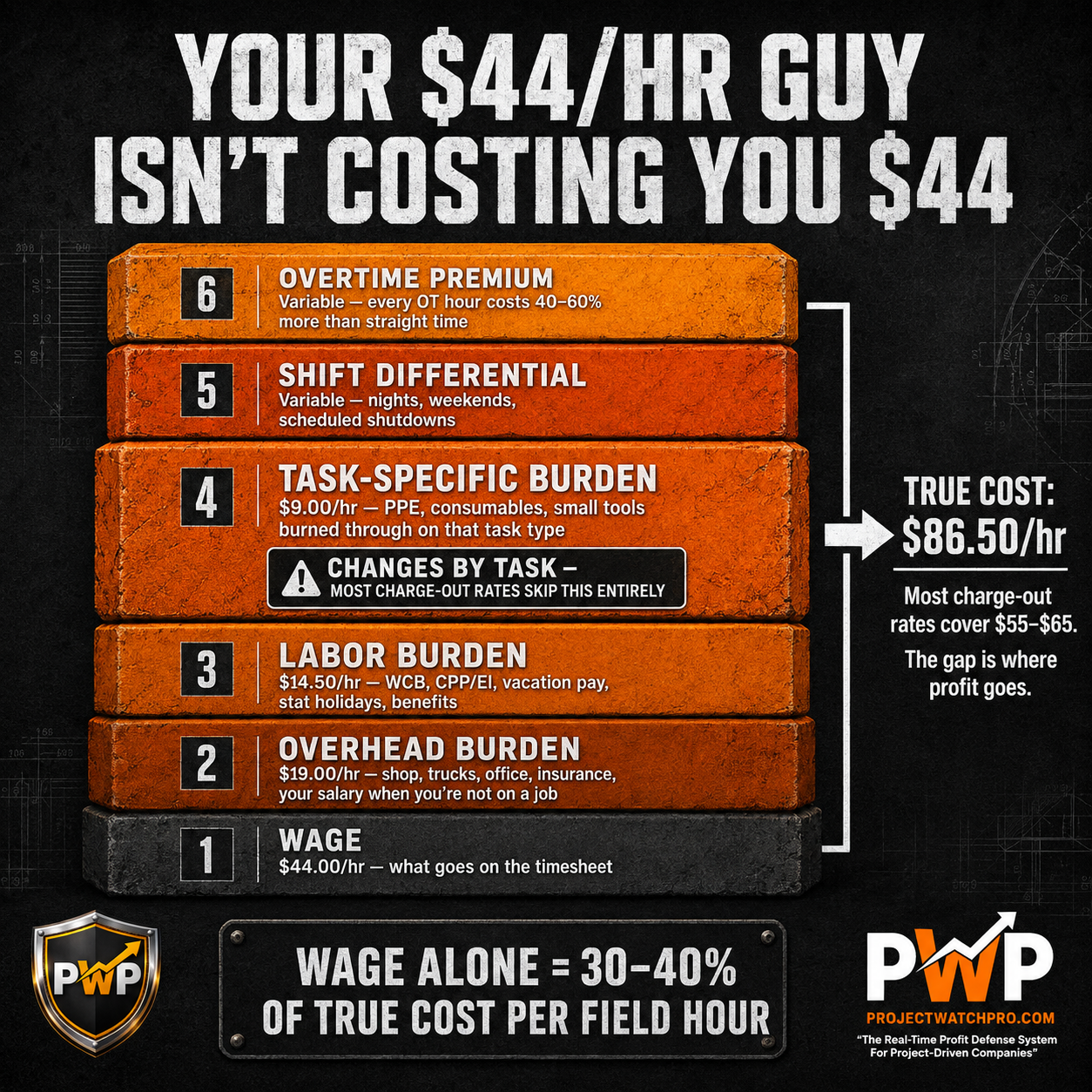
Layer 1 — Wage. The hourly rate on the timesheet. Say $44/hr. This is the number most charge-out rates are built from. It's also the smallest part of the true cost.
Layer 2 — Overhead burden. Your shop, your office, your truck payments, the software you run the business on, your accountant, your insurance, your own salary when you're not on a job billable to a client. All of that gets spread across the hours your crew is in the field earning revenue. On a typical trade contractor doing $1M–$5M, this runs $15–$22/hr per field employee.
Layer 3 — Labor burden. CPP or Social Security. EI or unemployment insurance. Workers' comp (WCB, WSIB — and in high-risk trades, that rate can be significant). Vacation pay. Statutory holiday pay. Benefits if you cover them. This layer alone typically adds $12–$18/hr on top of wage.
Layer 4 — Task-specific burden. This is the one almost nobody accounts for. Different tasks consume different materials per hour. A guy grinding welds burns through discs. A guy sandblasting burns through media, respirators, Tyvek, and nozzle tips. A guy doing precision layout doesn't consume much. The cost per hour for the same employee changes depending on what task he's on — and a proper task-level burden calculation maps those consumables to the task, not to the job as a whole.
Layer 5 — Shift differential. If work runs nights, weekends, or on scheduled shutdowns, the multiplier hits on top of everything else. This applies directly to the wage layer, which then cascades through burden.
Layer 6 — Overtime premium. When the job runs long and the crew goes over 8 hours in a day or 40 hours in a week, the overtime rate applies to the wage — and that premium stacks on top of all the other layers. An overtime hour on a high-burden employee can cost 40–60% more than a straight-time hour on the same employee.
Running the numbers on a real job
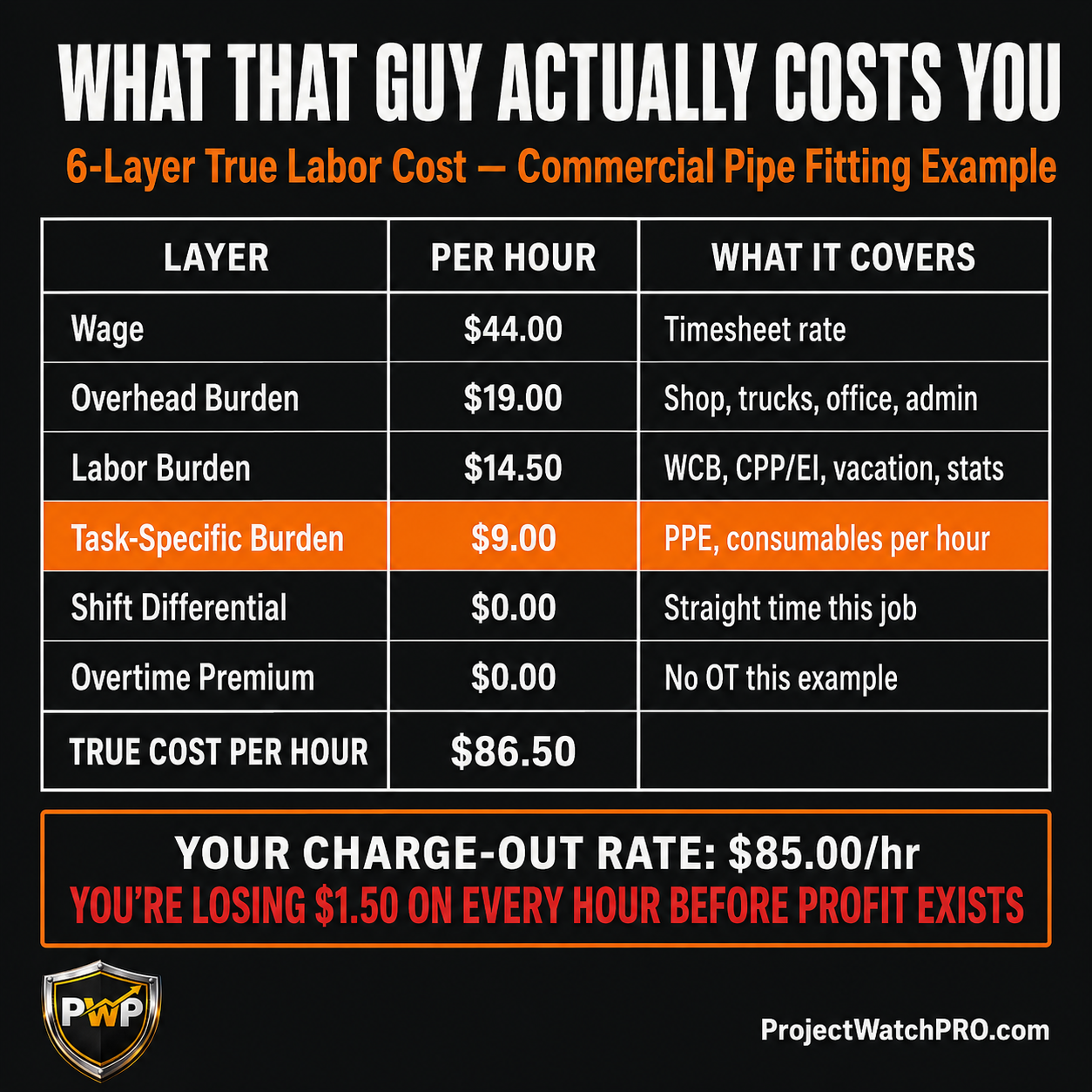
Here's what this looks like with actual figures. Crew member, commercial pipe fitting job:
If your charge-out rate for this role is $85/hr — you're losing $1.50 on every single hour before a dollar of profit exists.
If it's $92/hr — you've got $5.50/hr of actual margin on that labor. On a 400-hour job, that's $2,200 of labor margin. Still well short of a 20% quoted profit margin, which means your materials, overhead, and other cost layers need to carry the rest. If any of them are underestimated, the margin is gone.
This is why true labor cost calculation matters before you quote anything — not as a back-office exercise but as the foundation every number in your quote is built on. Heartland Coatings, a contractor out of Fort Saskatchewan, Alberta, ran this diagnostic and found their charge-out rate wasn't covering their true cost. They raised their rates on the spot. Ken LaPain & Sons ran the same numbers and discovered only one of their tasks was actually making money. They raised rates across the board immediately.
In both cases, the problem wasn't the work. It was the math the work was priced on.
What happens when the rate runs against your quote every 60 seconds
Once your charge-out rate is built on all 6 layers, the next piece is running it against your quoted budget while the job is still moving.
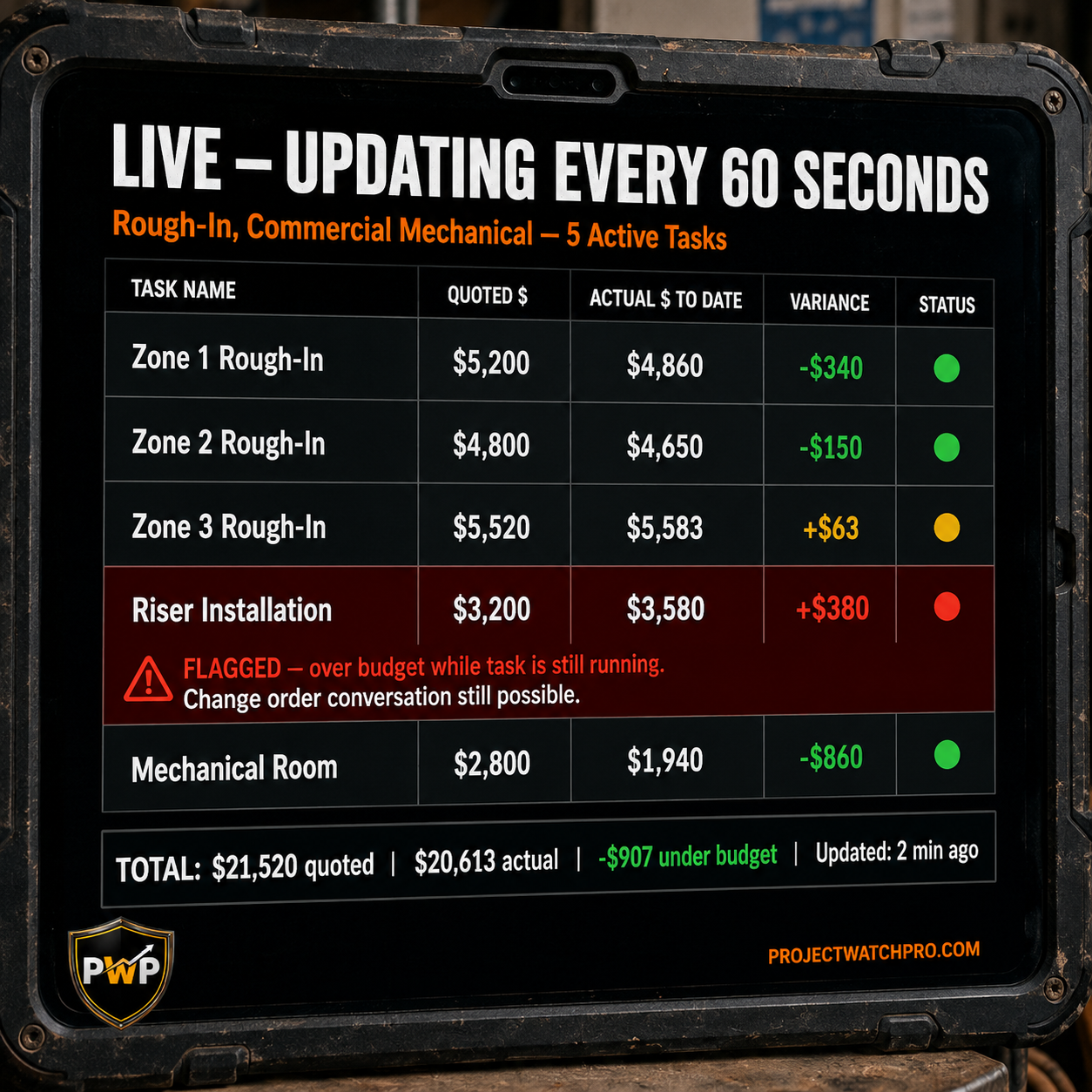
In ProjectWatchPRO, the Pulse Monitor does this in real time. Every time a crew member clocks into a task, the system starts running: actual hours worked × true 6-layer cost per hour. Every 60 seconds, that number updates against the quoted budget for that task. Not batch. Not weekly. Not when payroll runs. Continuously, while the crew is on site.
Here's what that looks like on the pipe fitting example:
- Task: Rough-in, Zone 3
- Quoted: 60 hours at $92/hr = $5,520 budget
- Actual to date: 47 hours at $86.50/hr true cost = $4,065.50
- Remaining budget: $1,454.50
- Hours remaining (estimated): 13
That task is on track. With 13 hours left and $1,454 of budget remaining, the true cost of those hours ($86.50 × 13 = $1,124.50) fits inside the budget with $329.50 to spare. You know that on Wednesday afternoon. Not on the 15th of next month.
Now say Zone 3 runs to 72 hours instead of 60. Ten of those last 12 hours are overtime:
- Regular: 62 hours × $86.50 = $5,363
- OT premium on 10 hours: 10 × ($44 × 0.5) = $220 additional
- True cost: $5,583 vs $5,520 budget
Overage: $63 on that task. Small. But you see it while you still have 4 more tasks running. You still have the option to tighten up elsewhere, have a conversation about scope, or document the OT as a project change. You have choices. The contractor who finds this out in the job cost report has none.
According to SmartBarrel's 2026 labor cost tracking analysis, construction field workers spend only 30–50% of paid time on direct productive work — the rest goes to waiting, travel, rework, and coordination. Real-time task-level tracking is the only way to catch that drift while the job is alive.
Why the Tools You're Already Using Can't Show You This While the Job Is Running
QuickBooks runs a job cost report. But it needs hours entered, coded, approved, processed, and posted before it has anything to show you. By the time it has enough data to be useful, the job is usually wrapped. And even then, it shows total hours against total budget — not by task, not in real time, and not with the true 6-layer cost baked in. It shows wage cost. Not what those hours genuinely cost you to deliver.
Your bookkeeper is closing the books accurately. That's their job. It's not catching labor drift on a Tuesday afternoon on a job running in another city. They're working from what's been submitted — and what's been submitted is usually a week old by the time it lands on their desk.
Estimating software quotes the job. Once the quote is signed, it's done. It doesn't follow the job into the field. It doesn't know what's happening on site, what hours were logged yesterday, or whether the crew is tracking to the budget or running three days behind.
The spreadsheet that shows hours vs. budget works if someone updates it every day, which usually doesn't happen, and if it has the right cost per hour behind the math, which usually it doesn't. And it's not updating every 60 seconds while your foreman is in the field.
These tools all have the same limitation: they tell you what already happened. They do it accurately. But a report of what happened isn't a tool you can use to defend what's happening right now.
A job that's losing money on labor can be corrected mid-job. You can have the change order conversation before the work in question is complete. You can make a crew decision, a scheduling decision, a scope conversation — while you still have time to make it. None of that is possible if the only signal you get arrives 30–45 days after the job closes.
ProjectWatchPRO was built specifically for this problem — after 20 years of seeing the same situation in contractors across Canada: good operators, full order books, experienced crews, and margins disappearing between the quote and the invoice with no way to see it while the job was still running. It was awarded Top Construction Job Costing and Project Management Software in Canada for 2026.
The 6-layer true labor cost built into the system isn't a rounding exercise — it's what a crew member genuinely costs per billable hour, calculated from your actual overhead, your actual burden rates, and your actual task consumables. The Pulse Monitor runs that cost against the quoted budget every 60 seconds. Every task. Every job. While the crew is still on site and the decisions still matter.
For a deeper look at why post-job reports fail and what real-time tracking looks like in practice, see Real-Time Job Costing vs. Month-End Reports.
Key Takeaways
- Tracking hours is not the same as tracking profit. Hours tell you how much time was spent. They don't tell you what that time cost you to deliver — which depends on all 6 layers of true labor cost, not just wage.
- Your charge-out rate is probably built on the wrong number. Most contractors set it on wage plus a rough percentage. The real number includes overhead burden, labor burden (WCB, CPP/EI, benefits, vacation), task-specific consumables, shift differential, and overtime premium. The true cost per hour is typically 60–100% higher than wage alone.
- Overtime shifts your cost without showing up on the timesheet. An overtime hour on a $44/hr employee with full burden can cost you $103+ per hour delivered. If that's not in the charge-out rate, every OT hour quietly erodes the margin on that task.
- By the time the job cost report arrives, the decision window is closed. The 45-day lag between when profit drifts and when you see it means you're always fixing yesterday's problems on today's jobs — but the fix never reaches the job it came from.
- Real-time job profitability tracking requires actual cost per hour — not wage — updating against the quoted budget continuously. A 60-second update interval means you see drift while the crew is still on site, not after they've moved on to the next job.
- QuickBooks, spreadsheets, and bookkeepers can't do this. They report what happened. They cannot show you what's happening right now on a job that's still running.
- The fix happens in two steps. First: build a charge-out rate on all 6 cost layers. Second: run that rate against your quote in real time. The True Labor Cost Calculator handles the first step. ProjectWatchPRO handles the second.
Frequently Asked Questions
How do I know if a construction job is profitable before it is finished?
To know if a job is profitable while it's running, you need your true cost per hour — wage plus all 6 burden layers — running against the quoted budget for each task in real time. If actual cost-to-date on a task is exceeding the quoted budget for that task, you're drifting. You need that signal while you still have crew on site and leverage to act on it.
How can I track job profitability daily?
Daily job profitability tracking requires three things: a charge-out rate built on your true 6-layer labor cost, tasks structured with individual hour and dollar budgets (not one lump sum), and a system that updates actual labor cost against those budgets continuously. A weekly timesheet entered on Monday for the previous week gives you data that's already 7 days old. You need it updating while the crew is working, not after they submit.
What is a charge-out rate in construction and how do I calculate it?
A charge-out rate is the cost-per-hour you apply to a crew member's time when pricing a job. To calculate it correctly, add all 6 layers: wage + overhead burden per billable hour + labor burden (WCB, CPP/EI, benefits, vacation) + task-specific burden (consumables and PPE per hour for that task type) + any shift differential + overtime exposure. Your margin is then added on top of that full cost. See True Labor Cost for Contractors for a full walk-through.
Why does my construction job always go over budget on labor even when I track hours?
Tracking hours doesn't tell you whether those hours are costing more than the quoted rate. Two common causes: overtime hours that weren't in the quote (each one costs more than the rate the job was priced at), and a charge-out rate that was built on wage instead of true 6-layer cost. The job can look fine on hours while quietly losing money on every single hour logged. See Why Construction Labor Hours Go Over Budget for a detailed breakdown.
What are the 6 layers of true labor cost in construction?
The 6 layers are: (1) wage — the base hourly rate on the timesheet; (2) overhead burden — your operating costs per billable field hour; (3) labor burden — payroll taxes, workers' comp, vacation pay, benefits; (4) task-specific burden — consumables and PPE the crew burns through per hour on that specific task type; (5) shift differential — the premium for nights, weekends, or scheduled shutdowns; (6) overtime premium — the additional cost when hours exceed straight-time thresholds. Most contractors' charge-out rates only account for layers 1 and a rough estimate of 3. Layers 2, 4, 5, and 6 are where the gap lives.
How is ProjectWatchPRO different from QuickBooks for tracking job profitability?
QuickBooks is an accounting tool. It records what happened after hours are submitted, coded, and posted — typically 1 to 4 weeks after the fact. ProjectWatchPRO tracks job profitability while the job is running: actual hours clocked in the field update against the quoted task budget every 60 seconds using the true 6-layer cost rate, not just wage. By the time QuickBooks has a job cost report ready, the crew has moved on. ProjectWatchPRO gives you the same signal before the job closes, when there's still time to act. See Real-Time vs. Month-End Job Costing for a full comparison.