Where the Heck Did the Hours Go on This Job?
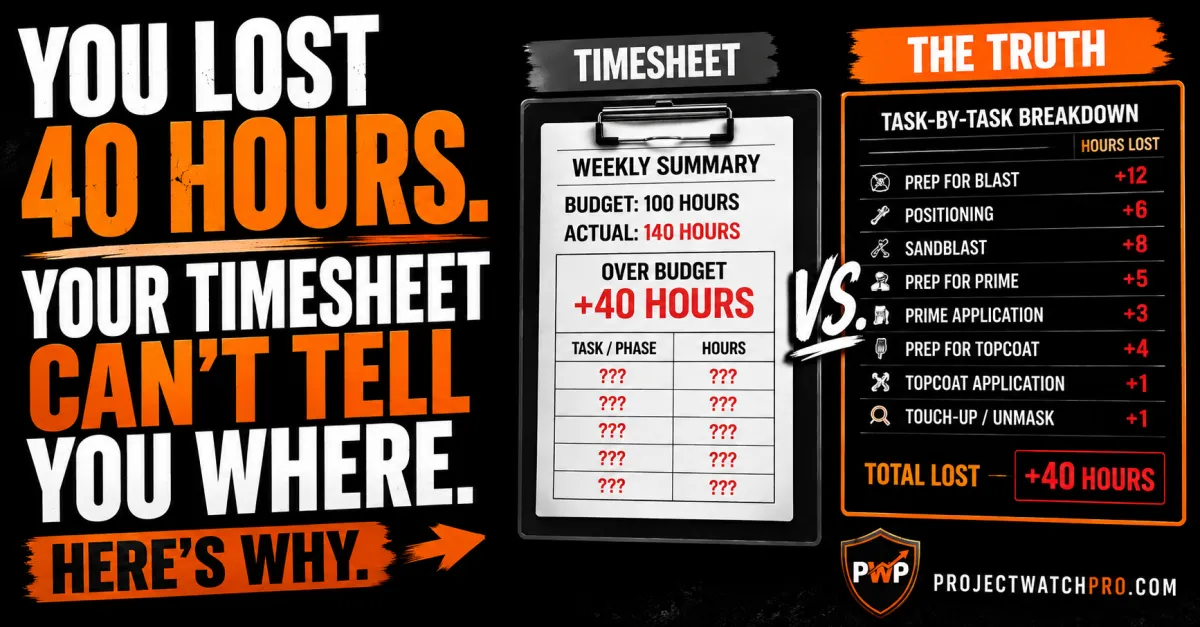
Your Job Lost 40 Hours. Your Timesheet Can't Tell You Where. Here's Why.
You quoted the job carefully. The estimate looked right. The crew is good. And by the time the job closed, you were 40 hours over budget — and nobody on the team can give you a straight answer for where those hours went.
It wasn't one bad day. The hours bled out across every phase, a few at a time, in ways nobody flagged and nobody tracked. By the time the weekly timesheet came in and the total didn't add up, the work was done and the invoice was sent.
Construction labor hours over budget occurs when actual field hours exceed the quoted scope for a project — most commonly because the quote was structured as a single total with no task-level breakdown, the per-hour cost rate was built on wage alone rather than all six cost layers, and no system was in place to surface a variance while the crew was still on site.
This isn't a crew problem. It's a structure problem. And here's exactly why it keeps happening.
Three Reasons Every Job Loses Hours Nobody Can Account For
The hours problem isn't random. It has a specific structure — and once you see it, you'll recognize it in every job that's ever come in over budget.
Here's what this looks like in a real operation. Industrial sandblasting and painting contractors — whether working on heavy equipment, structural steel, oil and gas facilities, or construction — run jobs through eight to twelve distinct task phases. Prep for blast. Positioning. Sandblast. Prep for prime. Prime application. Prep for each topcoat color. Application. Touch-up and unmask. Each phase has its own crew configuration, its own production rate, and its own cost profile.
Here's the actual task structure of a 100-hour blast and paint job on a CAT 345C Excavator:
Now here's what most quotes look like for that same job: "Blast and coat — 100 hours." One number. Ten phases. No way to know which one broke.

Reason 1 — The Quote Is One Number for Ten Different Tasks
When a job is quoted as a single total, the only feedback the system can generate is "we're over budget." It can't tell you where. It can't tell you by how much per phase. It can't tell you whether the overrun is still happening or already absorbed.
In the table above, the four prep phases — 1, 4, 6, and 8 — account for 54 of the 100 hours. More than half the job. If phase 8 (Prep for Second Color) runs 20 hours instead of 16, that's a 25% overrun on the largest single task. In a one-number tracking system, that 4-hour gap disappears into the total. You see it at week-end when the whole job is already 4 hours over — and you have no idea which phase caused it.
According to AMPP (formerly SSPC, surface preparation accounts for up to 60% of the total cost of an industrial coating project. The hours you're losing are concentrated in the phases that get the least structured attention in most estimates.
Reason 2 — Prep Time Gets Estimated From Best-Case Conditions
Production rates for surface prep — sandblasting, grinding, cleaning, profile verification — vary significantly with substrate condition, access configuration, contamination level, and profile spec. The rate that works on clean accessible steel at SSPC-SP10 doesn't work on pitted, contaminated structural steel at SSPC-SP5 with restricted scaffold access.
Most estimates use a single production rate and apply it to every job regardless of actual conditions. When the substrate is worse than expected, prep hours run over. And because the estimate had no phase-level breakdown, there's no structured way to identify this versus any other cause.
According to a 2025 Projul industry analysis, cost overruns affect the majority of construction projects — and labor is consistently the largest uncontrolled variable. The cause is almost never a slow crew. It's a rate assumption that didn't match field conditions, with no system to catch it early.
Reason 3 — Hours That Aren't on the Scope Still Show Up on Payroll
Handling and positioning equipment between bays, rigging and moving structural steel sections, scaffold repositioning between access points, waiting on inspection hold points, sourcing additional blast media mid-job — these are real field hours that generate real payroll costs. On a 100-hour job, mobilization, containment setup, and handling between phases can account for 15–20 hours.
If those hours aren't in the quote as their own line items with their own budgets, they exist in the payroll total but not in the estimate. They show up as "over budget" at week-end with no phase to attach them to — because they were never separated from the general labor pool in the first place. That's why inaccurate time tracking is so costly — not bad data, but no task structure for good data to track against.
Why the Rate Itself Is Part of the Problem — Not Just the Hours
Even with perfect phase-level tracking, there's a second structural layer: the rate those hours are priced at is almost certainly wrong.
The Six Layers Most Quotes Leave Out
Most blast and paint estimates price labor by multiplying hours by a wage rate. Wage is 30 to 40% of what an industrial field hour actually costs the company. The true cost of a field hour runs through six layers:
1. Wage — what the employee earns per hour
2. Overhead burden rate — your shop, facility, equipment, and G&A cost spread across every billable hour. See how to calculate your overhead rate correctly
3. Labor burden rate — payroll taxes, workers' compensation, health benefits, and vacation pay. The labor burden rate alone adds 25–40% on top of wage
4. Task-specific burden rate — the consumable and PPE cost per hour tied to this specific type of work: blast media, respirators, Tyvek suits, nozzle and hose wear, containment materials, abrasive disposal. This is unique to industrial blast and paint work and almost always missing from estimates. See how task-specific consumables should be costed
5. Shift differential — premium pay for night work, weekend turnarounds, and oil facility outage schedules
6. Overtime premium — the additional cost per hour when jobs run past their scheduled hours
Most quotes include Layer 1. Some catch part of Layer 3. Layers 2, 4, 5, and 6 are either guessed at, averaged from an old number, or left out entirely. The job is structurally under-priced before the crew arrives.

What This Means for Industrial Blast and Paint Work Specifically
The task-specific burden rate for abrasive blasting is significant in a way most other trades don't experience. Blast media alone — garnet, steel shot, or aluminum oxide — runs several dollars per square foot blasted. Add respirator cartridge replacement, Tyvek consumption in heavy industrial environments, nozzle and hose wear, containment material per job, and abrasive disposal or recovery costs.
Workers' compensation (WCB/WSIB) classifications for abrasive blasting and industrial coating are among the highest-risk categories in the trades sector. These are not minor adjustments. On a 100-hour job, the gap between wage and true cost per hour — multiplied across every hour clocked — is the gap between a profitable job on paper and a loss at closeout.
The two problems compound each other. A job that's 15% over on prep hours, at a rate that's 20% below true cost, doesn't just lose 15%. It loses the compounded effect of both gaps. On a job with a 15% quoted profit target, that combination can eliminate every dollar of profit and push the job into a loss — before the last color is applied. This is exactly how profit fade in construction happens: not at closeout, during execution.
Why Finding Out at Week-End Is Already Too Late
Most industrial painting and sandblasting operations track hours the same way: a weekly timesheet total compared to the job budget. When the total shows you're over, you investigate. By the time you investigate, the phase that caused the problem is complete and the crew has moved on.
I worked alongside one industrial painting contractor running $3M in structural steel and oil facility work. Good crews. Technical ability was not the issue. On one structural steel job, the blasters knew Tuesday morning that surface prep was running significantly over the quoted rate. The substrate had far more pitting than the site visit showed. The additional blast time was documentable as a substrate condition change — legitimate scope change. A change order conversation with the GC was still possible.
But the information sat in the field. Nobody in the office had phase-level visibility. The weekly timesheet came in Friday. By then, the blast was complete, the primer was applied, and the change order conversation happened after the fact — with no leverage left.
That's the 45-Day Profit Lag: the distance between when profit disappears and when you find out. On a two-week blast and paint job, the lag might be two weeks. But two weeks of running 15% over on prep hours, on a job with a 15% quoted profit target, eliminates every dollar of profit before the crew moves to the next machine. The cost of running without real-time profit visibility compounds with every job.

What the Profit Pulse System Replaces This With
The Profit Pulse System is a nine-step operating framework built specifically for contractors who want to stop finding out their jobs lost money after they're closed. For industrial sandblasting and painting operations, three specific steps fix the hours problem.
Steps 1–3 (True Cost Foundation — Overhead Guru, Labor Analyst, Burden Builder) establish the right per-hour rate: all six layers, calculated from your actual operating costs, your specific employees, and the task-specific burden rate for blast media, PPE, and containment. Not wage with a rough markup. The real number. See how real-time job costing works when the cost foundation is correct.
Step 4 — Task Architect builds the task structure: a standard task list that separates billable project work by phase so every quote, time entry, and job cost report speaks the same language. "Prep for Blast" is a task with a 14-hour budget. "Prep for Second Color" is a task with a 16-hour budget. The one-number quote becomes a ten-phase plan — and every phase can be tracked against its own budget.
Step 7 — Pulse Monitor connects the task structure to live field data. In ProjectWatchPRO, the phase-level budgets from the estimate become the task codes the crew tracks time against. When Phase 8 hits 20 hours against a 16-hour budget at end of day two, the dashboard flags it — while the crew is still on that phase, while there's still work ahead to adjust, while a change order conversation is still possible. See how the Pulse Monitor works as Step 7 of the system.
That's the structural difference between a Rearview Operator and a Profit Defender: not the crew, not the trade, not the volume of work. The operating system underneath it. Real-time job costing only works when the task structure exists to track against — and that structure starts in the quote.
Key Takeaways
- Labor hours run over budget because of two compounding structural problems: a quote with no task breakdown, and a per-hour rate built on wage alone. Either one creates a loss. Both together eliminate profit before the job is halfway done. Wage is only 30–40% of true labor cost.
- Prep phases — not blast time, not paint time — account for the majority of labor hours on a blast and paint job. On a 100-hour equipment scope, the four prep phases alone consume 54+ hours. A one-number tracking system cannot identify which prep phase broke. Inaccurate time tracking destroys more profit than most contractors calculate.
- The task-specific burden rate for abrasive blasting is unique to this trade and almost always missing from estimates. Blast media, respirators, Tyvek suits, nozzle wear, containment, and abrasive disposal per blast hour are real costs that don't appear in a generic labor rate. See how task consumables should be costed.
- Step 4 of the Profit Pulse System — Task Architect — is the structural fix. A standard task list that breaks every job into named, comparable phases with their own hour budgets transforms a single-number quote into a plan the field can track against. Without it, budget overruns can only be found, never prevented.
- Step 7 — Pulse Monitor — connects the task budget to live field data in ProjectWatchPRO. The quote structure and the timesheet become the same document. When a phase runs over, the dashboard surfaces it while the crew is still on site and the information still has value. Real-time cost tracking by task is the mechanism.
- The 45-Day Profit Lag hits industrial painting contractors hardest on multi-phase jobs. By the time a weekly timesheet shows a problem, the expensive phases are done and the leverage for a change order conversation is gone. Month-end job costing always arrives too late.
- A substrate condition change is scope change — but only if the change order happens while the work is in progress. The Task Architect structure creates visibility to identify it in time. The Pulse Monitor creates the trigger to act on it. Both require the phase structure to be set up in the quote before the job starts.
Frequently Asked Questions
Why are my construction labor hours always over budget?
Labor hours run over budget because most quotes are a single total with no task-level breakdown — so there's no visibility into which phase broke first. The fix is Step 4 of the Profit Pulse System (Task Architect): a standard task list that gives every phase its own hour budget so overruns surface by task while there's still time to act. See how to prevent budget overruns before they happen.
How do I track estimated vs actual labor hours on a job?
Phase-level time tracking — where the crew logs hours against specific task codes (prep, blast, prime, topcoat, detail) rather than a project total — is the only way to catch an overrun in time to act. In ProjectWatchPRO, the task budgets from the estimate become the codes the crew tracks against. When a phase runs over, it's visible in real time. Real-time job costing requires a task structure to work.
Why do sandblasting jobs always go over on hours?
Sandblasting and industrial painting jobs run over because prep phases — which account for more than half of total labor hours — are estimated at best-case production rates and tracked as part of one total. When substrate conditions are worse than quoted, the overrun is invisible until the job closes. Step 4 (Task Architect) and Step 7 (Pulse Monitor) of the Profit Pulse System solve both problems. Inaccurate time tracking compounds every loss.
How do I calculate true labor cost for industrial painting and sandblasting contractors?
True labor cost for a blast and paint employee runs through six layers: wage, overhead rate, labor burden rate (WCB/WSIB for abrasive blasting is high-risk), task-specific burden rate (blast media, respirators, Tyvek, containment per blast hour), shift differential, and overtime premium. Wage alone is 30–40% of the total. The True Labor Cost Calculator walks through all six in under 10 minutes.
Why did my job lose money even though the crew was busy?
Busy and profitable are different problems. A job loses money when the quoted profit doesn't survive execution — because prep phases ran over their task budget, the true cost per hour was higher than the rate in the estimate, or scope changes were absorbed without a change order. The Profit Pulse System addresses all three. Profit fade in construction is a structural problem, not a crew problem.
What is the Profit Pulse System and how does it apply to industrial painting contractors?
The Profit Pulse System is a nine-step operating framework that gives contracting businesses — including industrial sandblasting and painting operations — the structure to know their true cost, track jobs by task phase, and catch profit variance while work is still active. Steps 1–3 (True Cost Foundation), Step 4 (Task Architect), and Step 7 (Pulse Monitor) are most directly relevant to the labor hours problem. See the full system at projectwatchpro.com.

John A. McCabe is a 20-year operational consultant who has worked inside industrial sandblasting, coating, and painting operations — across heavy equipment refinishing, structural steel, and oil and gas facility maintenance — to identify where field profit disappears between the estimate and closeout. He is the author of *Profit Defended** and the founder of ProjectWatchPRO — awarded Top Construction Job Costing and Project Management Software in Canada for 2026.*


