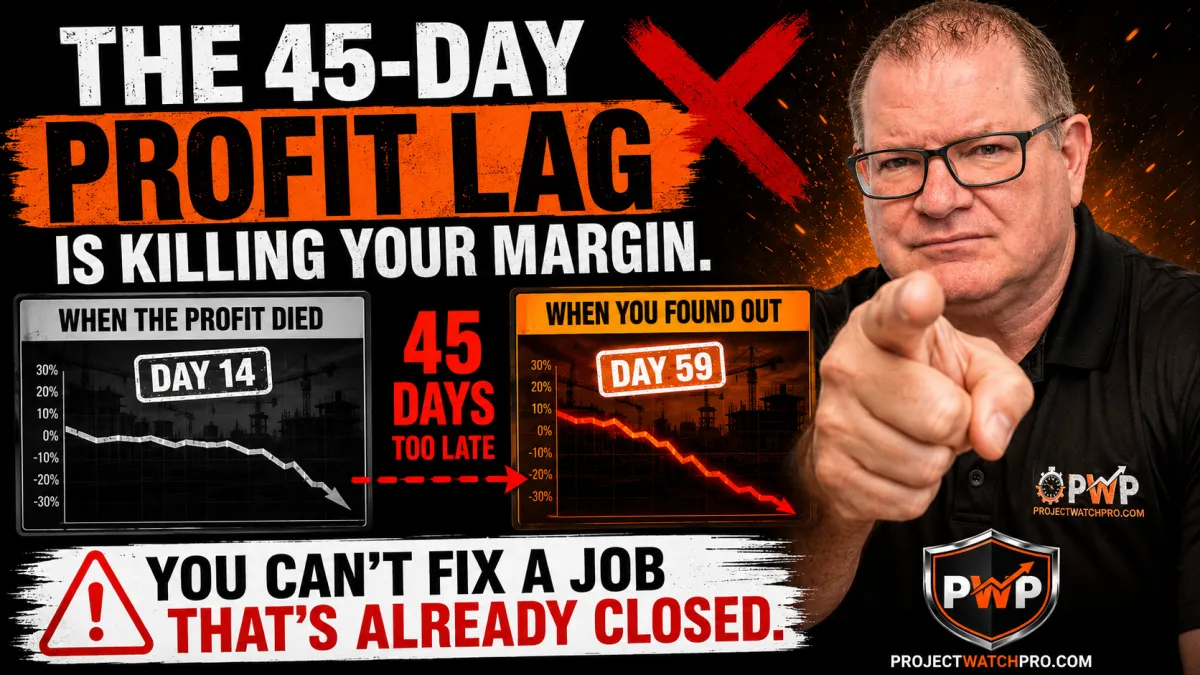
Real-Time Job Cost Tracking: Why 45 Days Is Too Late to Save the Job
Most Contractors Find Out About Margin Loss 45 Days Too Late. Here's What That's Costing You.
A 2026 industry analysis by SmartBarrel found that 91% of builders track job costs in real time on at least some projects.
Ninety-one percent.
And yet the same contractors who say they're tracking in real time still call the job a success at closeout — then reconcile the numbers four weeks later and find out the job lost money.
If nearly every contractor is tracking, why are jobs still bleeding?
Because there's a difference between tracking hours and tracking what those hours actually cost. And there's a difference between logging time to a job and logging time to a task — with the true cost applied, compared against the charge-out rate, updated the moment the crew clocks in.
Most job cost tracking captures neither of those things. It records hours in one block, to one job code, at a wage rate that's missing 60–70% of what that employee actually costs the business. By the time the real number appears, the crew is on the next job and the client has the invoice.
That gap — between when profit is lost and when you find out — is the 45-Day Profit Lag. And tracking hours without true cost is what keeps it alive.

Real-time job cost tracking in construction is the continuous comparison of true fully-loaded labor cost — applied by task, including all six cost layers — against the charge-out rate built into the quote for that task, updated from the moment a worker clocks in until the task closes. It is distinct from hour tracking (which records time without applying cost) and from charge-out tracking (which records billing rate without applying the cost side). A real-time job cost signal shows live margin by task while the crew is still on site and there is still time to act.
Why "Tracking Hours" Isn't the Same as Tracking Profit
This is where most contractors — and most job costing software — breaks down.
Tracking hours records that six workers logged eight hours each on a job. It tells you 48 hours happened. That's it.
What it doesn't tell you:
- Which task those hours were logged to — and whether that task was quoted for 48 hours or 32
- What those 48 hours actually cost the company after labor burden, overhead allocation, payroll taxes, WCB, and task consumables are applied
- Whether the charge-out rate for that task is covering what the crew cost to put there
According to a 2026 job costing analysis by Projul, a contractor can show $200,000 in annual profit while losing money on 40% of their jobs. The profitable jobs mask the losers — until the losers become the majority.
That's not a revenue problem. That's a tracking problem. Specifically: the absence of task-level, true-cost-applied, real-time job cost data.
The Three Tracking Failures That Keep the 45-Day Lag Alive
Failure 1 — Jobs are tracked as one block of hours.
When a crew logs eight hours to "Job #417," you know they were on the job. You don't know which tasks ran long, which tasks ran clean, and where the quote assumptions collapsed. Without task breakdown, there's nothing to compare against. The quote was built by task. The tracking is one number. They never connect.
Failure 2 — Hours are logged without true labor cost applied.
Base wage plus a rough burden percentage is not what that employee costs the company. The true cost of a field employee — when you layer in overhead allocation, all six labor burden components, shift differentials, and task-specific consumables — is typically 2.5 to 3.1 times the wage. Most contractors know this conceptually. Their tracking system doesn't apply it. So every hour in the system represents a number that's missing 60–70% of the real cost.
Failure 3 — The charge-out rate is never compared against actual cost while the job runs.
The charge-out rate went into the quote. The crew goes to the job. Those two numbers — charge-out rate and true running cost — never appear side by side until closeout. Which means the contractor has no margin signal while the job is alive. This is how profit fade compounds silently across the life of a job — small variances in the first week, invisible at the time, become the loss that shows up on the final report.

We've written about these failures in depth:
- Inaccurate Time Tracking Isn't Just a Payroll Problem. It's a Profitability Problem.
- "Real-Time" Job Costing Is a Marketing Term. Here's What It Actually Means.
- Month-End Job Costing Is a Post-Mortem, Not a Strategy
- You Quote Per Unit. Your Crew Gets Paid Per Hour.
What none of those posts covers is the specific step that breaks all three failures at once — while the job is still running.
What Task-Level, Real-Time Job Cost Tracking Actually Looks Like
Step 7 of the Profit Pulse System is called the Pulse Monitor.
The mechanism: every task on a job has its own cost code. When a crew member clocks into a task, the system begins accumulating true labor cost against that task in real time — updated continuously throughout the shift. The true cost running on that task is compared, live, against the charge-out rate built into the quote for that task.
The result is a live margin signal by task, while the crew is on site.
Not a report. Not a dashboard that refreshes at end of day. Not a number you calculate at closeout. A continuous, running comparison: what this task was quoted to cost versus what it is actually costing, right now.
This is how ProjectWatchPRO tracks live job profitability — and it's what breaks the 45-Day Profit Lag.

The Ken LaPain & Sons Discovery
When Ken LaPain & Sons ran their jobs through the Pulse Monitor framework, the finding was stark.
Task by task, cost by cost — only one task across their entire operation was actually making money. Every other task was subsidizing losses. The crew was working. The invoices were going out. The revenue was real.
The losses were hidden inside the task breakdown they'd never been able to see before.
With that information visible before the next job was scheduled — not 45 days after the last one closed — Ken LaPain & Sons raised rates across the board. The decision wasn't a guess. It was made from actual numbers, by task, with the charge-out rate comparison right there.
That's the difference between tracking and defending.
For a detailed look at how this plays out on a specific job, read: The $340K Fab Job That Made $12,000: A Profit Autopsy.
Why Most "Real-Time" Job Costing Tools Don't Actually Solve This
It's worth naming the alternatives — not to dismiss them, but to be precise about what they do and don't track.
The SmartBarrel 2026 construction labor cost tracking guide makes this observation: 33% of builders identify labor costs as the biggest challenge to staying on budget — even among the 91% who say they track in real time. If real-time tracking were solving the problem, that number would be falling. It isn't.
The reason: most job costing software updates charge-out rate applied to hours. It does not apply true labor cost by layer to hours. Those are different calculations producing different numbers — and the gap between them is exactly where margin disappears.

According to Buildertrend's 2026 construction statistics report, contractors who track costs daily catch overruns an average of 3 weeks earlier than those who review weekly or monthly. But catching overruns only matters if the cost side of the comparison is accurate — and in most systems, it isn't, because the true labor cost foundation was never built correctly in the first place. See where the profit leaks actually live inside a construction business.
Charge-out rate applied to 48 hours: records what you billed for those hours.
True labor cost applied to 48 hours: records what those hours actually cost the company, across all six cost layers.
The software shows you the first number. The Pulse Monitor shows you both — simultaneously, by task, while the crew is still on site. The margin signal is the gap between them.
The Three Questions Your Tracking System Should Answer Right Now
1. Which tasks on your current live jobs are running over the quoted hours?
2. What is the true cost per hour being applied to those tasks — not the charge-out rate, the cost side?
3. Is the charge-out rate covering what the task is actually costing, at this moment?
If your current system can't answer all three in real time, by task, for every live job — you're managing from the rearview mirror. Rearview Operators find out what went wrong at closeout. Profit Defenders catch the drift while the job is still running.
Key Takeaways
- 91% of contractors claim real-time tracking (SmartBarrel, 2026) — but real-time hours logged is not the same as real-time true cost tracked against charge-out rate by task.
- The 45-Day Profit Lag is the distance between when profit is lost and when you find out. Most contractors run their entire business inside that gap.
- Three failures keep the lag alive: hours logged to one job code with no task breakdown; hours tracked at wage rate instead of true cost; charge-out rate never compared against actual cost while the job runs.
- A contractor can show $200K profit while losing money on 40% of jobs (Projul, 2026) — profitable jobs mask the losers until the losers become the majority.
- Contractors who track daily catch overruns 3 weeks earlier (Buildertrend, 2026) — but only if the cost side of the comparison is built on true labor cost, not wage rate.
- Step 7 — Pulse Monitor of the Profit Pulse System delivers a live true-cost-vs-charge-out signal by task, updated continuously while the crew is on site.
- The Ken LaPain & Sons result: only one task profitable across the entire operation — visible only after task-level tracking was applied. Rates raised across the board on data, not guesswork.
- The fix starts upstream. If the true labor cost calculation is wrong before the job starts, the Pulse Monitor is running off a flawed baseline. Build the number correctly first.
FAQ — Real-Time Job Cost Tracking for Contractors
What is real-time job cost tracking in construction?
Real-time job cost tracking is the continuous comparison of true fully-loaded labor cost against the charge-out rate for each task, updated from the moment a worker clocks in. It differs from hour tracking (records time only) and charge-out tracking (records billing rate only). A real-time job cost signal shows live margin by task while the crew is still on site — when there is still time to act on what it shows.
Why do contractors still lose money on jobs even when they're tracking hours?
Tracking hours records that labor happened — not what that labor cost the company. The gap between a base wage and true fully-loaded labor cost — including overhead allocation, labor burden components, payroll taxes, WCB, and task consumables — is typically 60–70% of actual cost. When hours are tracked at wage instead of true cost, the job cost report systematically understates every hour. The job looks on budget until closeout reveals the real number.
What is task-level job costing and why does it matter?
Task-level job costing assigns each task its own cost code, quoted hours, and charge-out rate. When time is logged to the task — not just the job — you can compare quoted hours to actual hours at the task level while the job runs. Jobs don't leak profit at the job level — they leak inside tasks. Without task breakdown, you can't see where the overrun is happening until the invoice is already sent.
What is the 45-Day Profit Lag?
The 45-Day Profit Lag is the gap between when profit is lost on a job and when the contractor discovers it — typically when the final job cost report arrives 30–45 days after the invoice. By that point, the crew is on the next job, the client is invoiced, and there is nothing left to fix. The lag persists because most tracking captures hours and charges — not true cost versus charge-out rate, by task, in real time.
How does the Pulse Monitor break the 45-Day Profit Lag?
The Pulse Monitor Step 7 of the Profit Pulse System applies true labor cost to hours clocked per task, compares that running cost against the charge-out rate in the quote, and updates the comparison continuously while the job runs. The output is a live variance signal — which tasks are over, by how much, and what the margin looks like now, not at closeout. With that signal visible while the crew is on site, the contractor can adjust before the damage compounds. See how ProjectWatchPRO delivers this.
Where do I start if I want to track true labor cost in real time?
The Pulse Monitor comparison only works if the true cost baseline is correct before the job starts. Most contractors find their baseline is missing 20–40% of actual cost. Start with the True Labor Cost Calculator at truelaborcost.site — free, under 10 minutes. Once you have the correct per-hour true cost by employee, the task-level tracking and charge-out comparison becomes a defensible live margin signal rather than a comparison against a wrong number.
H2: Ready to Break the 45-Day Lag?
You don't have to wait until closeout to know what a job made.
The Profit Recovery Review is a 45-minute working session where we map your true labor cost, show you what your jobs are actually returning by task, and build the tracking structure that feeds a live Pulse Monitor on every job you run going forward.
$299. One session. You leave with your real numbers and a 90-day action plan.

John A. McCabe is a fractional COO and the founder of ProjectWatchPRO — awarded Top Construction Job Costing and Project Management Software in Canada for 2026. He is the author of Profit Defended and has spent 20 years building profit defense systems for specialty trade contractors across North America.


